
A move abroad, a new address, and your iPhone still refuses to change its region. Sometimes it names a balance. Sometimes it just will not let the screen finish.
Before you try anything else, it is worth knowing that Apple gates this on several separate things and only tells you about one at a time.
I have put them in the order they usually bite, with the fix for each.
1. A balance, even nine pence of it
The commonest blocker by a mile. The amount does not matter at all.
Apple, in Change your Apple Account country or region: "Before you update your location, you must spend your account balance and cancel your subscriptions."
The same page tells you to "Spend any balance remaining on your Apple Account. If you're not sure whether or not you have a balance, check your Apple Account balance."
There is no minimum. One owner was stuck on nine cents. They could find nothing cheap enough to buy with it.
2. Spending a tiny balance, when nothing costs that little
Apple never explains this part, and it is where most people give up.
The answer comes from senior Apple Community members rather than from documentation. Add a valid payment method for your current country. Then buy something that costs more than your balance.
Store credit is spent first and your card covers the difference, so the balance lands at zero.
A Level 10 member gave that exact method to the owner stuck on nine cents, and a second Level 10 member on a different thread gave the same answer independently.
The payment card has to belong to the country you are leaving, not the one you are moving to. That is the catch that makes this hard for people who have already closed a bank account.
3. Ask Apple to zero it, which is a real option
Narrower, and worth knowing before you buy something you do not want.
Three separate senior members, across three threads, point people to Apple Support to have a balance removed rather than spent. One gave a phone number as well as the web form.
If you would rather type than call, you can chat with Apple Support in the Messages app and ask there.
Apple Support is also where a gift card with a scratched-off code goes. The scratched gift card page lists the photos and numbers to have ready.
Apple does not mention this anywhere on its region page. It is the answer that gets used when the balance is unspendable, and it is user-reported rather than documented, so treat it as a request rather than a right.
4. A subscription that has not run out
Second on Apple's own list. It is also the one that quietly delays people by a month.
Apple, same page: "Cancel any subscriptions that block a country or region change, and wait until the end of the subscription period."
Read that carefully. Cancelling is not enough on its own. You wait. The period you have already paid for has to end first.
Check yours in Settings. Tap your name, then Subscriptions.
5. A pre-order, rental, membership or Season Pass still running
The rung nobody expects. These are things you forget you ever bought.
Apple, same page: "Wait for any memberships, pre-orders, movie rentals, or Season Passes to complete, and wait for any pending store credit refunds to process. You can cancel a pre-order."
So a film you rented on Friday can block a region change on Saturday. A pre-ordered album can do it for weeks.
The pre-order is the one you can act on, since Apple says outright that you can cancel it.
6. A refund that is still being processed
Same sentence as above. It deserves its own line because it is invisible to you.
A pending store credit refund counts as an open item on the account. You cannot see it as a balance. So the phone appears to be refusing for no reason at all.
Nothing to do here but wait for it to land. Then check your balance again.
7. No valid payment method for the new country
The last gate. It stops you at the final screen rather than at the start.
Apple, same page: "You may be required to enter a valid payment method for your new country or region."
So a card, or an accepted local method, for the place you are moving to. That is why people get all the way through and then stall on the last screen.
If your phone is asking you to sign in rather than blocking the change, an iPhone stuck in an Apple Account sign-in loop is the page for that instead.
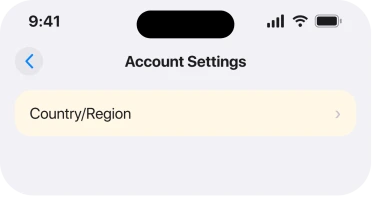
Apple's route on the phone is Settings, your name, Media & Purchases, View Account, then Country/Region.
If only the email address needs changing, replace the primary Apple Account email. That is a separate account setting.
One thing to do before you change anything. Apple: "Redownload your apps, music, movies, TV shows, and books on any devices that you might use to play or read them in the future. Some types of content might not be available in your new country or region." Do that first, because afterwards is too late.
If your storage is tight, our page on an iPhone that says there is not enough storage covers how to make room.
Status: iOS 26.6.1, checked 19 August 2026. Every blocker is quoted from Apple's page. The two routes for clearing a small balance are owner-reported and unconfirmed.
Why can I not change my Apple Account country?
Almost always an open item on the account. A balance of any size. A subscription that has not expired. A pre-order or rental still running. A refund still processing. Or no valid payment method for the country you are moving to.
How do I get rid of a small Apple Account balance?
Add a payment method for your current country and buy something that costs more than the balance, because store credit is used first and your card pays the difference. If that is not possible, senior community members direct people to Apple Support to have the balance removed.
Do I lose my apps if I change region?
Your purchases stay in your account, but not everything is available everywhere. Apple tells you to redownload anything you want to keep using before you change, because some content may not be offered in your new country.
Can I change region without a payment method?
Apple says you may be required to enter a valid payment method for the new country, so plan for needing one. That requirement is what stops most people at the final screen rather than at the start.
The Short Version
- Any balance blocks the change, including a few pence.
- Buy something dearer than the balance and let your card cover the difference.
- Apple Support can zero a balance, which Apple's own page never mentions.
- Cancelling a subscription is not enough until the paid period ends.
- Rentals, pre-orders, memberships and Season Passes all count as open items.
- A pending refund blocks it invisibly, and only time clears that one.
- Redownload anything you want to keep before you change, not after.
Where to Next
The order Apple tells you things in is what drags this out. Each screen names one blocker, you clear it, and the next one appears, so a fifteen minute job turns into a fortnight.
Reading all seven first is the whole trick. Check your balance, your subscriptions, your rentals and any refund in one sitting, then start the change once, knowing what is in the way.
If you got past this and something unexpected blocked you, tell me what it was. Apple's list is good but it is not exhaustive, and a real case from a reader is worth more here than another guess.
And if adding a recovery contact keeps failing, the requirements are stricter than they look.
If your problem is that the App Store itself will not load rather than that the region will not change, an iPhone with a missing App Store is a better place to start.

Isaac Smith is the founder and editor of PC Glance, a website that covers computers, laptops, and technology. He is a tech enthusiast and a computer geek who loves to share his insights and help his readers make smart choices when buying tech gadgets or laptops. He is always curious and updated about the latest tech trends.