
The App Store icon has gone from your Home Screen and you cannot install anything, which makes you start wondering what else has quietly disappeared.
One test splits this in about ten seconds, and it gives you a straighter answer for the App Store than it would for an app you installed yourself.
Swipe down and search. I will explain why that test can be trusted here.
The test, and why it is trustworthy here
For an app you downloaded yourself that search is a bit unreliable, because one tucked into the Hidden folder in App Library will not show up and you end up chasing something that was there all along.
Built-in apps cannot go in there.
Apple's iOS 26 guide is explicit: "Apps that come installed can't be hidden, only apps you download separately from the App Store can be hidden." So the Hidden folder cannot be where your App Store went, which removes the usual ambiguity and makes an empty search mean something definite.
So treat it as a fork. Found means it is a Home Screen problem. Not found means the app itself is gone, and the second half of this page is about which of the three things did that.
If search finds it: it left the Home Screen, not the phone
Touch and hold the result in App Library and drag it back to a Home Screen page, or use Add to Home Screen.
If whole pages of icons vanished rather than this one app, a Home Screen page is switched off.
Apple's page on missing app icons says to touch and hold an empty area, then gives two ways in: "Tap Edit, then tap Edit Pages. Or, tap the dots near the bottom of your screen." Then tap any unchecked circles to unhide a page.
Both routes are current, and the dots are the quicker one.
On a Mac, a different App Store glitch hides the Buy button, and a quick window nudge restores it.
If it is other apps that keep disappearing rather than the App Store, why an iPhone keeps deleting apps covers offloading and the rest of those causes, none of which can touch the App Store.
If search finds nothing: a restriction removed it
This is the common one, and the wording Apple uses for it is worth reading carefully.
In Apple's device-management documentation, the restriction that governs app installation is described like this: "the system disables the App Store and removes its icon from the Home Screen." Apple says the same thing twice, for two related keys.
Removes, not hides. That is why searching turns up nothing, and it is why people conclude the app was deleted when it was not.
The consumer-facing version of that switch is in Screen Time.
Open Settings > Screen Time first, because if that screen offers to turn Screen Time on, none of this branch is yours and you should be reading the managed-phone or the European section instead.
If it is on, carry on to Content & Privacy Restrictions > iTunes & App Store Purchases.
On a phone you manage for a child, tap the child's name after Screen Time first.
The setting you want inside that pane is Installing Apps, which needs to read Allow.
Apple, on a separate page about a missing App Store: "make sure that you choose 'Allow' for the Installing Apps setting. The App Store should reappear on your device."
Apple does not print that name on either page giving the route, so treat the last step as our description of the screen rather than Apple's wording.
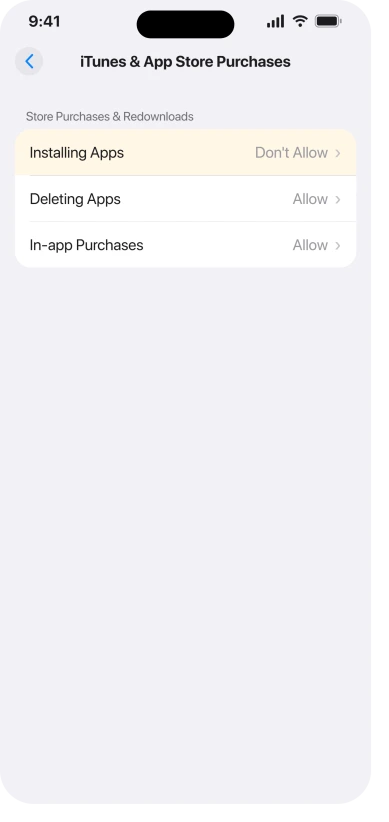
Ours, and Apple does not state it: the Screen Time toggle and the management key appear to be the same underlying restriction, described in two places for two audiences.
Apple only uses that removal wording on the management side.
Its Screen Time pages describe a different pane, Allowed Apps & Features, where a switched-off app "isn't deleted; it's temporarily hidden from your Home Screen until you turn it back on".
About the iTunes & App Store Purchases pane and the icon, Apple says nothing either way.
There is often a confirming symptom, though it is weaker than it looks. Of the two keys Apple documents, one adds that users "are unable to install or update their apps" by any route.
The other says installing can still continue through a marketplace app. So if nothing will install at all, that points hard at the restriction, but installing still working does not rule it out.
If apps are merely stalling instead of being blocked, that is a different problem and apps stuck on Waiting is the page for it.
Do not stop at "restrictions are off"
Two community threads describe the icon failing to come back when the switch is returned to Allow.
One reports that other apps behave normally as their switches are toggled, "but the App Store remains missing from the Home Screen and the App Library unless the the entire content and restriction section is toggled off".
Another describes the icon returning when Screen Time is disabled altogether and disappearing again once the install toggles are touched.
Neither is dated and neither names a build, so treat them as a hint rather than a rule.
The practical version: if Installing Apps is already set to Allow and the icon is still missing, switch Content & Privacy Restrictions off entirely and look again before you conclude it is something else.
One more from the same corner: a reader who fixed it found the icon came back and stayed only after turning off Share Across Devices in Screen Time.
Apple's sentence is that "if you have Share Across Devices turned on, your Screen Time passcode automatically updates on those devices if you reset it", which is about the passcode rather than the restriction.
Treat the connection as a guess, but it is in the same territory.
If it is a work, school or family-managed phone
A restriction can also arrive from outside, and then no setting on the phone will reverse it.
Look at the very top of Settings, over the search field, for a line saying the device is managed, and check Settings > General > VPN & Device Management for a profile.
Apple's note on the management key is the important part: it requires a supervised device.
If your phone is supervised by an employer or a school, the App Store was removed deliberately and the person who set it up is the only one who can put it back.
Two things worth knowing before you go and ask.
There is no supported way round it, and that includes apps you already own: Apple's own warning for a phone without the App Store is that "you won't be able to manually update them either".
And the answer may legitimately be no, because on a work phone this is usually policy rather than a mistake.
What helps is asking precisely.
Tell whoever runs the devices that the app-installation restriction is switched on for your supervised phone and that it has removed the App Store, rather than reporting the icon as missing, which sounds like a fault and gets triaged as one.
If you are in the EU, it may genuinely be deleted
Everywhere else this is impossible, and Apple's own list of removable built-in apps does not include the App Store. In the European Union it changed.
Apple documents that on iPhone, EU users can delete Messages, App Store, Camera, Photos and Safari.
Deleting the App Store first requires installing an alternative app marketplace and setting it as your default for app installation, so this does not happen by accident, but a previous owner or another family member could have done it.
Getting it back does not live where you would look for it: "Go to Settings, then tap Apps. Tap App Installation, then choose Restore App Store at the bottom of the page."
Settings > Apps is the same reorganisation that moved a lot of per-app settings out of their old homes, which our page on where app settings went covers.
Apple also spells out what you lose while it is gone, and it is worth knowing before anyone deletes it again: "You won't receive automatic updates for apps that you previously downloaded from the App Store, and you won't be able to manually update them either."
If the Screen Time passcode is not yours
A second-hand phone or a long-forgotten passcode leaves people stuck at this point, and the answer is short.
On your own phone, go to Settings > Screen Time > Change Screen Time Passcode, then tap Change Screen Time Passcode again.
Apple: "If asked, enter the Apple Account email address and password that you used to set up the Screen Time passcode."
For a child managed through Family Sharing, Apple is explicit that it is done from the parent's device, not the child's: "the Family organizer needs to reset the Screen Time passcode on their own device, not the child's device."
When that recovery fails, Apple offers one diagnosis and nothing after it, which is to check you are using the same Apple Account that set the passcode, since it may not be the one signed in now.
Apple's page stops there. It does not describe a way through for a phone you bought second-hand with a stranger's restriction on it, and neither will we.
What will not fix it
- Reset Home Screen Layout. It rearranges icons. It cannot re-add an app the system removed, so it does nothing for any restriction case.
- Reset All Settings. Same limitation, much wider damage, and it clears neither a Screen Time passcode nor a management profile.
- Reinstalling it from the App Store. Circular. If the icon is gone, there is nothing to open.
- Updating iOS. None of the Apple pages we read connects a missing App Store to a software version.
- A system-repair tool. Nothing is corrupted. The app was removed on purpose by a setting.
Status: Apple's own page on missing app icons covers Search, hidden pages and the Hidden folder, and never mentions Screen Time or a management profile at all.
Why did my App Store disappear on its own?
It almost certainly did not disappear on its own. The realistic causes are a Screen Time restriction, a management profile, or, in the EU only, an actual deletion. If Search still finds it, none of those applies and the icon simply left the Home Screen.
Can I get the App Store back if I deleted it?
In the EU, yes: Settings, Apps, App Installation, then Restore App Store. Anywhere else the question does not arise, because Apple does not let you delete it in the first place.
Why can I not install any apps either?
Because the broader of the two restrictions does both. Apple's device-management documentation for it says users "are unable to install or update their apps", which covers apps you already own as well as new ones. Clearing the restriction restores both at once.
Can someone else have set this without me knowing?
Yes, and it is worth checking before you assume a fault. A Family Sharing organizer can set it from their own device, and an employer or school can enforce it on a supervised phone, where it shows as a management profile.
The Short Version
- Search Spotlight, then search App Library. Found means a Home Screen problem, not found means something removed the app.
- That test is more trustworthy here than for an app you downloaded, because a built-in app cannot be sitting in the Hidden folder.
- Apple's device-management wording for the equivalent restriction is that the system "disables the App Store and removes its icon from the Home Screen". If Screen Time behaves the same way, and we think it does, that is why searching finds nothing.
- The switch is Settings, Screen Time, Content & Privacy Restrictions, iTunes & App Store Purchases, Installing Apps.
- If it is already set to Allow, turn Content & Privacy Restrictions off entirely before looking further, because two reports describe the icon not returning otherwise.
- A managed work, school or child phone can have this set from outside, and then only the administrator can undo it.
- In the EU the App Store really can be deleted, and the way back is Settings, Apps, App Installation, Restore App Store.
- Reset Home Screen Layout and Reset All Settings do not help, because neither re-adds an app the system removed.
Where to Next
Search Spotlight first, then App Library. Found means the icon left your Home Screen. Not found means something removed the app itself, and those are different problems with different fixes.
For the App Store specifically the test is unusually reliable, which is why I would trust it here.
If it is nowhere and you cannot get it back with the reset, tell me whether the phone belongs to a company or a school, because that changes the answer completely.

Isaac Smith is the founder and editor of PC Glance, a website that covers computers, laptops, and technology. He is a tech enthusiast and a computer geek who loves to share his insights and help his readers make smart choices when buying tech gadgets or laptops. He is always curious and updated about the latest tech trends.