
You open Settings to switch on a Safari extension, and the switch is gray and will not move. Deleting the extension and installing it again changes nothing.
On iOS 27 the cause one owner found was not Safari at all, but an app with Screen Time access. I read the thread, 8 Me too clicks so far, then went through Apple's Safari and Screen Time guides for every step.
What the first owner tried
The thread began with an iPhone 17 Pro Max owner who could not switch any extension on or off. The owner had worked through a long list before asking.
In their words, they "rebooted the phone multiple times" and "ensured 'Content & Privacy Restrictions' is completely disabled". They also removed and reinstalled the extensions, and turned Share Across Devices off and on.
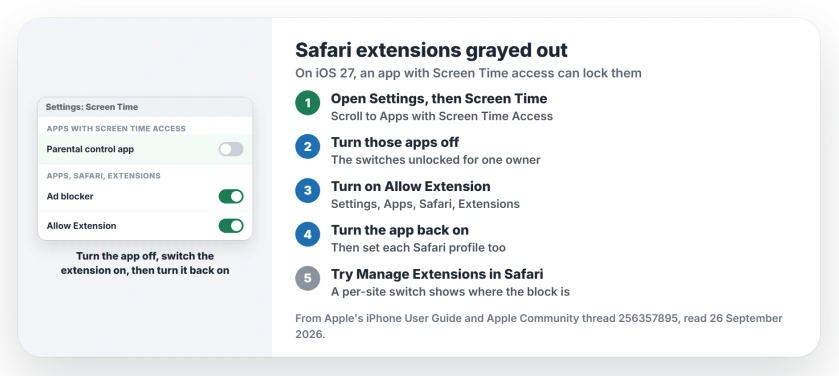
Status: iOS 27, checked 26 September 2026. Extension switches can lock while an app has Screen Time access. Turning that app off, then back on, freed them for one owner.
1. Look for apps with Screen Time access
The fix came from a second owner, who found the cause was "an app on my phone that I use to control Screen Time."
Their route, in their words: "go to the Settings>Screen Time screen," then "scroll down to Apps with Screen Time Access," and "disable any apps you see there."
With that app off, they could "enable my extensions," and then "re-enable the app."
Parental control and focus apps are the kind that ask for Screen Time access, so check for one you installed long ago. That note is ours.
2. Switch the extension on in Settings
With the Screen Time app paused, go to the switch itself. Apple says in its Safari guide: "You can turn Safari extensions on or off at any time."
Open Settings, tap Apps, then Safari, then Extensions. Tap the extension and turn on Allow Extension.
3. Check each Safari profile
Profiles catch people out, and the rule is documented by Apple: "If you have Safari profiles set up, turn on the extension for each profile you want to use it with."
So an extension can work in one profile and seem dead in another. Open each profile's section and set it there too.
4. Try the switch inside Safari
Apple also puts a per-site switch in Safari itself. In its words: "You can turn an extension on or off for an individual website without changing your overall Safari settings."
Tap the left side of the search field, then Manage Extensions, and turn the extension on. If that switch works while Settings stays gray, the block is in Settings, not in the extension.
A cleaner text view doesn't require an add-on in Chrome: use its native iPhone Reading mode instead.
5. When no app has Screen Time access
The first owner had no such app, and the Apps with Screen Time Access section did not appear for them at all. They suspect the new regional age rules in iOS 27, though Apple's guides say nothing about that link, so treat it as their theory.
In that case, check your Content and Privacy Restrictions on the restrictions page, and keep iOS current, since a later release may sort it out. Waiting on Apple is our suggestion, not a confirmed fix.
Other iPhone Safari problems
If pages load blank or white, the Safari blank pages fix goes step by step. And if Screen Time asks for a code you have lost, the Screen Time passcode page shows Apple's reset route.
Why are my Safari extensions grayed out on iPhone?
On iOS 27, one owner traced it to an app with Screen Time access. Turning that app off unlocked the extension switches.
Where is the switch for a Safari extension on iOS 27?
Open Settings, then Apps, Safari and Extensions. Tap the extension and turn on Allow Extension, in each profile you use.
Can Screen Time block Safari extensions?
It did for one owner. An app they used to control Screen Time kept the switches gray until they turned it off.
Where is Apps with Screen Time Access?
In Settings, under Screen Time, further down the page. The first owner, who had no such app, did not see the section at all.
The Short Version
- Gray switches can come from Screen Time.
- Open Settings, then Screen Time.
- Turn off apps with Screen Time access.
- Switch the extension on, then the app.
- Set extensions for each Safari profile.
- Try Manage Extensions inside Safari.
Where to Next
Open Screen Time in Settings now and scroll to the bottom. If an app is listed there, that is your first thing to try.
No app listed and still stuck? Say in a comment which extension it is and your iOS version, and I will compare it with the thread.

Isaac Smith is the founder and editor of PC Glance, a website that covers computers, laptops, and technology. He is a tech enthusiast and a computer geek who loves to share his insights and help his readers make smart choices when buying tech gadgets or laptops. He is always curious and updated about the latest tech trends.