
You dig out an old FireWire drive with years of photos on it, buy a cheap cable to fit your USB-C Mac, and plug it in. The drive spins, but nothing shows up in Finder.
That cable was never going to work, and on the newest macOS no adapter will either. I read one owner's thread, answered by four experienced volunteers, and checked Apple's own port and adapter pages for the routes that still work.
What the owner tried
The owner has a 2018 MacBook Pro with only USB-C ports. The drive is older, a LaCie d2 from 2011: "The 2011 d2 hard drive has two 400 FireWire ports."
Their first attempt, in their words: "I purchased a cable from Amazon that has a FireWire connection at one end and a USB Type A port".
With a USB-C adapter on the end, the drive never mounted. Asked about other sockets, they replied: "There are only FireWire ports on the back of the d2 drive."
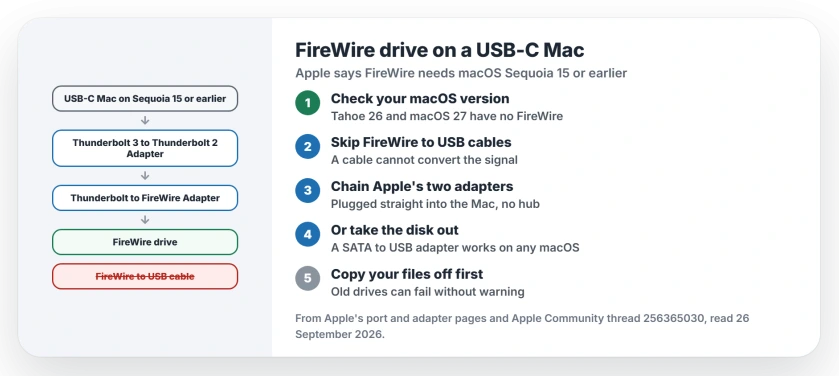
Status: checked 26 September 2026. Apple says FireWire needs macOS Sequoia 15 or earlier. FireWire to USB cables cannot work. Use Apple's two adapters, or take the disk out.
1. Check which macOS your Mac runs
I put this step first, because Apple says on its ports page: "Mac support for FireWire connections requires macOS Sequoia 15 or earlier."
So on macOS Tahoe 26 or macOS 27, no adapter brings FireWire back. A Level 9 volunteer in the thread made the same point about Tahoe. Your routes there are step 4 or step 5.
2. Skip FireWire to USB cables
FireWire and USB are different connections, not different plug shapes, so a plain cable between them has nothing to translate the signal. That is why the owner's drive stayed dark.
The same volunteer was blunt: they called these cables scams, and said the lucky outcome is that they simply do nothing. Send yours back if you still can.
3. On Sequoia or earlier, chain Apple's two adapters
A Level 7 volunteer set out the route: "In order to connect a Firewire drive to it you would need 2 adapters:" the Thunderbolt 3 (USB-C) to Thunderbolt 2 Adapter, then the Thunderbolt to FireWire Adapter.
The first one is documented by Apple, whose adapter page says it "connects a Mac that has a Thunderbolt 3 port to a device that uses a Thunderbolt or Thunderbolt 2 cable."
Plug it straight into the Mac, since Apple says it does not work through USB-C hubs.
The second is harder to find, as the same volunteer put it: "Unfortunately Apple discontinued the Thunderbolt-to-Firewire adapter some years ago".
Apple's adapter has a FireWire 800 port, so a drive with only 400 ports also needs an 800 to 400 cable. That detail is ours.
4. Take the disk out of its case
This road is simpler, and it works on any macOS. A Level 9 volunteer put it this way: "You are probably better off removing the actual Hard Drive from that enclosure".
They added why it should work: "If that drive was new around 2011, then it would likely be a SATA drive." A SATA to USB adapter or dock then connects it like any other USB drive.
Once the disk shows up, I would copy everything off before you try anything else. Old drives can fail without warning, so that order is ours.
5. Or borrow an older Mac as a bridge
If a friend or relative has an older Mac with a FireWire port, running Sequoia or earlier, plug your drive in there. Copy your files across the network, or onto a USB stick, and bring them home. That route is ours as well.
Other Mac drive problems
If your newer USB drive will not mount either, the Tahoe external drive page covers the formats and fixes. And for moving files with a stick, the USB memory stick guide starts from the basics.
Can a Mac on macOS Tahoe read a FireWire drive?
No. Apple says FireWire needs macOS Sequoia 15 or earlier. On Tahoe or macOS 27, take your disk out of its case instead.
Do FireWire to USB-C cables work?
No. FireWire and USB are different connections, and a plain cable cannot convert between them. A volunteer in the thread called these cables scams.
How do I get files off an old FireWire drive?
Take your disk out and connect it with a SATA to USB adapter, or plug the drive into an older Mac that still has FireWire.
The Short Version
- FireWire needs Sequoia 15 or earlier.
- FireWire to USB cables do not work.
- Chain Apple's two Thunderbolt adapters.
- Plug them straight into the Mac.
- Or take the disk out of its case.
- Copy your files off first.
Where to Next
Check your macOS version in the Apple menu, under About This Mac, before you buy anything. That one number tells you which route is open.
Got your files back another way? Leave a comment with what worked, so the next reader with an old drive has one more route.

Isaac Smith is the founder and editor of PC Glance, a website that covers computers, laptops, and technology. He is a tech enthusiast and a computer geek who loves to share his insights and help his readers make smart choices when buying tech gadgets or laptops. He is always curious and updated about the latest tech trends.