
Safari goes to the address you tapped, the tab title fills in, and then the screen just stays white. Nothing loads. The same page opens perfectly somewhere else. That is a confusing one to be stuck on, and I would like to get you past it.
One thing is worth knowing before you start. In most of these cases the page did arrive, and something on your phone stopped it being drawn.
That is why the fixes below are about what is filtering the page, not about your connection.
1. Force Safari closed and open it again
Thirty seconds, and it clears the largest share of one-off cases.
Swipe up from the bottom of the screen and pause, then swipe the Safari card away. Open Safari again and reload the page.
If white pages come back within minutes, you have a setting rather than a glitch, and the rest of this page is where to look.
2. Turn off any content blocker
Owners report this more than any other cause on the page. I have put it at number two for that reason alone, and it is easy to forget you ever installed one.
Content blockers are separate apps that plug into Safari. Ad blockers, tracker blockers and privacy apps all install one, and so do some VPN apps and some parental-control apps.
When a blocker's rules go wrong it strips the page down to nothing and leaves you with white.
One owner spent long enough on this to post about it, then found the setting was on without their knowledge and wrote: "for some reason that was on. Switched it off and voilà." Their post collected 135 other people saying the same thing was happening to them.
A second owner on an older thread reported turning off all content blockers and the problem going with them.
So open whichever blocker app you have and switch it off. Or turn its Safari extension off. Then reload the page. If the white pages stop, you have your answer.
If the extension switches are gray and will not move at all, that is a different fault. On iOS 27 one owner traced it to Screen Time, as the grayed out extensions page explains.
3. Check that JavaScript is still switched on
Apple states this as a troubleshooting step, and a page with JavaScript off is exactly a white screen on most modern sites.
Apple, in If Safari isn't loading websites or quits on your iPhone, iPad, or iPod touch: "Turn on JavaScript if it's not already on: Go to Settings, then tap Apps. Tap Safari. Tap Advanced, then turn on JavaScript."
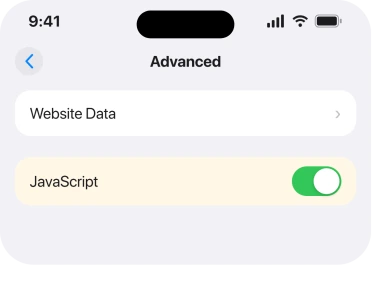
Nobody turns this off on purpose. A configuration profile does it, or somebody helping you does, or a hand slips in a settings screen. Then it stays off for years.
4. Clear History and Website Data
Apple's own step, and one owner reported it as their fix.
Apple, same page: "Go to Settings, then tap Apps. Tap Safari. Tap Clear History and Website Data. Tap Clear History to confirm."
Know what this costs before you tap it. It signs you out of sites, drops saved preferences and empties your browsing history across devices signed into the same Apple Account. Your bookmarks and passwords are untouched.
To keep browsing history while removing site storage, use the narrower Safari cleanup.
5. Turn off a VPN or Private Relay while you test
Both sit between you and the site, and both can produce a page that half arrives.
Apple, same page again: "If you're using a VPN (Virtual Private Network), check your VPN settings. If you have a VPN turned on, some apps or websites might block content from loading."
For Private Relay, Apple's advice when the problem hits one particular site is direct: "check if you have Private Relay turned on. You can temporarily turn off Private Relay in iCloud Settings."
If turning Private Relay off fixes it, our page on Safari not connecting to iCloud Private Relay covers what else that switch affects.
6. Try Prevent Cross-Site Tracking off for one site
Narrower, and it is worth trying when a single site is white and the rest of the web is fine.
Prevent Cross-Site Tracking is Safari's tracker blocking. Some sites load their own content through a third-party domain. Block that domain and you get the shell of the page with nothing inside it.
An owner on a long Safari thread reported exactly this, and turning the setting off resolved a specific site for them.
Treat it as a test rather than a destination. Turn it off, load your site, then turn it back on. Leaving tracker blocking off permanently to read one badly-built site is a poor trade.
7. Turn the experimental web features back to defaults
Last, because it is the most obscure. I have kept it here rather than higher up because it did not work for everybody who tried it.
Safari carries a screen of experimental web features, aimed at developers, under Advanced. They are switchable. They are also easy for you to leave in a state nobody intended.
Apple does not name that screen anywhere in its own troubleshooting, so everything in this rung comes from owners rather than from documentation.
On a thread carrying 1,075 people reporting blank Safari pages, one owner narrowed it to a single feature and posted that disabling it fixed the rendering.
Another owner reported switching everything on that screen off, with a tentatively positive result.
And the person who started that thread said it did not fix it for them at all, and thought the real cause was memory pressure from too many open tabs.
That is a separate fault with its own answer, and Safari reloading tabs on iOS 26 is the page for it.
The names on that screen change between iOS versions, so the exact feature one owner named years ago may not exist on your phone. Reset the screen to its defaults rather than hunting for a switch by name.
Status: iOS 26.6.1, checked 19 August 2026. Apple's four steps are current and quoted. The content blocker cause is owner-confirmed twice. The experimental-features fix failed for one owner.
Why is Safari showing a blank white page on my iPhone?
Most often something on your phone is filtering the page rather than blocking the connection. A content blocker, JavaScript switched off, a VPN or Private Relay, or tracker blocking. Each one can leave you with a loaded address and an empty screen.
Does clearing Safari data delete my bookmarks?
No. Clear History and Website Data removes history, cookies and cached site data. It also signs you out of sites. Your bookmarks, saved passwords and Reading List are not touched.
Why does the page load in Chrome but not Safari?
Because the filtering is Safari's, not your network's. A content blocker extension, Safari's tracker blocking or a JavaScript setting only applies to Safari, so another browser on the same phone reaches the same site normally.
Where is JavaScript on iOS 26?
Settings, then Apps, then Safari, then Advanced. Apple moved app settings under an Apps heading, so any instruction telling you to open Settings then Safari is out of date.
The Short Version
- The page usually arrived. Something on the phone stopped it being drawn.
- Force close Safari first. It clears one-off cases in seconds.
- A content blocker is the most confirmed cause and people forget they have one.
- JavaScript switched off gives you a white page on almost every modern site.
- Clearing website data signs you out everywhere, so know that before you tap.
- Rule out your VPN or Private Relay with a single test.
- Experimental features fixed it for some owners and not for the person who asked.
Where to Next
A white page tells you nothing at all. No error, no code, no clue about which layer failed, so people go round in circles restarting the phone and blaming the router.
Work down the list instead. Rungs 2 to 6 ask the same question five ways: what is sitting between your Safari and the site. One of them is usually holding the door shut.
If a content blocker turned out to be yours, tell me which app it was in the comments. Naming the ones that actually do this would be more useful to the next reader than another general warning.
And if a page claimed your phone has a named virus, that scare has six steps and none of them is a scan.
If your tabs are reloading and losing their place rather than going white, that is memory rather than filtering, and Safari tabs disappearing on iOS 26 is closer to your problem.

Isaac Smith is the founder and editor of PC Glance, a website that covers computers, laptops, and technology. He is a tech enthusiast and a computer geek who loves to share his insights and help his readers make smart choices when buying tech gadgets or laptops. He is always curious and updated about the latest tech trends.