
You type a long reply, switch apps for a few seconds, come back, and Safari has reloaded the page and eaten every word. Infuriating, and it is less Safari misbehaving than you might think.
On iOS 26 this happens constantly, and it is less Safari misbehaving than iOS clearing your tabs out of memory the second you look away.
For a small group it comes down to one hidden setting left switched on. For everyone else it is memory pressure you can ease. A ten-second check in Settings tells you which.
Let me show you what is really doing it, because the setting people reach for first is not the one that helps.
First, check for the hidden toggle
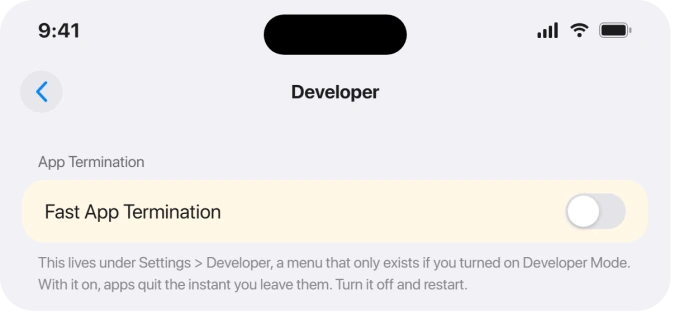
A setting called Fast App Termination forces apps to fully quit the instant you leave them, instead of pausing in the background.
It lives in a Developer menu, and on iOS 26 some people found it switched on even though they never touched it.
Open Settings and pull down to reveal the search bar, then type Developer. If a Developer row appears, tap it, find Fast App Termination, turn it off, and restart the phone.
For those affected, this stops the reloading outright, text loss included.
The odds here are low, though. That Developer menu only exists if you once connected this iPhone to a Mac running Xcode or turned on Developer Mode.
Most people have no Developer row at all, and if you do not, this is not your cause. Move on to memory pressure.
For everyone else, it is memory pressure
Status: this is a widely reported iOS 26 behavior, not an officially acknowledged bug, and users still report it through iOS 26.5.
iOS keeps recently used tabs and apps parked in memory so they resume instantly.
When memory runs short it evicts them, and an evicted tab has to rebuild from scratch when you return, losing your scroll position and anything you had typed.
iOS 26 does this sooner and more often than before.
People report tabs reloading after ten or fifteen minutes even on an iPhone 16 Pro Max with plenty of free storage, so it is not simply that your phone is old, though older phones with less memory do get hit harder.
Ease the memory pressure
You cannot turn eviction off, but you can make it bite less by leaving the phone more free memory to work with.
Cut your open tab count.
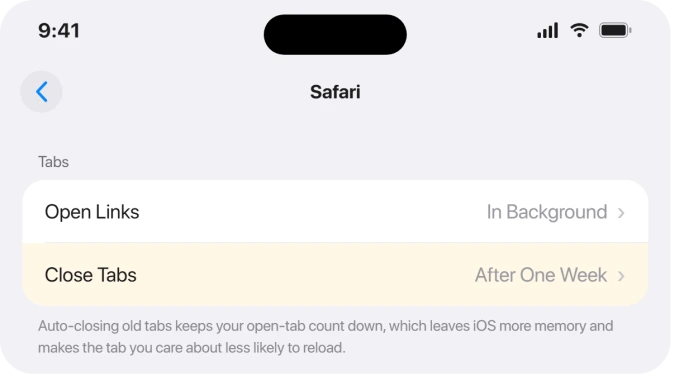
A wall of open tabs is a standing memory cost, so in Settings > Apps > Safari set Close Tabs to After One Week and close the ones you are done with.
Know the trade before you do it. That timer closes tabs you have not viewed inside the week, which is the usual reason people find tabs missing later.
If keeping tabs matters more to you than reloading does, our guide to Safari tabs disappearing explains that side of it.
Fewer tabs means the one you care about survives longer.
Then give memory back: close heavy apps you are not using from the App Switcher, and restart the phone, which clears the slate more thoroughly than anything else.
Free space helps too, because a nearly full iPhone has less room to work with.
If your storage is jammed, iPhone System Data storage on iOS 26 clears the worst of it.
One counterintuitive point: Low Power Mode makes this worse, not better. It throttles background activity, so tabs and apps get dropped faster.
If you live in Low Power Mode to save battery, that is part of your reload problem, and iPhone battery drain on iOS 26 covers better ways to stretch the charge.
Protect the text you type
The wiped-form problem is the same eviction, hitting a page while your unsent text is still only in memory. There is no Safari setting that brings that text back, so the fix is to not trust the page with it.
For anything longer than a sentence, type it in Notes first, then paste it into the web form. Notes survives backgrounding, so a reload cannot eat it.
While you are entering text, stay on that tab and resist app-switching, and on long web forms, save a draft if the site offers one. If you turned off Fast App Termination above, this stops happening on its own.
Safari settings worth changing
A couple of real Safari options reduce how often you get yanked around.
In Settings > Apps > Safari > Open Links, choose In Background. Opening a link then loads it behind your current page instead of jumping you away and leaving the first page to be reloaded later.
Some users suspect the new Compact tab bar is tied to the memory trouble and report the older layout behaves better.
It is unconfirmed, but costs nothing to test: in the same Safari settings, switch the tab layout from Compact to Bottom (or Top).
Turning off browser Extensions is also worth a try, since a leaky extension adds to the memory load.
If the trouble is only the first page after Safari has sat unused, that is a separate iOS 27 complaint, and the slow first page article covers what owners found.
What will not fix it
Skip the advice to hunt for a Safari auto-refresh switch. There is no such setting on iPhone or Mac, and any guide promising one is inventing it.
Turning off iCloud Safari syncing, clearing all history and website data, and closing every tab are the usual suggestions, and the person who started the biggest thread on this tried all three with no change.
They are harmless to try, but do not expect them to end the reloading. The real levers are the toggle, the memory pressure, and protecting your text.
Why does Safari keep reloading pages after iOS 26?
Because iOS 26 evicts background tabs from memory aggressively, so a tab you return to rebuilds from scratch.
For some people a hidden Fast App Termination setting is forcing it; for most it is general memory pressure.
Fewer open tabs, a restart, and staying out of Low Power Mode all reduce how often it happens.
Why do my iPhone apps reload every time I switch to them?
Same cause as the Safari tabs: iOS is terminating them in the background to reclaim memory, and iOS 26 does it more eagerly.
Check for the Developer menu's Fast App Termination toggle and turn it off if present. Otherwise, close unused apps, restart, free up storage, and avoid Low Power Mode.
How do I stop Safari losing text I typed in a form?
There is no setting that restores unsent text after a reload.
Type anything long in the Notes app first and paste it in, keep the entry tab in the foreground without switching apps, and save a draft when a site allows.
Fixing Fast App Termination, if you have it, stops the loss entirely.
The Short Version
- Search Settings for a Developer menu. If it exists, turn off Fast App Termination and restart. That is the clean fix, but most people will not have that menu.
- For everyone else it is iOS 26 memory pressure evicting tabs. It hits even new iPhones and is still around in 26.5.
- Ease it: set Safari > Close Tabs > After One Week, close heavy apps, restart, free up storage, and get out of Low Power Mode (it makes reloads worse).
- Protect typed text by composing in Notes and pasting, and by not switching apps mid-entry.
- Set Safari > Open Links > In Background, and test the Bottom or Top tab layout. There is no Safari auto-refresh setting, and clearing data or iCloud sync rarely helps.
Where to Next
On an iPad where every app reloads on switching back, the same pressure is behind it.
And if Safari switched search engines without being asked, the setting is not where you expect.
- Storage jammed too: iPhone System Data storage on iOS 26
- Battery behind the Low Power Mode habit: iPhone battery drain on iOS 26
- More iOS 26 fixes: iOS 26 problems and fixes
- Back to the start: pcglance home

Isaac Smith is the founder and editor of PC Glance, a website that covers computers, laptops, and technology. He is a tech enthusiast and a computer geek who loves to share his insights and help his readers make smart choices when buying tech gadgets or laptops. He is always curious and updated about the latest tech trends.