
You open Screen Time, tap Change Screen Time Passcode, and look for the Forgot Passcode link that used to be there. It is not there. Now you cannot change a setting. You may not even be able to leave your Apple Account.
That is a stressful spot, but there are only three situations, and each one has its own way out. Let me help you spot yours before you do anything drastic.
What changed on iOS 27
Apple rewrote its Screen Time passcode page on 14 September 2026, for iOS 27, and the steps no longer mention a Forgot Passcode link.
Instead, you tap Change Screen Time Passcode twice. Then, if iOS asks, you sign in with the Apple Account used when the passcode was first set. That prompt matters.
This reading is ours: on iOS 27 that Apple Account prompt is the reset. If your iPhone never asks for it, the recovery step was skipped when the passcode was set.
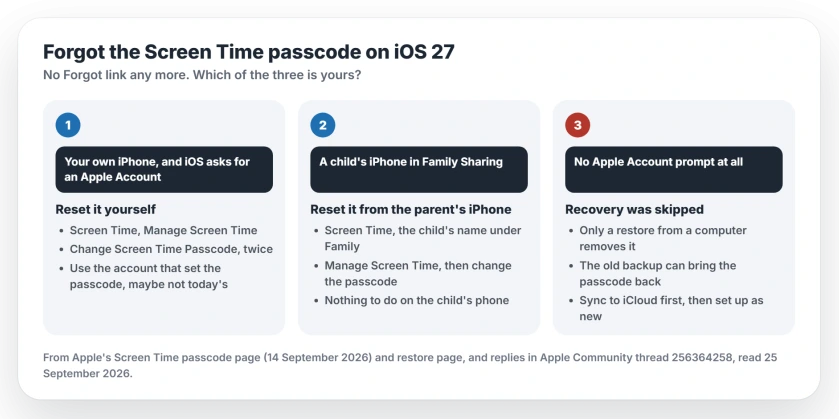
Status: checked 25 September 2026 on iOS 27. Apple's reset now runs through the Apple Account used when the passcode was set. Without it, volunteers point to a restore from a computer.
1. Your own iPhone: use the recovery Apple Account
In Settings, choose Screen Time, then Manage Screen Time. Tap Change Screen Time Passcode, then tap it again. When asked, use the Apple Account that created the passcode, then choose a new one.
People get stuck at this step. Apple warns that the recovery account can differ from the account on the phone today.
So think back. Was it an old email address? A work account? A parent's account from when the phone was new? Try each one before you give up.
2. A child's iPhone: reset it from your own device
If you manage the child through Family Sharing, the reset does not happen on their iPhone, and Apple is explicit: the organizer or a parent resets it on their own iPhone, "not the child's device".
On your own iPhone, go to Settings and choose Screen Time, then pick the child's name under Family. Tap Manage Screen Time, then Change Screen Time Passcode twice, and enter the new one.
3. No Apple Account prompt at all
This is the hard one. Apple's advice on setup is that you "don't skip adding a Screen Time Passcode Recovery". If it was skipped, the phone has no reset left. That is the whole problem.
The owner who raised this in a forum thread on iOS 27 wrote: "there is no 'forgot passcode' option on the screen". They had also found "i cant log out from apple ID because of it".
Three Level 10 volunteers gave the same answer. One put it plainly: "You should Factory Reset the phone using a computer".
Can another Apple device switch it off remotely? The owner asked exactly that, and another Level 10 member replied: "This is not possible".
4. Restoring from a computer, and the backup trap
Apple's restore steps run from a computer: Finder on a Mac, or Apple's Devices app on Windows. Apple is clear that this "removes all information and settings" from the iPhone, so save what you can first.
There is a catch with backups, though. The same Level 10 member warned that "a backup contains the Screen Time Passcode", so the old backup itself can be unusable.
This advice is ours: make sure iCloud Photos, Contacts and Messages in iCloud are on and synced first. Then set the iPhone up as new, and let iCloud bring those back, rather than restoring the old backup.
If you have no computer, the same volunteer suggested Apple's own service instead.
5. Stop it happening again
When you set a new Screen Time passcode, iOS offers to link an Apple Account for recovery, so say yes and use an account you will still have in five years.
Paid unlock tools advertise a way around all of this. We could not test any of them, and Apple does not list them, so I would stick to Apple's routes.
Other Screen Time problems
If Screen Time limits are being ignored rather than locked, the Screen Time fixes for iOS 26 deal with that. And if the restrictions switch refuses to turn off, that page explains the adult check behind it.
If it is your Apple Watch passcode you cannot remember, the Apple Watch passcode page shows the reset, and your iPhone keeps a backup to restore.
If Screen Time is set but Roblox still opens on a child's Mac, the Roblox and Screen Time page has the limits that held.
Why is there no Forgot Passcode option for Screen Time?
On iOS 27, Apple's steps ask for the Apple Account used when the passcode was set, instead of a separate Forgot link. If no recovery account was added, there is nothing to reset with.
How do I reset my Screen Time passcode without the old one?
Tap Change Screen Time Passcode twice and sign in with the recovery Apple Account. On a child's iPhone, reset it from the parent's device in Family Sharing.
Can I remove Screen Time without the passcode?
Only by erasing the iPhone. Volunteers recommend a restore from a computer, and warn that the old backup may put the passcode back.
Is the Screen Time passcode the same as my iPhone passcode?
No. They are separate codes. Your iPhone passcode unlocks the phone, while the Screen Time one only guards Screen Time settings.
The Short Version
- On iOS 27, the reset is the Apple Account prompt, not a Forgot link.
- Use the Apple Account you had when you set the passcode.
- A child's passcode is reset from the parent's iPhone.
- No prompt means recovery was skipped. Only a restore from a computer removes it.
- An old backup may bring the passcode back, so set up as new.
- Next time, add a recovery Apple Account.
Where to Next
Try every Apple Account you have ever used before you erase anything, because it is the cheapest fix by far.
If none of them works, post in the comments which of the three situations is yours. I will reply with my next step for your case.

Isaac Smith is the founder and editor of PC Glance, a website that covers computers, laptops, and technology. He is a tech enthusiast and a computer geek who loves to share his insights and help his readers make smart choices when buying tech gadgets or laptops. He is always curious and updated about the latest tech trends.