
You typed the wrong passcode a few times, and now your Apple Watch makes you wait hours before the next try. If the code has gone from your memory, the wait will not bring it back.
Apple's answer is a reset: the watch is wiped, you pair it once more, and your iPhone keeps a backup. I went through Apple's own page for each step. I also added the order Apple Support gave one owner by phone when Reset never showed.
Holding one button did not work
One owner's watch was "locked for 7 hours" when they posted this week. They put it on the charger and held a button for five minutes, but "it didn't show up with a reset button".
Apple's reset uses two buttons, one after the other. The erase screen comes from the Digital Crown, held after the side button.
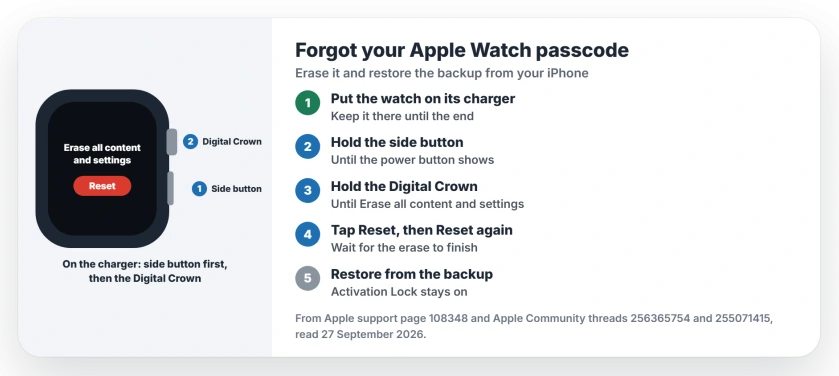
Status: checked 27 September 2026 against Apple's page from April 2026. The reset works without the passcode, and your iPhone keeps a backup to restore.
1. Side button, then the Digital Crown
Apple's passcode reset page starts with the charger: "Put your watch on its charger and keep it there until you complete these steps".
Now hold the side button, the flat one under the dial, until a power button shows in the upper-right corner of the screen.
Apple says the next step is: "Press and hold the Digital Crown until you see Erase all content and settings". Tap Reset, then tap Reset again. Leave the watch on the charger until it finishes.
2. If Reset never shows up
A 2023 thread about the same lockout has 260 Me too clicks. In April 2024, one owner there had a Series 5 where the usual steps failed, and Apple Support gave them a different order by phone.
On the charger, they had to "hold crown and side button at the same time", then let both go after a few seconds.
When the Apple logo appeared, they held the side button "until a red button showed up prompting me to erase and reset the watch".
That route is user-reported and two years old. Try Apple's steps first.
3. Or erase it from your iPhone
Keep your watch close to the paired iPhone. Open the Apple Watch app, tap My Watch, then General, then Reset. Choose Erase Apple Watch Content and Settings and confirm it.
Apple says you might need your Apple Account password here. On a cellular watch, keep the plan if you will pair it with this iPhone again.
4. Set it up again from the backup
You do not start from nothing. Apple documents that "a backup of its contents is created on your iPhone" before the watch erases. Pick that backup when setup asks.
Keep your Apple Account password close as well. Apple's page says the reset "does not remove Activation Lock", so setup may ask for it.
Locked out of a different passcode?
If it is the Screen Time passcode on your iPhone you cannot remember, the Screen Time passcode page covers what iOS 27 offers. And if your iPhone wants a passcode you never set, this page explains what to do before you guess.
And if your watch keeps asking for its passcode while you are wearing it, the passcode prompt page covers why it locks itself.
Can I unlock my Apple Watch without the passcode?
No. Apple says you'll need to reset it, and then you pair it with your iPhone once more. The backup on the phone brings your data back.
Why does holding the side button not show Reset?
In Apple's steps, the side button only brings up the power button. Holding the Digital Crown after that shows the erase screen.
Will I lose my data if I reset the watch?
Not if you restore. Apple says a backup is made on your iPhone before the erase, and setup offers it.
What if Reset never appears?
Use the Apple Watch app on the paired iPhone to erase it instead. Or try the order Apple Support gave one owner: both buttons, then the side button at the Apple logo.
The Short Version
- A forgotten watch passcode cannot be recovered.
- Leave it on the charger throughout.
- Hold the side button, then the Digital Crown.
- Tap Reset, then Reset again.
- Or erase it from the Watch app.
- Restore the backup. Activation Lock stays on.
Where to Next
Put your watch on its charger now and do the two holds in order. When setup asks, restore your backup.
If Reset still never shows up, tell me your watch model in a comment, and I will look for the route that worked on it.

Isaac Smith is the founder and editor of PC Glance, a website that covers computers, laptops, and technology. He is a tech enthusiast and a computer geek who loves to share his insights and help his readers make smart choices when buying tech gadgets or laptops. He is always curious and updated about the latest tech trends.