
Stop before you type anything.
Apple's own lockout table gives you three free tries, then delays that climb to eight hours, and at ten wrong attempts the phone either wipes itself or has to be restored, which also wipes it.
Guessing is the expensive move, and there is one rule that makes it far cheaper.
The rule that decides how much a guess costs
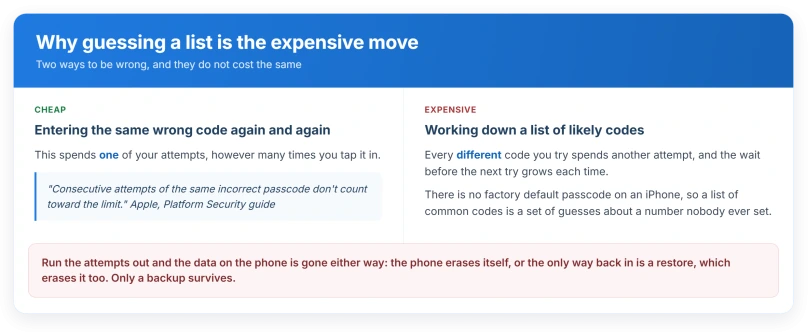
Apple, in its Platform Security guide: "Consecutive attempts of the same incorrect passcode don't count toward the limit."
Read that twice, because it changes everything about the advice you have been given. Typing 000000 five times in a row costs you one attempt. Typing 000000, then 123456, then 111111 costs you three.
Lists of likely codes are the one thing that burns your budget fastest. There is no factory default passcode on an iPhone, so those lists are guesses about a number that was never set by anybody.
Apple's published escalation, from the same table: nothing for the first three, one minute at four, five minutes at five, fifteen at six, an hour at seven, three hours at eight, eight hours at nine.
Apple on the tenth: "Erase Data: Choose whether to erase your device automatically after ten failed passcode attempts. If you don't enable this option, your device will need to be restored on a computer after ten failed attempts."
Ours, and it is the whole reason this page leads with it: both branches end with your data gone. Either the phone erases itself or the only way back in is a restore. A backup survives. Nothing on the phone does.
Restarting will not shorten a delay either. Apple: "The delays are enforced by the Secure Enclave. If the device is restarted during a timed delay, the delay is still enforced, with the timer starting over for the current period."
Now work out which prompt you are actually looking at
Three different screens send people to this search, and only one of them can destroy anything.
A prompt for the passcode of a previous device. This appears during setup or in Settings, not on the lock screen, and it is asking for a code from a phone you used before. Wrong answers here cost nothing.
A Screen Time passcode. Four digits, appears inside Settings or when a limit is reached, never on the lock screen. Apple: "A Screen Time passcode isn't the same as the passcode you use to unlock your device."
The lock screen passcode. The one with the escalating delays above. If your phone is unusable until you enter it, this is you, and the section on getting back in is below.
If you are being asked for an Apple Account password rather than a device passcode, that is a different loop entirely and the Apple Account sign-in loop is the page for it.
The previous-device prompt, which almost nobody writes about
This is the likeliest answer for somebody who genuinely never set a passcode on the phone in their hand, because the code being demanded belongs to a different phone.
Apple, in a support article about iCloud data not syncing: "Students may be prompted for an old passcode for a previous device to finish syncing iCloud data on a new device."
The same page: "If your current passcode is different from your previous passcode, enter the passcode for your previous device to continue with Setup Assistant and sync your iCloud data."
The screens use wording like Some iCloud Data Isn't Syncing, Resume Data Sync and Forgot all passcodes?, so if any of that looks familiar this is your prompt.
There is a documented way out that does not erase your phone.
Apple: "If you are still unable to remember your passcodes, you'll need to delete your end-to-end encrypted data stored in iCloud to continue using iCloud on the device. Data that will be erased includes saved passwords, Safari bookmarks and history, Messages in iCloud, Maps history, and Memoji, but doesn't include iCloud Drive and other data categories."
That is a real cost and worth reading twice, but it is nothing like erasing the device.
One owner met a wall on that route in September 2026: after tapping Forgot all passcodes?, the only choices were Try again later and Cancel. Two weeks on, the same screens changed. In their words: "This time (two weeks after first trying), it offered to delete my Apple Health data."
After they accepted, the banner read Ready for your new iPhone. So if you only see Try again later, wait a while and check again. That timing is one owner's experience, not an Apple rule.
Two scoping notes, both ours.
Apple frames that article around student accounts, and confirms the same behaviour for everyone else on its iCloud Keychain page: "you need to approve with an old passcode or from another device when prompted", if you chose to approve later at sign-in.
Things that genuinely make an iPhone demand a passcode
If it is the lock screen and you do know the code but were not expecting to be asked, Apple documents exactly when biometrics are refused.
Apple, on using a passcode: the passcode is required when you "Turn on or restart your device", "Update your software", "Erase your device", "View or change passcode settings" and "Install iOS or iPadOS Configuration profiles".
The Platform Security guide adds the timers, and two numbers get mixed up constantly.
Apple: "The user hasn't unlocked their device for more than 48 hours." That is a separate rule from this one: "The user hasn't used their passcode or password to unlock their device for 156 hours (six and a half days), and the user hasn't used biometric authentication to unlock their device in four hours."
So 48 hours is about not unlocking at all. Six and a half days is about not using the passcode specifically. Neither is the other.
Two more triggers sit in the iOS 26 user guide and not in the security guide, and they matter because a stranger can set them off.
The passcode is demanded when "An attempt to use Emergency SOS is initiated" and when "An attempt to view your Medical ID is initiated". Both are reachable from a locked phone by anybody holding it.
Find yours on that list before you try anything, because I would rather you spent none of your attempts than one.
When somebody else did set one
Two cases, both documented, and both leave a trace you can check.
A work or school profile. Apple, to administrators: "When installing the configuration profile, users receive a prompt to enter a password or passcode that meets the policies you specify. Otherwise, the profile doesn't install." The same page carries a Maximum passcode age setting that forces scheduled changes.
To check your own phone, Apple's route is Settings, General, VPN & Device Management.
Apple: "If you don't see any profiles, then no device management profiles are installed on your device." Our page on an App Store icon that vanished walks the same screen in more detail.
A managed phone is far more dangerous to guess on. Apple tells administrators: "The passcode or password time delay begins after the sixth attempt, so if you set this value to six or lower, no time delay is imposed and the device is erased when the attempt limit is exceeded." On a work iPhone the wipe can arrive with no warning delays at all.
Lost Mode, which creates a passcode from nothing. Apple: "Passcode: If your iPhone, iPad, iPod touch, or Apple Watch doesn't have a passcode, you're asked to create one now." So a phone with no passcode can acquire one remotely.
That one has a check attached. Apple says marking a device as lost sends "A confirmation email is sent to your Apple Account email address", so look in your mail.
Apple also lists "Your device was locked or placed in Lost Mode by someone other than you" as a sign of a compromised account.
What Stolen Device Protection does, which is the opposite
It comes up constantly on this topic and it is backwards. Stolen Device Protection does not impose a passcode.
It makes changing yours harder, listing a passcode change among the actions that need Face ID or Touch ID plus a one hour delay.
If you have it on, that is a reason your passcode could not have been quietly changed by somebody who only knew the old one.
Getting back in without a computer
Apple's stated order: "If you forget your passcode, try Passcode Reset first. If you can't use Passcode Reset, you can then reset your iPhone or iPad without a computer to regain access to your Apple device."
Passcode Reset is the 72 hour window.
Apple: "When you change your passcode in iOS 17, iPadOS 17, and later, Passcode Reset gives you 72 hours during which you can still access your iPhone or iPad using your previous passcode."
Ours, and it matters for this exact article: if you truly never set a passcode then you never changed one, so this option will not be offered to you.
It is the right tool for somebody who changed a code and forgot the new one, and the wrong tool for the person this page is written for.
The other route erases the phone but does not need a computer. Apple: "If you use iOS 17 or later, the Forgot Passcode? option appears when you are locked out, connected to a cellular or Wi-Fi network, signed into your Apple Account, and have Find My turned on." It needs your Apple Account password and a live network connection.
One safety point that cuts both ways. That same 72 hour window means a passcode changed against your wishes can still be beaten with the old one for three days.
And if you changed yours to lock somebody out, they have three days with the old one unless you use Settings, Face ID & Passcode, Expire Previous Passcode.
Status: iOS 26.6, checked 14 August 2026. Apple documents no way for a passcode to change by itself. The only scheduled change it publishes applies to phones managed by an employer or school.
What does not work
- Trying a list of common codes. Every distinct guess spends an attempt. Repeating one wrong code does not. This is Apple's rule, not ours.
- Restarting to clear a delay. The Secure Enclave keeps the timer and starts the current period again.
- Clearing Safari data or cookies. Nothing on any Apple page connects browsing data to a passcode prompt.
- Waiting for a fix. Nothing here is a bug, so no point release changes it.
Locked out of an Apple Watch instead? The Apple Watch passcode page covers its reset, which you do with the watch on its charger.
Is there a default iPhone passcode?
No. Apple never ships one and never publishes one. Setup offers you a six digit code, a four digit code, a custom one, or none at all, and whatever exists on your phone was chosen by a person. Lists of default codes are guesses that cost you real attempts.
Why is my iPhone asking for a passcode after an update?
Because Apple requires it. Updating software is on Apple's own list of operations where biometrics are refused and the passcode must be typed. So is restarting. If you have not typed the code in a while and only ever unlock with your face, that first prompt can feel like it came from nowhere.
Can somebody change my iPhone passcode remotely?
Not directly, but Lost Mode can add one to a phone that had none, and Apple says a confirmation email goes to your Apple Account address when a device is marked as lost. If that email is in your inbox and you did not send it, treat the account as the problem rather than the phone.
The Short Version
- Do not work through a list of likely codes. Each different guess spends one of ten attempts.
- Repeating the same wrong code costs one attempt, not many. That is Apple's rule.
- At ten wrong attempts the data is gone either way, by automatic erase or by the restore you will need.
- Work out which screen you are on first. A previous-device prompt and a Screen Time passcode are not the lock screen and cannot wipe anything.
- The previous-device prompt has an escape that deletes some iCloud data and leaves the phone alone.
- A managed work phone can erase with no warning delays at all.
- Apple documents no way for a passcode to change by itself.
Where to Next
Whatever you do, do not spend your attempts guessing. Each wrong code costs you one of a small number, and the lockout gets longer every time.
Work out which of the documented situations you are in first, because most of them have an answer that does not involve the passcode at all.
If none of them matches what you are seeing, describe the exact screen below and I will help you work out which one it is.

Isaac Smith is the founder and editor of PC Glance, a website that covers computers, laptops, and technology. He is a tech enthusiast and a computer geek who loves to share his insights and help his readers make smart choices when buying tech gadgets or laptops. He is always curious and updated about the latest tech trends.