
Unlocking an iPhone can mean opening its Lock Screen or allowing service from another carrier. For everyday access, use Face ID, Touch ID or the device passcode. For a carrier unlock, first check Settings > General > About > Carrier Lock.
These locks have different remedies. A carrier approval does not recover a forgotten passcode, and erasing an iPhone does not automatically remove its carrier restriction or Activation Lock.
Choose the lock that matches the screen
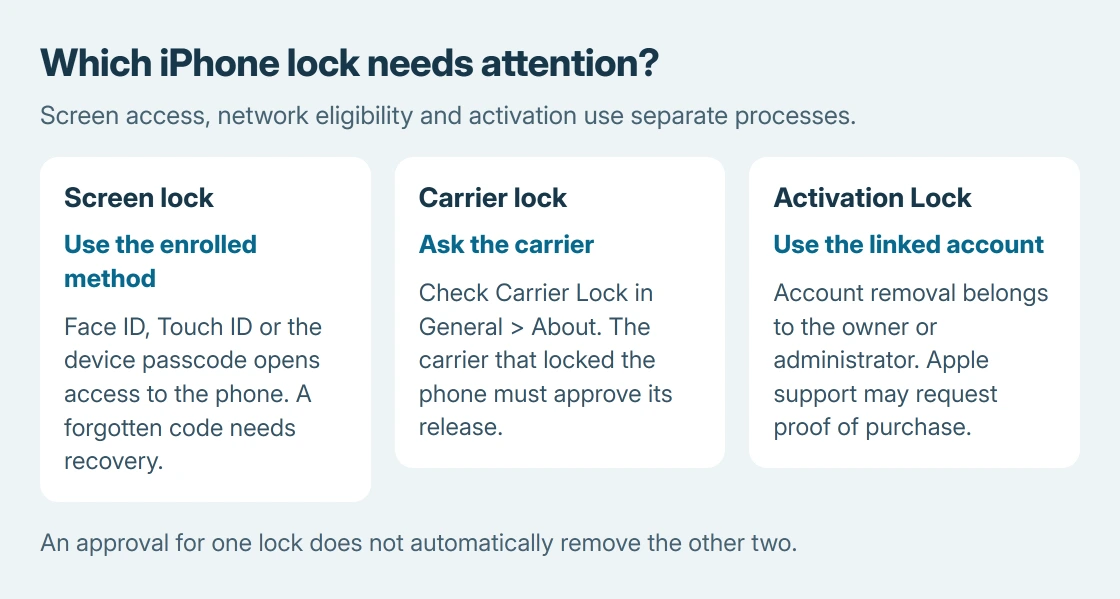
A normal Lock Screen accepts the device passcode, face or fingerprint. A carrier restriction matters when activating another provider's SIM or eSIM. Activation Lock appears during activation and asks for the linked account.
Apple says No SIM restrictions beside Carrier Lock means the iPhone is unlocked for carrier use. Its carrier-unlock instructions also make clear that the carrier handles that restriction.
Status: Apple's unlock, carrier, passcode and Activation Lock pages checked October 26, 2026. Carrier eligibility varies. No phone was unlocked, restored or erased.
A SIM PIN or PUK request is another case. Use the SIM recovery instructions for that prompt instead of repeatedly entering the iPhone passcode.
Open the Lock Screen with the method already set up
Face ID models
On a Face ID model, wake the display, look at the phone and wait for the padlock to open. Then start an upward swipe at the bottom to reach the Home Screen. Recognition alone can leave the Lock Screen visible until that swipe.
Touch ID models
For an iPhone with a Home button and Touch ID, press Home with a registered finger. Apple's current guide gives iPhone Duo a different Touch ID control: rest the registered finger on its side button.
The device passcode
To use the passcode, swipe upward on a model without a Home button, or press Home on a Home-button model. Enter the device passcode. Apple documents these model differences in its wake and unlock guide.
When iOS requires the passcode, biometric recognition cannot replace it. A restart is one situation that requires it. The unexpected-passcode guide explains other prompts that can be mistaken for the device lock.
Request a carrier unlock before changing providers
Open Settings > General > About and inspect Carrier Lock. If it does not show No SIM restrictions, contact the carrier that locked the phone and ask about its current unlock requirements.
Apple states that it cannot perform a carrier unlock. Approval rules and processing times belong to the carrier, so use that provider's official support rather than assuming every network uses the same waiting period.
After approval, follow the carrier's confirmation instructions. With a physical SIM, Apple directs inserting the new provider's SIM to activate. For eSIM, use the new provider's eSIM activation procedure.
Check Carrier Lock again if the new service reports an unsupported SIM. If the restriction remains after the carrier says it completed the request, return to that carrier with the result shown in About.
Apple also describes a backup, erase and restore route after approval when there is no different physical SIM to use. That is a conditional completion step, not the first way to request an unlock. Preserve the backup before considering it.
Carrier approval does not mean a particular service plan, eSIM or network configuration will work. Have the new provider confirm compatibility with the exact iPhone before changing service.
Handle a forgotten passcode without confusing it with a SIM lock
Stop trying unrelated guesses when the code is unknown. If the passcode was changed within the last 72 hours, Apple's previous-passcode option may allow access with the old code on iOS 17 or later.
On an eligible locked-out phone, Forgot Passcode? > Enter Previous Passcode leads to creating another code. Availability has account and connection requirements; a code deliberately expired early cannot be used through this route.
If that option cannot be used, Apple's passcode-reset process can erase the device. Read the data-loss warning before proceeding. A restore can recover saved backups, not unsaved local data.
An unresponsive screen or broken button that prevents the required recovery actions needs Apple service. Repeating a carrier-unlock request will not change that hardware problem.
Resolve Activation Lock with the linked account
For a phone asking for its previous owner's Apple Account during setup, ask that owner to unlink the phone. Apple provides the Activation Lock removal routes, including an account removal option on the web.
For a business or school device, contact its administrator. If the phone is yours and account recovery does not resolve access, Apple offers a support request with proof of purchase. Approval is not guaranteed by possessing the phone alone.
The Short Version
Open the screen with its enrolled method or passcode. Check Carrier Lock and contact the carrier to change networks. A forgotten passcode and Activation Lock require their own Apple recovery processes, with possible data loss.

Isaac Smith is the founder and editor of PC Glance, a website that covers computers, laptops, and technology. He is a tech enthusiast and a computer geek who loves to share his insights and help his readers make smart choices when buying tech gadgets or laptops. He is always curious and updated about the latest tech trends.