No, AirPods shouldn't be worn in the shower, including water-resistant AirPods Pro. Take them out before running water, soap or shampoo can reach them. Dry a wet pair completely before wearing or charging it again.
Newer models' water-resistance ratings don't change that advice. They're tested under specific conditions, while a shower adds running water and products that can affect the seals and thin membranes in the speakers.
In this guide
Keep every AirPods model out of the shower
Apple says its water-resistance guidance specifically excludes showering and putting AirPods under running water. It also excludes saunas and steam rooms. Turning your head away from the showerhead doesn't change that advice.
That applies to AirPods Pro 1, Pro 2 and Pro 3, as well as AirPods 3, AirPods 4 and AirPods 5. Newer protection ratings aren't permission to use them with soap or shampoo.
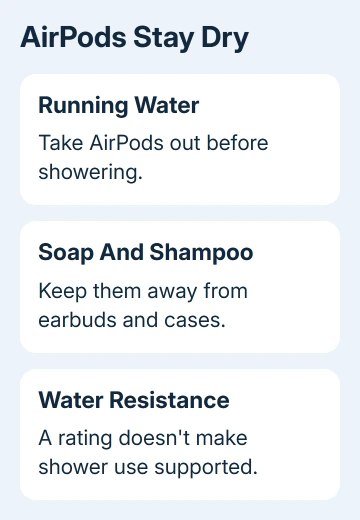
I wouldn't risk an expensive pair to finish a podcast in the shower. Pause playback and leave the earbuds and case somewhere dry, where splashes from the sink or shower can't reach them.
Surviving an earlier shower without visible damage doesn't make it safe to keep doing it. Water resistance can diminish over time, and the earbuds and charging cases can't be rechecked or resealed for that resistance.
If your pair is already wet, skip the model comparison for now and follow the drying steps. What matters now is getting them dry enough to use or charge, even if they survived a similar accident before.
Read the rating for the earbuds and the case separately
AirPods Pro 1 earbuds carry an IPX4 rating for non-water sports and exercise. Their MagSafe and Wireless Charging Cases aren't sweat or water resistant. Putting wet earbuds inside gets moisture into a case that has no water protection.
AirPods Pro 2 with the Lightning case and AirPods 3 with either listed case have IPX4 protection for the earbuds and case. It still doesn't cover shower use. Even with that rating, keep the case and earbuds away from running water.
AirPods Pro 2 with the USB-C case and both AirPods 4 versions have IP54 ratings for the listed earbuds and cases. Those models have dust resistance as well as water and sweat resistance for their intended use.
AirPods Pro 3 and their USB-C MagSafe case, plus both AirPods 5 models and their cases, have IP57 ratings. They're tested at a maximum depth of 1 meter for up to 30 minutes. The same guidance still rules out showers.
The IP letters and numbers describe tested dust and water protection, not resistance to every bathroom liquid. Soap, shampoo, conditioner, lotions and oils are specifically listed as things to keep away from AirPods.
For AirPods 1 or 2 and AirPods Max, don't assume a rating from the newer earbud list applies. Match your own model before following cleaning instructions. Earbuds, over-ear headphones and their cases have different cleaning procedures.
Dry AirPods that were splashed or worn in the shower
Remove the earbuds from your ears and wipe them with a soft, dry, lint-free cloth. Keep them out of the charging case while they dry. Water on the outside needs attention even when the earbuds still play normally.
Leave them to dry completely for at least two hours before using them or putting them in their case. Two hours is the minimum drying time. If they're still damp then, give them longer.
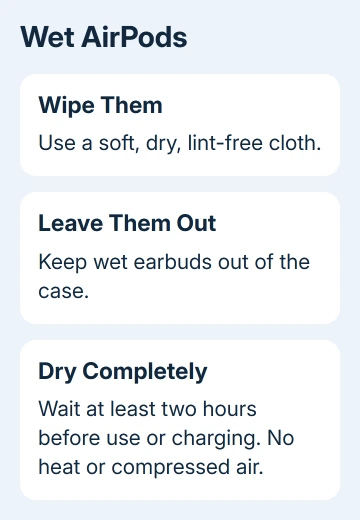
Don't use heat or compressed air to hurry the process. Put the hair dryer away and give them time to dry. Waiting is inconvenient, but the manufacturer warns against trying to speed it up this way.
If the case was wet too, wipe it and let it dry separately. A dry pair of earbuds doesn't make a damp case ready for charging. Check the earbuds and case separately, since moisture can remain in one after the other has dried.
Once everything is fully dry, check playback and charging. If one side stays quiet, the sound crackles or charging still fails, get help with the remaining problem. Don't repeat wetting and drying to see whether the problem improves.
Remove shampoo or soap with the correct cleaning method
Soap exposure needs cleaning as well as drying. The AirPods Pro cleaning steps explain how to wipe the body with a cloth slightly dampened with fresh water after contact with substances that can cause damage.
Wipe it dry afterward with a soft, dry, lint-free cloth and allow it to dry completely. Use the damp cloth on the body; don't rinse the whole earbud under a faucet.
For AirPods Pro ear tips, pull the tips off before cleaning them. Rinse the detached tips with water without soap or other household cleaners, wipe them and let them dry completely before fitting them back onto the earbuds.
Reattach each tip firmly once it is dry. A wet tip can carry moisture back to a dry earbud, so check the small removable parts as well as the main body before using the pair again.
Use the cleaning page for your exact model if you need to clean a speaker mesh. The mesh-cleaning method for one generation isn't automatically the method for another. Avoid poking openings with sharp objects to clear trapped residue.
If your main symptom after drying is very low sound, the quiet AirPods guide helps with the other volume checks. Drying and cleaning come first when liquid exposure started the trouble.
Get help for lasting sound or charging problems
If your AirPods stay silent, sound distorted or won't charge after proper drying, have them checked for service. Arrange it through Apple Support and describe which part got wet, whether soap was involved and which problem remains.
Have the exact model and serial number ready. If a case needs replacement, match it to the earbuds rather than buying a case based only on its appearance. The replacement-case explanation covers why compatibility matters.
Ask which service options cover the damage and how much they'll cost. The price depends on what needs repair and your coverage, so you can't work it out from the water-resistance rating.
The Short Version
Keep AirPods out of showers, including newer Pro models. For accidental exposure, wipe them dry and leave them out of the case until completely dry, for at least two hours. Soap or shampoo also needs the model's cleaning procedure.
Checked November 10, 2026.