
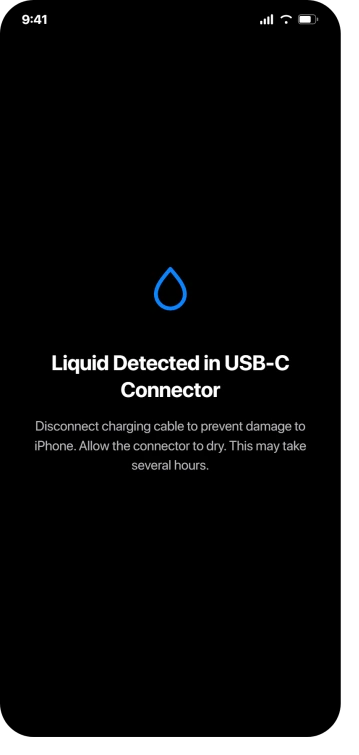
Liquid Detected, the charging stops, and your phone has been nowhere near water. That is an alarming thing to be told for no reason.
Apple gives two different waits for this on two different pages, thirty minutes on one and at least five hours on the other, which is not much help when you need the phone charged tonight.
Let me sort out which of them applies to you.
It genuinely got wet
Start with what Apple asks for. Unplug everything, then "tap your iPhone gently against your hand with the connector facing down to remove excess liquid", then "leave your iPhone in a dry area with some airflow".
Then the waiting, on which Apple's own pages disagree with each other.
The liquid-alert page, last updated in October 2024, says "after at least 30 minutes, try charging with a Lightning or USB-C cable or connecting an accessory".
If the alert comes back, the same page says to leave it "for up to a day" and that "it might take up to 24 hours to fully dry".
Apple's water-resistance page, updated in July 2026, says something different: "Allow at least 5 hours before charging with a Lightning or USB-C cable or connecting an accessory." The iOS 26 user guide repeats the five hours, and the alert on your screen says "This may take several hours".
Read the 30 minutes as a retry, not as a dry time. Apple's own sentence is "try charging", and the paragraph then escalates to a day. Three of Apple's four current statements point at hours.
Beyond shaking out the excess, Apple endorses one way to speed the drying up, and it is not on the liquid-alert page at all.
From the water-resistance page: "Placing your iPhone in front of a fan blowing cool air directly into the Lightning or USB-C connector might help the drying process." The iOS 26 user guide gives the same instruction in near-identical words.
It went in water and now it will not turn on
A dead phone shows no alert at all, so nothing above applies to you yet.
The temptation is to keep pressing buttons and to plug it in to see whether it responds.
Both are the wrong move while the connector is wet, because Apple's whole warning is about what current does to wet pins.
Dry it for the full period first, then charge, and if it has a wireless charger use that in the meantime.
If it stays dark after that, the problem has stopped being liquid detection and our list for an iPhone that will not turn on is the right page, starting with Apple's full hour on a charger before anyone concludes anything.
It never went near water
Apple does address this, in a section headed "If your iPhone and accessory aren't wet". The whole of it is two lines:
"If you see this alert every time you connect a certain cable or accessory, that cable or accessory might be damaged. Contact the manufacturer."
"If you see this alert every time you connect an Apple Lightning or USB-C cable or accessory, you might need service."
So Apple's published answer to a dry phone is: suspect the cable, or book a repair.
Worth ruling out one thing before you book anything. Apple publishes a separate alert for accessories, and it treats one version of it as a hardware signal.
Our page on what your USB-C port is wired for sets out which alert means which, and which iPhones were never able to do the thing you are testing.
Note what the alert is actually about, in Apple's words: "your iPhone has detected liquid in the Lightning or USB-C connector or on the cable or accessory".
The wet thing does not have to be the phone.
Owners keep landing in the same place. One iPhone 13 Pro owner on Reddit had collected years of cables and found "only one of them will charge the phone right now".
Another got the alert exclusively from a third-party car charger, days apart, while "Apple charger at home works perfectly". A third tried two genuine Apple cables and saw it on both.
What Apple never says: condensation, humidity, sweat, steam or a software bug, in this context, on any page we read.
People raise all of those, and we found no report tying the alert to a specific temperature change. Treat the condensation theory as a theory.
Apple does say, of the separate liquid-contact sticker, that it "won't activate because of humidity and temperature changes that are within the product's environmental requirements", which is a different sensor but a fair counterweight.
Ours, not Apple's: the detection appears to work on electrical resistance across the pins, which is why a dry phone with old corrosion in the port can read the same as a wet one.
iFixit describes it the same way. That would also explain the reports where a soaking months ago is followed by an alert that keeps returning.
If that describes your phone, the port is where I would look rather than the clock, and drying it out will not achieve anything.
You need it charging in the next ten minutes
Take the free option first. Apple: "If you have a wireless charger, you can still use that to charge your iPhone. For best results, make sure that the back of your iPhone is dry before you place it on your Qi-certified charger." So this works while the connector is still drying.
Apple's pages differ slightly on how much has to be dry: the liquid-alert page asks only for the back, while the water-resistance page asks for the phone.
If you have no wireless charger, Apple documents an override, and this is its complete wording:
"Although you shouldn't charge your iPhone when it's wet, you might need to in an emergency. If you reconnect your iPhone to the cable or accessory, you have the option in an emergency to override the liquid detection and charge your iPhone."
That is everything Apple publishes, and it states the cost in the paragraph before: "If you charge your iPhone while the Lightning or USB-C connector is wet, the pins on the connector or cable can corrode and cause permanent damage or stop functioning, causing connectivity issues for your iPhone or accessory."
Knowing that, the mechanic is the useful part: plug in a second time and the option appears. Apple gives no steps and never names the button, though on screen it reads Emergency Override.
Two owners reported exactly that, and the timing is the part to notice. One overrode, charged fine, and "about an hour later it stopped charging and now I can't get it to charge at all. Can't even use the port for any other accessories either." Another described the port failing about five hours after.
Ours: the risk here is corrosion working over hours, not a spark at the moment you tap it, so a successful charge tells you nothing about whether you got away with it.
Use it to make a phone call you have to make. Do not use it as the way you charge tonight.
If you already used it, there is something to do rather than just worry. Unplug now, and give the connector the full drying period before the next cable charge, wirelessly in between if you can.
Then watch the port over the following days for charging that cuts in and out, a cable that only works held at an angle, or accessories that stop being recognised.
Those are the signs to get it looked at, and it is worth doing while any cover you have still runs, because liquid damage itself is not covered.
What Apple tells you not to do
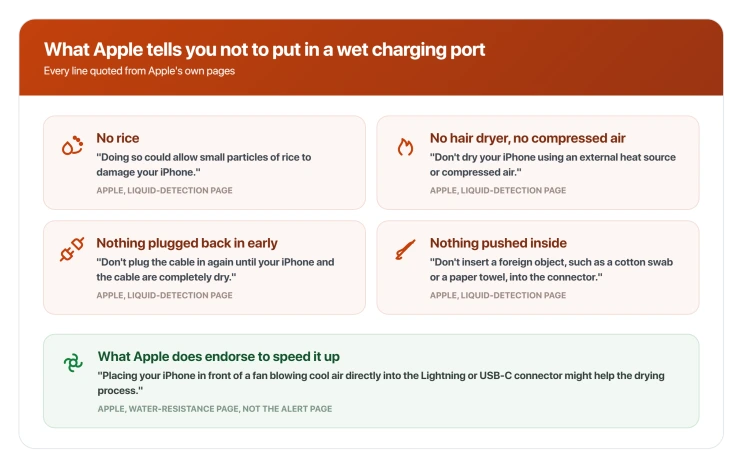
All of these are Apple's own instructions rather than ours:
- No rice. "Don't put your iPhone in a bag of rice. Doing so could allow small particles of rice to damage your iPhone."
- No heat and no compressed air. Both sit in one sentence: "Don't dry your iPhone using an external heat source or compressed air." One owner reported using a hair dryer and a vacuum on the port, and the warning stayed.
- Nothing inserted into the connector. "Don't insert a foreign object, such as a cotton swab or a paper towel, into the connector."
- Nothing plugged back in early. "Don't plug the cable in again until your iPhone and the cable are completely dry."
That last one needs a word, because our own guide to an iPhone that will not charge does tell you to lift packed lint out of a USB-C port with a wooden or plastic toothpick.
Both things are true, and the difference is which problem you have. Dry, packed pocket lint is a physical blockage and clearing it carefully is reasonable.
A port that is reporting liquid is the one case where going in makes it worse, because you push moisture under the pins and Apple's instruction is explicit.
Third-party water-eject apps came up repeatedly and one owner on an iPhone 17 Pro Max reported trying one in 2026 with the warning still appearing.
Ours: those apps play a tone through the speaker to push water out of the speaker mesh, and there is no path from that to the charging connector.
It has been days and it still will not clear
Apple has one more mechanical step that gets skipped: "If your phone has dried out but still isn't charging, unplug the cable from the adapter and unplug the adapter from the wall (if possible) and then connect them again."
Past that, Apple's page routes you to the two lines quoted earlier: a damaged accessory, or service. That is where the documented road runs out.
It does happen on current hardware.
Three separate Apple Community threads from 2026 describe iPhone 17 and iPhone 17 Pro Max owners on iOS 26 getting the warning with no liquid exposure, one of them a week in and unable to charge over USB-C at all.
None of those threads shows a resolution, so we cannot tell you how they ended.
One thing to rule out before you book anything: if the alert has actually stopped and the complaint now is speed rather than a refusal to charge, you are looking at a different message, and what sets off the Slow Charger warning is the page for that.
Status: iOS 26.6, and the alert page Apple sends you to still carries its October 2024 text. No release note from 26.0 to 26.6 mentions liquid detection.
Can you check the liquid indicator yourself?
Probably not, and whether you can comes down to something most people never check about their own model.
Apple's liquid damage page explains the Liquid Contact Indicator: "The indicator's color is normally white or silver, but when it contacts water or a liquid containing water, it will turn fully red." It sits inside the SIM tray cavity, so you reach it by ejecting the tray and looking in.
The recent models the table does list all carry an asterisk, and the footnote says that when the model "is sold in certain countries or regions, it supports eSIM only and doesn't have a SIM tray or an externally visible LCI".
It finishes the thought too: "In other countries or regions, this iPhone model has a SIM tray and an externally visible LCI."
So this turns on where your phone was sold rather than which model it is. The same iPhone has an indicator in one country and none in another.
On an eSIM-only iPhone there is no tray to eject and nothing to look at. iPhone Air, iPhone 17 Pro and iPhone 17 Pro Max are not listed in that table at all.
The indicator is also not the thing that raised your alert. Ours: it reads as a passive strip that changes colour, and nothing in Apple's description suggests it feeds the detection.
Apple presents it as something you look at, not something that fires.
How long does the Liquid Detected warning last?
Apple gives a range rather than a figure. Its newer pages say to allow at least five hours before charging over the cable, the alert itself says "this may take several hours", and the liquid-alert page says a stubborn one might need up to 24 hours. Retrying earlier does no harm, since the phone re-tests when you plug in.
Why does my iPhone say liquid detected when it is not wet?
Apple's documented answer is the cable or accessory rather than the phone, and it says a repeat offender means either a damaged accessory or a phone that needs service. Owners most often trace it to one specific cable or a third-party charger. Old corrosion in the port can also read the same way, which is our reading rather than Apple's.
Is Emergency Override safe to use?
Apple documents it for emergencies and documents corrosion as the consequence of charging a wet connector. Owner reports of ports failing afterwards describe the failure arriving hours later, not immediately. Treat it as a way to get one urgent thing done, and dry the phone properly afterwards.
Will Apple fix it under warranty?
Not for liquid damage. Apple: "Service for liquid damage to an iPhone or iPod isn't covered by the Apple One-Year Limited Warranty", though it adds that "you may have rights under consumer law". It also says that if you are unsure whether liquid is causing the problem, "even if you see a red LCI", contact Apple or an authorised provider anyway.
The Short Version
- Apple publishes two waits. The liquid-alert page says try again after 30 minutes, while the water-resistance page and the iOS 26 user guide both say allow at least five hours.
- Read 30 minutes as a retry, not a dry time. Apple's own words are "try charging", and the same paragraph escalates to up to 24 hours.
- The one way Apple endorses to speed the drying up is a fan blowing cool air into the connector, and it appears on the water-resistance page rather than the alert page.
- Apple's answer for a dry phone is the cable or accessory, and owners most often find one specific cable or a third-party charger is responsible.
- Wireless charging works while the port dries. The liquid-alert page asks only for a dry back, though the water-resistance page asks for a dry phone.
- Emergency Override exists and Apple describes reconnecting to reveal it. The documented cost is corroded pins, and the owner reports of ports dying describe it happening hours later.
- No rice, no heat, no compressed air, and nothing pushed into the connector, all of which Apple states outright.
- On an iPhone sold as eSIM-only in your country there is no SIM tray and no liquid indicator to inspect. The same model sold elsewhere has both, so that check depends on where you bought it.
Where to Next
Two waits are published and they are not the same, so use the one that matches what actually happened to the phone.
If it never got wet, the connector is the thing to look at rather than the clock.
A wet phone often stops responding to touch before anything else goes wrong. Why that happens, and what it does not mean.
A camera that stopped at the same time is worth checking separately. Apple's own list starts with what is touching the phone.
Either way, do not put anything in the port and do not use a hairdryer on it. If yours clears and comes straight back, tell me and we will look at why.

Isaac Smith is the founder and editor of PC Glance, a website that covers computers, laptops, and technology. He is a tech enthusiast and a computer geek who loves to share his insights and help his readers make smart choices when buying tech gadgets or laptops. He is always curious and updated about the latest tech trends.