
Your emergency contacts have been notified and you are trying to work out what they actually received. That is exactly the right question to ask first.
It was a text message. Not a phone call, not access to Find My, and not your Medical ID.
Let me tell you what was in it, and then deal with the screen you are looking at.
If your screen is stuck on that sentence
A lot of people arrive here because the phone is frozen on the message rather than because they want to know what was sent.
That is a different problem. Force restart the phone: press and quickly release volume up, press and quickly release volume down, then press and hold the side button until the Apple logo appears.
Both button presses need to be quick, which is the step people usually get wrong.
If the call itself is the live problem, what to do when an iPhone calls emergency services deals with the call and the triggers behind it.
What the message actually says
Apple describes the content and never prints the sentence. Its wording is "a message that says you have called emergency services. This message also includes your current location."
The literal text is not published by Apple. Two versions exist elsewhere, one from a 2021 screenshot and one from a forum post, they are not paraphrases of each other, and neither is tied to iOS 26.
So we are not going to print the exact words, because Apple has never published them for the version you are running.
What is documented is the follow-up. As your location changes, further messages go out, and Apple is specific that they travel "using the Messages app".
There is one string Apple does publish, and it belongs to the satellite path.
If you used Emergency SOS via satellite and a contact is on a non-Apple device, or on iOS earlier than 16.4, they receive: "You're receiving this message because someone you know chose you as an emergency contact and used Emergency SOS via satellite."
Were you asked first? Apple says both
Read this before you blame yourself for not cancelling in time.
Apple's Emergency SOS privacy page says it is your choice: "Once the call ends, you can choose to notify your emergency contacts with a message that says you have called emergency services."
Apple's Safety Features privacy page, carrying the same date, says the opposite: contacts "will automatically receive a message that says you have called emergency services, unless you cancel the message."
Ours: only one Apple page frames this as your choice. Four others say it sends unless you cancel, including two iOS 26 guide pages and the Personal Safety guide.
So that is almost certainly the real behaviour, and a reader who saw no prompt did not miss one.
Crash Detection is the clearer case, though the detail sits on the privacy page rather than the support article about Crash Detection itself.
There, your device "will start a 10-second countdown prior to sending a message to your emergency contacts", and you can cancel inside it.
How to stop the location updates
Apple's instruction here is one sentence, and it does not point at a settings page:
"When you use Emergency SOS on your iPhone, you can stop these updates by tapping the status bar on your iPhone and selecting Stop Sharing Emergency Location."
Stopping the updates stops the next one. Everything already sent stays in their Messages thread, and there is no way to take that back.
The status bar is the strip along the very top of the screen with the time and the battery, not a settings page.
Someone on an Apple Community thread asked outright what the status bar even was, so it is a fair thing to be unsure about.
Ours: Apple documents no Stop Sharing control anywhere in Settings, only this one.
Apple does not say how long the updates run for. Its only phrase is "a limited period of time", and it puts no number on that anywhere.
It does give one number nearby, and the two are easy to confuse: "When your location is being shared, you'll get a reminder to stop every four hours for 24 hours." Ours: read literally, that is how often you are nudged rather than how long the sharing lasts.
Apple states no duration in either direction, so treat it as a prompt rather than an expiry.
Do that first if the sharing is what is bothering you, because I would rather you stopped the updates than sat looking at the screen.
What your contacts cannot see
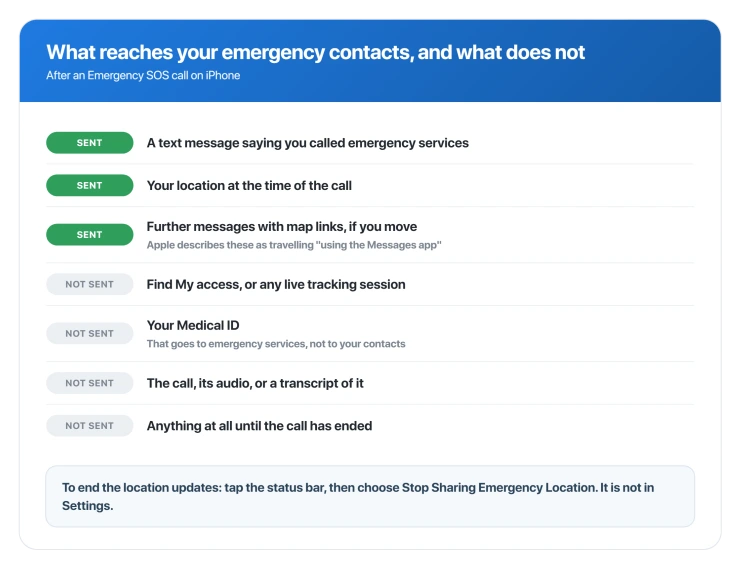
- Not Find My. Apple describes the updates as travelling through Messages. Your contacts are not given a live tracking session, only texts that happen to carry a map link.
- Not your Medical ID. Apple's Medical ID page says it can be shared automatically during an emergency call, and the recipient is emergency services. Apple gives the region two ways: United States and Canada on the Medical ID page and on the Safety Features privacy page, and United States only on its Personal Safety page. Two of the three say Canada is included.
- Not the call. They do not hear it or get a transcript. The single exception is Emergency SOS via satellite, where a contact on iMessage running iOS 16.4 or later can be shown the live transcript, and only if you choose that.
- Not in real time. The first message goes after the call ends, so a contact learns about it afterwards rather than while it is happening.
- Not a reply channel, on satellite. Apple: contacts "can't respond to the messages, other than replying 'YES' or 'NO' when necessary."
If nobody received anything
Apple documents two reasons, and states the first of them in three places.
Both privacy pages make the whole notification conditional on you not having uninstalled Messages, and the Crash Detection article goes further: "If you use Emergency SOS, your emergency contacts will not be automatically notified if the Messages app is not the selected text messaging app or is deleted."
Ours: iOS 26 lets you set a third-party app as your default for messaging.
If you did that, you have switched off emergency contact notification without being told, and nothing on the Emergency SOS settings screen mentions it. Worth checking if this matters to you.
The other documented case is simply signal. Apple's guide qualifies the whole feature with "provided that cellular service is available", and the satellite path exists precisely for when it is not.
The switch that stops the location going out
Understand what you are trading before you touch this, because it is a decision about a real emergency rather than tidying up after an awkward one.
Apple lists this same switch as a setup step for making sure your contacts do get your location. Turning it off is you deciding they should not, including on the night it matters.
There is also a limit on how far it reaches.
Apple documents an override for the case where Location Services is switched off altogether: "If Location Services is disabled, it will be temporarily enabled in order to notify your emergency contacts with your location." Ours: that sentence is about the global switch, not this one, and Apple says nothing about whether this specific toggle survives an emergency call.
So we cannot promise you it holds.
With that in view, the control is not on the Emergency SOS screen. Go to Settings > Privacy & Security > Location Services > System Services and turn off Emergency Calls & SOS.
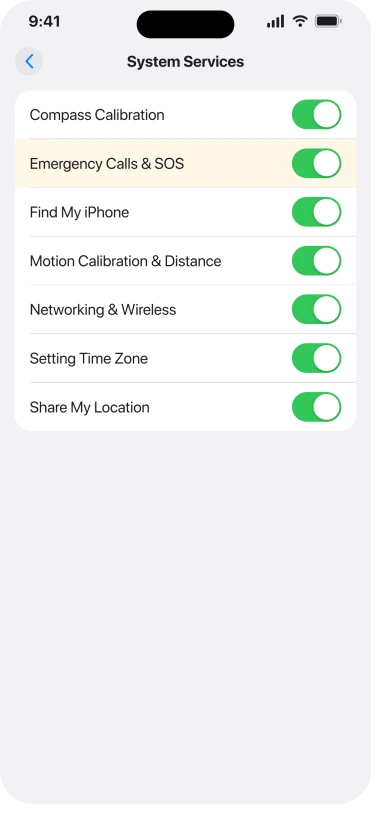
Note what it does not do. It is aimed at your location, not at the message. Nothing here stops your contacts being told you called.
Check who is actually on the list
Worth doing once, because most people set this up long ago or never.
Open the Health app, tap your picture at the top right, tap Medical ID, then Edit, and look under Emergency Contacts.
You can add people there, and Apple notes you cannot put emergency services on that list.
Apple attaches a sentence to this that is easy to skim past and worth a second: "it's important to make sure that the person or people assigned as emergency contacts are people you trust." These are the people who get told where you are.
If you use Check In, note that an active Check In contact is sent the same message. Our page on why Check In alerted someone covers that feature from the other side.
If you are the one who got the message
Plenty of people reading this are the contact rather than the phone owner, so this part is for you.
The phone sent that text, not the person. It goes out automatically after an emergency call ends, which means it does not tell you whether they are hurt, and it does not mean they chose to write to you.
If several arrive, that is their location changing as they move. It is one event being updated, not repeated emergencies.
You can reply in that thread like any other message, and it is worth doing, because they may not know it went out.
One exception: if the text came from a short code because they used Emergency SOS via satellite, do not reply STOP.
Apple's rule is that STOP or NO switches you off for "this or future emergencies", and only RESTART turns you back on.
If it was a false alarm
Apple publishes nothing about this. Its guidance for an accidental trigger is entirely about the call, and the instruction there is not to hang up.
Ours, and it is reasoning rather than an Apple instruction: the messages arrive in an ordinary Messages thread, so replying in that thread is the obvious way to tell people you are fine, and it costs nothing.
One genuine warning, from the satellite side.
A contact who replies STOP or NO to the shortcode stops receiving those notifications "for this or future emergencies", and only RESTART turns them back on.
Apple states the rule but never points out the consequence: an irritated contact who texts STOP after a false alarm has quietly opted out of your next real one.
Status: the two Apple privacy pages describing this still disagree with each other, and no iOS 26 release from 26.0 to 26.6 changed any of it.
Can my emergency contacts see my location afterwards?
For a while, yes, but as messages rather than tracking. Your phone keeps texting them updated locations as you move, for what Apple only calls a limited period. You can end it by tapping the status bar and choosing Stop Sharing Emergency Location.
Did my iPhone call my emergency contacts?
No. It calls emergency services and texts your contacts. People often report it as a call, but Apple only ever describes a message, and the notification arrives after the call has ended.
Can I cancel the message before it goes?
For Crash Detection, yes, inside a documented ten-second countdown. For a manual Emergency SOS, Apple says the message sends unless you cancel but never says where that control is or how long it lasts, so do not count on catching it.
Do my contacts get my Medical ID?
No. Medical ID goes to emergency services during the call. Two Apple pages say the United States and Canada. A third says the United States only. Your emergency contacts receive the location message either way.
The Short Version
- Your contacts got a text with your location, not a call, not Find My access, and not your Medical ID.
- Apple describes the message but has never published its exact wording, and the versions you may find elsewhere predate iOS 26.
- Two Apple privacy pages disagree about whether you are asked first. The iOS 26 guide says it sends unless you cancel.
- To end the location updates, tap the status bar and choose Stop Sharing Emergency Location. It is not in Settings, and it only stops the next one. What has already arrived cannot be pulled back.
- Our reading of Apple's "every four hours for 24 hours" is that it is a reminder cadence, not an expiry. Apple states no duration either way.
- If your contacts got nothing, check whether a third-party app is your default for messaging, which Apple documents as disabling this.
- You can switch off the location sharing for good in System Services, but it is a decision about a real emergency, and it does not stop the message itself.
Where to Next
What your contacts got was a text with your location. Not a call, not Find My, and not your Medical ID, and that is worth knowing before you start apologising for something bigger.
If the screen is still stuck on that sentence, deal with that first, then decide whether to change the trigger.
If your contacts describe getting something else entirely, please tell me, because that would be new to me.

Isaac Smith is the founder and editor of PC Glance, a website that covers computers, laptops, and technology. He is a tech enthusiast and a computer geek who loves to share his insights and help his readers make smart choices when buying tech gadgets or laptops. He is always curious and updated about the latest tech trends.