
Your calendar has filled up with invitations you never accepted, and everywhere you look somebody warns you that tapping Decline will only prove your address is real.
That warning is on no Apple page about invitations, subscriptions or junk reporting. It comes from the tech press in 2016 and has been repeated ever since.
So I would stop worrying about that. There is a better button anyway, and it is Apple's own route for an unknown sender: open the event and tap Report Junk, then Delete and Report Junk.
What Apple actually documents
Apple documents two things that travel back to whoever sent the invitation.
On its invitation page it says that "if you add comments to your response, your comments can be seen by the organizer but not by other attendees", and for a proposed new time that "the organizer will receive either a counter-proposal or an email with your suggestion".
Read those carefully, because they are about comments and about proposing a new time. Apple never says what a plain Decline on its own sends. That is the gap the popular advice is filling in.
The next step, that replying therefore brings more spam, is the bit nobody has measured. It is the ordinary email logic, that a response proves a live address, carried over to invitations.
It is plausible, it is the reasonable guess, and it is still an inference rather than a finding.
What Apple did do is give you a different button. Its removal page says that "if you want to report an event from an unknown contact, tap Report Junk, then tap Delete and Report Junk".
Apple never explains why it kept that apart from Accept, Maybe and Decline, but it aimed it squarely at an unknown sender.
Ours: a button for reporting a stranger is not a button for replying to one, though Apple does not say so outright.
So, to the question in the title: you do not need to decline, because there is a better button. Whether declining would actually have cost you anything, nobody can tell you.
First work out which of the two you have
This is the part that decides everything else. Apple separates the two in its own steps, under one heading for deleting an event and another for unsubscribing from a calendar, and never explains the difference in words.
Two different things get called calendar spam. An invitation is one event somebody sent to your address.
A subscribed calendar is a whole feed that got added to your phone, usually by a single tap on a link, and it pours in dozens of events that keep coming back.
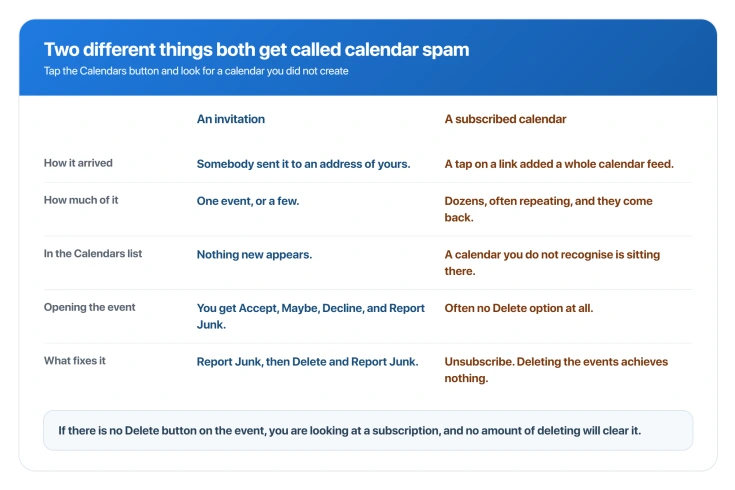
The test takes five seconds, and it is ours. Apple documents the Calendars button and it documents both kinds of spam, but it never offers this as the way to tell them apart.
Open Calendar, tap the Calendars button at the bottom, and look for a calendar you did not create.
If there is one, that is your problem and deleting events will not fix it. If the list looks normal, you are dealing with invitations.
There is one more tell, ours as well. If you open the event and there is no Delete option at all, that points at a subscription.
It is the position somebody is in when they hunt for a Delete button that was never going to be there.
If it is a subscribed calendar
Unsubscribing is the whole fix, and Apple gives you a version that also reports it.
Tap the Calendars button, tap the info button beside the calendar you do not recognise, then tap Unsubscribe.
A sheet comes up, and that is where the choice sits: Unsubscribe, or Unsubscribe and Report Junk.
Apple's note on the second option is worth reading before you choose: "When you tap Unsubscribe and Report Junk, the calendar is reported to Apple as a suspected junk subscription."
Deleting the events instead is the mistake to avoid. The events are not yours, they are drawn from the feed, and while the subscription stands they simply come back.
Our page on calendar events disappearing covers the same mechanism from the opposite direction, for anyone who unsubscribed and lost things they wanted.
If a calendar refuses to go, Apple offers hiding as a fallback: "If a calendar can't be removed (for example, the US Holidays calendar), you can hide it instead." That stops it being drawn.
It does not stop anything arriving.
If it is an invitation
Open the event and use Report Junk, then Delete and Report Junk, which is the route on Apple's removal page.
One thing we could not settle. Apple documents that button on the iPhone, on a page it published in April 2026.
One reader on iOS 26 has reported the option missing from an invitation and says it was there on the previous version. We could not corroborate that, and we could not disprove it.
So if Report Junk is not there, you have another route, with one condition attached.
Apple documents the same action at iCloud.com, where opening the event and choosing Report Junk deletes it "from your calendar on all your devices where you're signed in to the same Apple Account".
Be careful what you expect from reporting, though.
Apple documents what reporting does and nothing beyond it: the event or the calendar goes, and Apple is told it was junk.
Apple never says reporting blocks the sender or stops future invitations.
The setting that actually prevents it, and you can do it on the phone
This is the part most people get wrong, because they believe it needs a computer.
You can change how invitations reach you, so they arrive as an email rather than dropping straight into your calendar. In Mail you can ignore, delete or filter them like anything else.
Go to Settings, tap your name, tap iCloud, tap Show All, tap iCloud Calendar, tap Send & Receive, then set Receiving to Email.
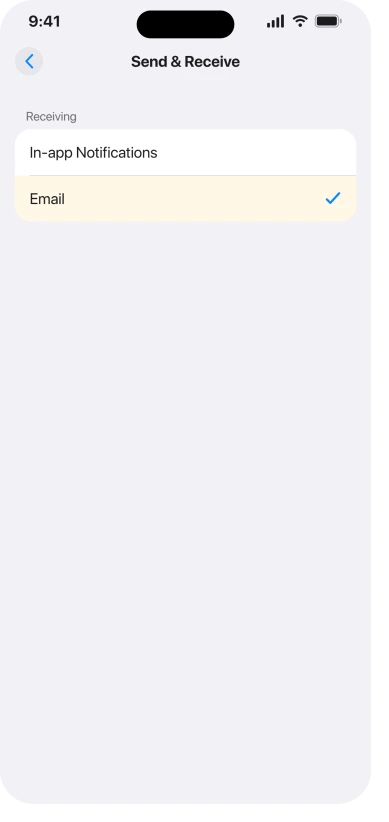
Apple states the requirement plainly: "To set up these options for iCloud Calendar, you can use an iPhone or iPad with iOS 17, iPadOS 17, or later, or you can set up on iCloud.com."
You do not need a computer. Ours, and it fits: the belief looks like a misreading of a sentence on Apple's other calendar page, the iCloud.com one, which carries the note "You need to be on a tablet or computer to use Calendar on iCloud.com."
That is about the website, not about the setting.
Apple also says the change follows you.
On the iPhone page: "The settings you choose on your iPhone or iPad or on iCloud.com apply to all devices where you've signed in to to your Apple Account and turned on iCloud for Calendar, including your Mac." The doubled word is Apple's.
Two limits, ours rather than Apple's. It changes where invitations land, so it does not stop anyone sending you one.
And it lives under iCloud Calendar, so a Google or Exchange calendar on the same phone is untouched.
Does this mean your phone was hacked?
No, and it is worth saying plainly because it is the real question underneath.
An unwanted invitation means somebody has an email address of yours.
A spam calendar means a subscription got added, and Apple describes that as something you "might have unintentionally subscribed to", which in practice means one tap on a link.
Neither requires a compromised phone or a compromised account.
Two different things are in play, though, and only one of them is safe. Apple files these events under phishing and social engineering, alongside fake prize offers.
So your phone is not the thing at risk. The link inside the event is, and getting you to tap it is the entire reason it was sent.
If unwanted contact is the wider worry, our page on blocked numbers that still get through covers the messaging side.
Status: current as of iOS 26.6. No iOS 26 release from 26.0 to 26.6 changed anything about calendar invitations or junk reporting, and Apple's removal page was last published in April 2026.
What does not work
- Deleting the events, when it is a subscription. They repopulate from the feed. Unsubscribe instead.
- Hiding the calendar as a fix. Apple offers it only when removal is impossible. It stops the display, not the delivery.
- Turning off Calendar notifications. It silences the symptom, leaves the subscription running, and costs you the reminders you actually wanted.
- Expecting Report Junk to block the sender. Apple documents reporting and deleting. It documents no blocking.
Will declining a spam invite tell the sender I am there?
Apple only documents what goes back when you add a comment or propose a new time, never what a plain Decline sends. Whether that brings more spam is an assumption the tech press has repeated since 2016 and nobody has measured. You can sidestep the question entirely by using Report Junk, which is Apple's own route for an unknown sender.
Why can I not delete a spam calendar event?
Because it is not an invitation, it is a subscribed calendar, and individual events in a feed are not yours to delete. Tap the Calendars button, find the calendar you do not recognise, tap the Info button beside it, and unsubscribe.
How did a calendar get added without me agreeing?
Apple documents that tapping a link to a calendar file subscribes you to it, with no password and no confirmation step described. That is the whole trick, and it is why Apple describes people as having "unintentionally subscribed".
Can I stop invitations arriving at all?
Not entirely. You can change where they land, from your calendar to your email, which is the setting above. Anyone who has your address can still send one, but it stops landing in your schedule.
The Short Version
- No Apple page we read warns against tapping Decline, but there is no reason to use it either. Report Junk is Apple's own button for an unknown sender, which is a different thing from replying to one.
- Apple's own answer is Report Junk, which is a separate button from the three reply options and does not send a reply.
- Work out which problem you have first: tap the Calendars button and look for a calendar you did not create.
- A subscription needs Unsubscribe, and Apple offers Unsubscribe and Report Junk. Deleting its events achieves nothing.
- If Report Junk is missing from an invitation, Apple documents the same action at iCloud.com.
- The real prevention is Settings, your name, iCloud, Show All, iCloud Calendar, Send & Receive, Receiving, Email. Apple has allowed this on the phone since iOS 17.
- None of this means your phone was compromised, but the links inside those events are still phishing.
Where to Next
The short version is that I would not spend any more time worrying about Decline. Nothing on Apple's own pages supports the warning, and there is a better button sitting right there.
Report Junk removes the event, tells Apple where it came from, and does not write back to the sender.
Then take the ten seconds to check your subscribed calendars, because that is usually where the invitations are getting in. If yours keep arriving after that, tell me below and we will look at where they are coming from.

Isaac Smith is the founder and editor of PC Glance, a website that covers computers, laptops, and technology. He is a tech enthusiast and a computer geek who loves to share his insights and help his readers make smart choices when buying tech gadgets or laptops. He is always curious and updated about the latest tech trends.