
Your calendar events have disappeared, and on iOS 26 the amount that has gone is the fastest clue you have.
One entry missing and a whole year missing come from completely different places, so it is worth counting before you panic.
And before you count, check the days either side, because there is a setting that shifts events rather than deleting them.
One whole calendar gone at once
If every event of one color vanished and the rest are fine, nothing was deleted. That calendar is switched off.
It is the same button you already tapped.
On its multiple calendars page, Apple says to tap the Calendars button at the bottom, then "Select the calendars you want to view".
An unselected calendar keeps every event and shows you none of them.
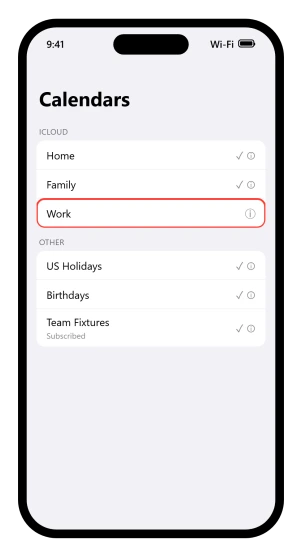
Two entries there are built in.
US Holidays and Birthdays come from Apple rather than from anything you typed, and Birthdays has a quirk to know before you go hunting: because the iCloud Birthdays calendar updates daily, Apple says changes to birthdays "might not appear in the Calendars app until the next day".
Colors can mislead you too. You set one by tapping the Info button beside a calendar, but for some accounts, Google among them, "the color is set by the server".
So two calendars that look identical may be two separate ones from two separate accounts.
Subscribed calendars are the other half of this.
A subscribed calendar is read-only and comes off in a few taps: tap the Calendars button, tap the Info button, tap Unsubscribe, then confirm with Unsubscribe or Unsubscribe and Report Junk.
That second option reports the calendar to Apple as suspected junk.
One event gone, everything else fine
You typed it on the train, you remember hitting Add, and the day you made it for is empty.
New events land wherever your default calendar points.
From Apple's Calendar settings page: choose a default calendar and "any new events you create are added to that calendar automatically".
If that default belongs to a work account you have since hidden, everything you create vanishes the moment you save it.
Check it at Settings > Apps > Calendar > Default Calendar. To move something that already went astray, tap the event, tap Calendar, then pick the one you want.
There is a second place a single event hides, and the fix is on the screen you have already opened. If you declined the invitation, the event is still there and simply not drawn.
Apple: "To see events you declined, tap the Calendars button at the bottom of the screen, then turn on Show Declined Events."
Open the day before and the day after
Some events did not disappear. They moved, and the setting that moves them exists to help people working across time zones.
Apple's starting point, on its time zone page, is that "events appear according to the time zone of your current location".
Settings > Apps > Calendar > Time Zone Override pins the whole calendar to one place instead, so a phone set to a colleague's city shows times that are correct and unexpected.
An evening event shifted by hours crosses midnight and lands on the day either side. Turn the override off in the same place and everything returns to your local clock.
Apple prints one limit on it: "Time Zone Override only changes the time zone shown in the Calendar app."
There is a tell for this one. Apple says events created before you turned the override on "appear in the new time zone, but also show the original time zone used when they were created".
An event carrying two time zones has told you exactly what happened.
Everything before a certain date, nothing after
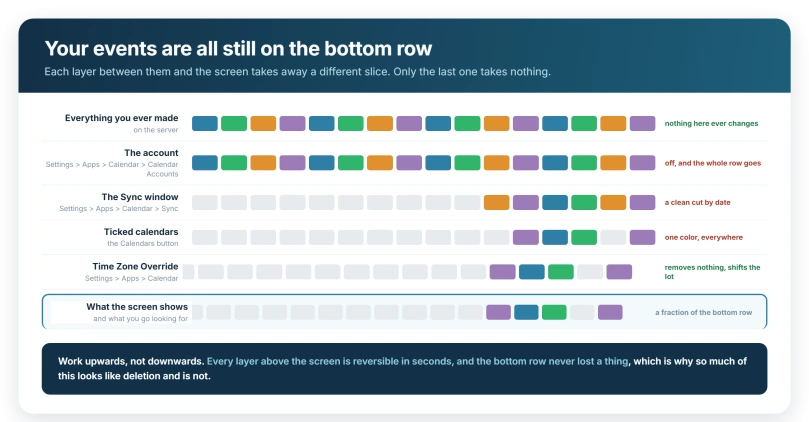
Last month is intact, last year is gone, and the cut is suspiciously clean. That is a sync window rather than a deletion.
Settings > Apps > Calendar > Sync decides how far back the phone bothers to keep events, from Events 2 Weeks Back up to All Events, with one, three and six month steps in between.
Apple's iCloud sync article sends you there and then says something most advice misses, because it treats the setting as a way to kick the sync rather than a dial to widen:
"If All Events is selected, choose a specific timeframe instead, like Events 1 Month Back. If a specific timeframe is selected, choose All Events instead."
So move it whichever way it is not currently set. Apple's next steps matter as much: go back to the Home Screen, "wait a few minutes, then open the Calendar app. Tap the Calendars tab, and swipe down to refresh."
Nothing here deletes anything on the server. Narrowing the window does take events off the phone, which is exactly why widening it brings them back.
Nothing at all, in any calendar
If every event has gone, look at the account rather than the app.
Go to Settings > Apps > Calendar > Calendar Accounts and check the account is still listed and still switched on.
Apple documents iCloud, Microsoft Exchange, Google and Yahoo here, plus CalDAV for anything else, and a calendar that lived on one of those goes quiet the moment the account does.
When the missing schedule belongs to Microsoft, check the Outlook calendar connection for account-type and app-specific repair steps.
Work accounts can fail without saying so, and the row stays in the list looking healthy. If an employer manages the account, that is a conversation with them rather than a setting here.
A second row on that screen explains a lot of calendars that never update. Tap Fetch New Data, and under Fetch, choose a schedule.
Apple's condition on the one most phones are already using: "If you choose Automatically, new data is downloaded when your iPhone is charging and connected to Wi-Fi."
That does a lot of quiet work. A phone that has not been charging on Wi-Fi has not fetched anything, which is why a work calendar sits frozen all day and catches up overnight.
Pick Every 15 Minutes or Hourly and the charging condition goes away.
Our guide to iPad Mail not updating works through that screen, and note that Fetch New Data is shared by Mail, Contacts and Calendar, so what you set for mail applies here.
A Focus can hide calendars on a schedule
If the events come back at six o'clock, nothing is broken. A Focus can carry a filter that limits Calendar while it runs.
Apple: "you can add app filters that determine what information apps will show during the Focus. For example, you can choose which mail account or which calendar to use during the Focus." Check Settings > Focus, tap the Focus you actually use, then look under Focus filters.
One detail explains why this looks phone-specific: Focus filters "don't get synced across devices" when Share Across Devices is on, so the same account behaves differently on an iPad beside you.
What actually removes events
Most of this page is about events you cannot see. Three things take them away for real.
Deleting a calendar takes its events with it, and the route is short enough to reach by accident: tap the Calendars button, tap the Info button beside the calendar, then Delete Calendar at the bottom of the list.
Unsubscribing removes everything that came from a subscribed calendar, though re-subscribing with the same address brings the lot back, because that data was never yours.
The third is somebody else.
Apple, on shared calendars: "When you share a calendar, others can see it, and you can let them add or change events." If the calendar that emptied is one you share with editing turned on, nothing on your phone caused it.
If events really were deleted, Apple keeps archived copies.
On a computer or tablet, sign in at iCloud.com, open the settings control, choose Data Recovery, then Restore Calendars, and pick a version by date.
One warning: restoring removes all sharing information, so shared calendars must be shared again.
If none of this is your phone
Two checks are left, and neither is a setting from the sections so far.
Open Settings > your name > iCloud > See All and confirm Calendars is switched on. Apple lists that among the first things to check when calendars will not sync, and it is easy to knock off during a sign-out.
Then go and look somewhere else entirely. Sign in at iCloud.com, or open Calendar on an iPad or a Mac. If the events are there, nothing was deleted and the fault is on this phone.
If they are gone there too, they left the account, and a shared calendar or another device is where that happened.
Before you assume the update did it
You updated on Tuesday night and opened Calendar on Wednesday morning to a blank week.
An update restarts the phone, which is when a calendar account gets its chance to fail a sign-in quietly. The events did not go anywhere. The connection that draws them stopped, and the timing made it look causal.
Our guide to an iPhone that keeps asking you to sign in draws the line for the account side: "being asked for your password once after an update, a password change, or a new sign-in is completely normal. It is the endless reappearance after correct entry that is the bug."
One more thing that is not a disappearance at all. If the events are visible but the alerts never arrive, that is notifications.
Each calendar has its own Event Alerts switch behind the Info button, and the app-wide controls are at Settings > Notifications > Calendar.
Our guide to reminders that never alert names the trap that catches Calendar the same way: "Scheduled Summary collects notifications from apps you choose and delivers them in batches at times you set."
Status: current for iOS 26.6. Apple documents calendar visibility, the default calendar, subscriptions, Time Zone Override, Fetch and the Sync window, that last one on its sync article.
Why did my iPhone calendar events disappear?
Start with how much is gone. One event usually went to a different default calendar. A whole color missing means that calendar is unticked in the Calendar app. Everything before a date is the Sync window at Settings, Apps, Calendar. Everything at once points at the account. And check the days either side, because a time zone setting moves events rather than removing them.
How do I get old calendar events back on iPhone?
Go to Settings, tap Apps, tap Calendar, then tap Sync. Apple says to move it whichever way it is not set: if All Events is chosen, pick a timeframe, and if a timeframe is chosen, pick All Events. Then wait a few minutes, open Calendar, and swipe down on the Calendars tab to refresh.
Why did my calendar events disappear after an iOS update?
Usually the update did not remove them. Restarting gives a calendar account a chance to fail its sign-in quietly. Check Settings, Apps, Calendar, Calendar Accounts to confirm the account is still there and switched on, then confirm Calendars is on at Settings, your name, iCloud, See All.
Where do new iPhone calendar events go?
Into whichever calendar is set as your default, which receives new events automatically. Check it at Settings, Apps, Calendar, Default Calendar. If that default belongs to an account you have hidden in the Calendar app, everything you create will vanish the moment you save it, even though nothing has been deleted.
The Short Version
- Check the days either side before you count anything, because a time zone setting moves events without deleting one.
- A calendar with no checkmark hides every event on it. Tap the Calendars button in the Calendar app.
- One event usually went into the Default Calendar, at Settings > Apps > Calendar.
- Everything before a date is the Sync window. Apple says to move it whichever way it is not set, then swipe down to refresh.
- Everything at once points at Calendar Accounts, and at Calendars under Settings > your name > iCloud.
- Fetch set to Automatically only downloads while charging on Wi-Fi, and it is one setting shared with Mail.
- Birthdays update daily, so a change can take until the next day to show.
- Deleting a calendar, unsubscribing, or a collaborator with editing rights are the three things that actually remove events.
Where to Next
Count before you conclude anything, and check the days either side while you are there. A time zone setting moves events rather than deleting them, and moved looks exactly like missing.
One entry gone and a whole year gone come from completely different places.
If the gaps are public holidays from late 2026 onward and your calendar comes from Outlook, the missing 2027 holidays page covers that cause.
Notes vanish for reasons of their own, and the account is usually the clue. iPhone notes disappeared sorts it by where they were stored.
Tell me in the comments how much disappeared and whether the days around it look shifted, and I will point you at the right half of this page.

Isaac Smith is the founder and editor of PC Glance, a website that covers computers, laptops, and technology. He is a tech enthusiast and a computer geek who loves to share his insights and help his readers make smart choices when buying tech gadgets or laptops. He is always curious and updated about the latest tech trends.