
Your notes have gone, and if any of them were the only copy of something, that is a horrible thing to open your phone to. Do not start restoring backups yet.
Open Notes and tap back until you reach the Folders list. One question splits this in two: is a whole heading missing, or are notes missing from inside a folder that is still sitting there?
A missing heading means an account got switched off. Your notes still exist, and I can get you to them in about a minute.
If a whole heading is gone
You are looking for iCloud, On My iPhone, or a Gmail or Outlook group that used to be in that list and is not now.
Apple states the consequence plainly on its Notes accounts page: "When you remove or delete an account, the notes in that account no longer appear on your iPhone. The notes remain in your internet account (for example, iCloud.com or Google) and any other devices you had already set up."
Read that twice if you are panicking. Apple is saying the notes are still there.
The iCloud heading
Go to Settings, tap your name, tap iCloud, tap See All or Show All, tap Notes, then turn on Sync this iPhone.
Two Apple pages disagree about that route and it is worth knowing which to trust. Apple's iPhone guide says only "Tap your name, then tap iCloud. Turn on Notes", which describes a switch that is not what you tap any more.
Its iCloud guide gives the fuller route with See All and Sync this iPhone, and hedges the button name itself as "See All (or Show All)". Follow the iCloud guide.
Anyone following the shorter one taps iCloud, finds no Notes switch, and concludes their phone is broken.
Apple's cleanest statement of this cause: "If you're not signed in to your Apple Account on a device, or the device has the Notes feature turned off, you won't be able to access your iCloud notes on the device."
The check that confirms it: open iCloud.com on a computer and look. If the notes are sitting there, nothing was lost and the phone simply stopped showing you that account.
The On My iPhone heading
If your notes vanished after an update, this is the account to check, and it is the one Apple's own missing-notes page never mentions.
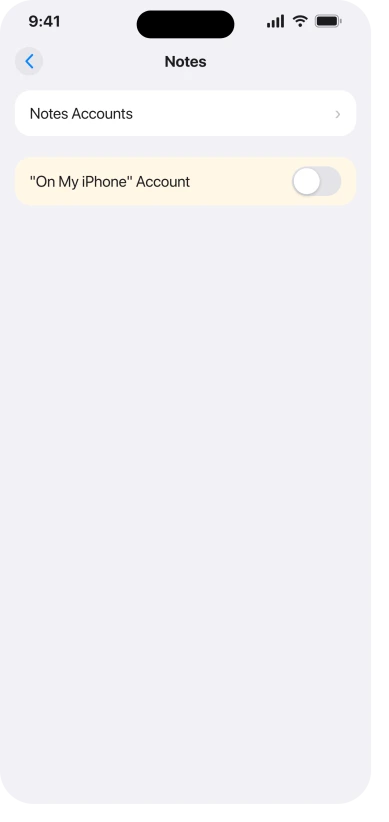
Go to Settings, tap Apps, tap Notes, then turn on the "On My iPhone" Account.
Apple describes what lives there in one sentence: "Notes in this account appear only on your iPhone, and they're included in your iPhone backups to iCloud."
Both halves matter. These notes never sync, so checking iCloud.com proves nothing about them, and a reader who checks the web and sees nothing can wrongly conclude they are gone forever.
They are in your device backups though, which matters later.
One owner posted exactly this in October 2025: "After downloading an iOS update a week or two ago I lost all of the iPhone Notes from 'On My iPhone'. My iCloud notes and Gmail notes are still showing. I've tried all of the recommended fixes but none are for 'On My iPhone'."
That last sentence is the whole problem with this topic in one line.
A Gmail, Outlook or Exchange heading
Go to Settings, tap Apps, tap Notes, tap Notes Accounts, tap the account, and make sure Notes is on.
That route is worth trusting, because Apple prints the same path on two separate current pages, its missing-notes article and its iOS 26 user guide.
It is the same Settings and Apps reorganisation that moved a lot of per-app settings out of their old homes.
If every heading is present and switched on
Then this branch is not yours, and there are three things worth doing before you move on.
Search from the Folders list rather than inside one folder, and make sure All Accounts is selected, because searching one account while the note sits in another produces exactly this.
Open the same account on a second device or at iCloud.com, which tells you whether the note exists anywhere.
And check the Attachments view and any pinned notes, since a note that was moved rather than deleted is still somewhere.
If all of that comes back empty, the note was probably deleted, and the rest of this page is about that.
If the heading is there but notes are missing from it
Now it is worth looking at Recently Deleted, and there is a shortcut that saves most people the trip.
Apple's missing notes page says the folder "only appears if you have recently deleted notes", and it repeats the point on its iCloud page: "If you don't see Recently Deleted, you don't have any notes in that folder, and there's nothing to be recovered."
So no Recently Deleted folder means nothing was deleted in the last 30 days. Stop looking down that road and go back to the account checks.
If the folder is there, open Notes, tap back to Folders, tap Recently Deleted, and search. To get a note out, Apple's steps are: "In the Notes list, tap Edit. Select the note that you want to move. Tap Move, then select the folder you want to move it to."
Two things people miss here. Search only matches the title of a locked note, so Apple warns "you might need to check all of your locked notes to find the specific note that you're looking for".
And when you search, make sure All Accounts is selected, or you are searching one account while the note sits in another.
If search finds nothing at all since iOS 27, even for notes you can see, that is a bug of its own, and the Notes search page has the workaround.
For a Gmail or Outlook note, Recently Deleted is not where it went.
Apple sends you to "the Trash folder of that account in the Mail app", and warns the recovery is manual: "you need to copy and paste the note to a new note in the Notes app."
What is genuinely gone, said straight
Thirty days, and then it is over. Apple: "You can recover and edit notes you deleted in the last 30 days on iCloud.com or on devices where you're signed in to the same Apple Account. However, you can't recover notes you permanently removed."
Do not expect iCloud.com to be a second chance. It is the same folder seen from a browser, on the same clock, and Apple says a permanent delete "is removed immediately from all your devices".
The same thirty-day clock runs on photos that will not delete, with one exception worth knowing if your iCloud storage is full.
Past that, Apple documents no recovery route anywhere. Not on its missing-notes page, which never mentions backups at all, not in the iPhone guide, and not in the iCloud guide.
What is left is a device backup made before the loss, and for an On My iPhone note that backup is the only copy that has ever existed.
So find out whether you have one before you decide anything.
Settings, your name, iCloud, then Backup shows the date of the last one, and a computer backup is listed in the Finder or the Apple Devices app.
If the last backup is newer than the loss it does not help, and restoring it replaces everything on the phone as it is now.
Ours: if you think a good backup exists, stop the phone quietly overwriting it while you make up your mind. Turning off automatic iCloud backup on that screen buys you the time to decide.
Status: Apple republished its missing-notes page on 12 May 2026 and it still omits both account causes. Notes appears once in the whole iOS 26 changelog, as a Markdown feature.
Four things not to do first
- Restoring a backup as a first move. It replaces what is on the phone now, and every free check on this page costs you nothing and takes seconds.
- Checking iCloud.com to rule things out. It only ever shows iCloud notes. It says nothing about On My iPhone or a Gmail account.
- Treating a missing Recently Deleted folder as proof of loss. Apple says on three separate pages that an absent folder means there is nothing in it to recover.
- Recovery tools, for the account causes. If the account is switched off, the notes were never deleted, so there is nothing for a scanner to find.
Why did my notes disappear after an update?
Usually because an account stopped being shown rather than because anything was deleted. An update is when people notice, since a toggle that was already off becomes visible the moment the folder list changes. Ours: we cannot tell you how common each cause is, only that Apple's own page omits two of them, so a reader who has done everything published has not done these. Check the Folders list for a missing heading first.
Where did my On My iPhone notes go?
Check Settings, Apps, Notes, and whether the "On My iPhone" Account is switched on. Those notes only ever existed on the phone, so they never appear on iCloud.com, and their absence from the web is not evidence they are lost.
Can I get notes back after 30 days?
Apple documents no way. Its own wording is that you cannot recover notes you permanently removed, and its missing-notes page offers no backup route. A device backup from before the loss is the only remaining possibility.
The Short Version
- Open the Folders list first. A missing heading is an account switched off, which is free to fix and means nothing was lost.
- Apple's own words: notes in a removed account "remain in your internet account… and any other devices you had already set up".
- iCloud notes: Settings, your name, iCloud, See All, Notes, Sync this iPhone. Apple's shorter published route is out of date.
- On My iPhone notes: Settings, Apps, Notes, and switch that account on. They never sync, so iCloud.com cannot tell you anything about them.
- Third-party accounts: Settings, Apps, Notes, Notes Accounts, and check Notes is on for that account.
- No Recently Deleted folder means there is nothing in it to recover. Apple states that on three separate pages.
- Search only matches the title of a locked note, and only searches the account you have selected.
- After 30 days Apple documents no recovery at all, and for an On My iPhone note a pre-loss backup is the only copy that ever existed.
Where to Next
If you have already toggled iCloud sync and already checked iCloud.com, you have not run out of options. You have run out of the two checks that cannot see an On My iPhone account.
Go back to the Folders list and read the headings rather than the notes.
It takes ten seconds and it is the one place those two checks cannot reach. If your heading is there and the notes inside it are not, say so below and I will point you at the right half of this page.

Isaac Smith is the founder and editor of PC Glance, a website that covers computers, laptops, and technology. He is a tech enthusiast and a computer geek who loves to share his insights and help his readers make smart choices when buying tech gadgets or laptops. He is always curious and updated about the latest tech trends.