
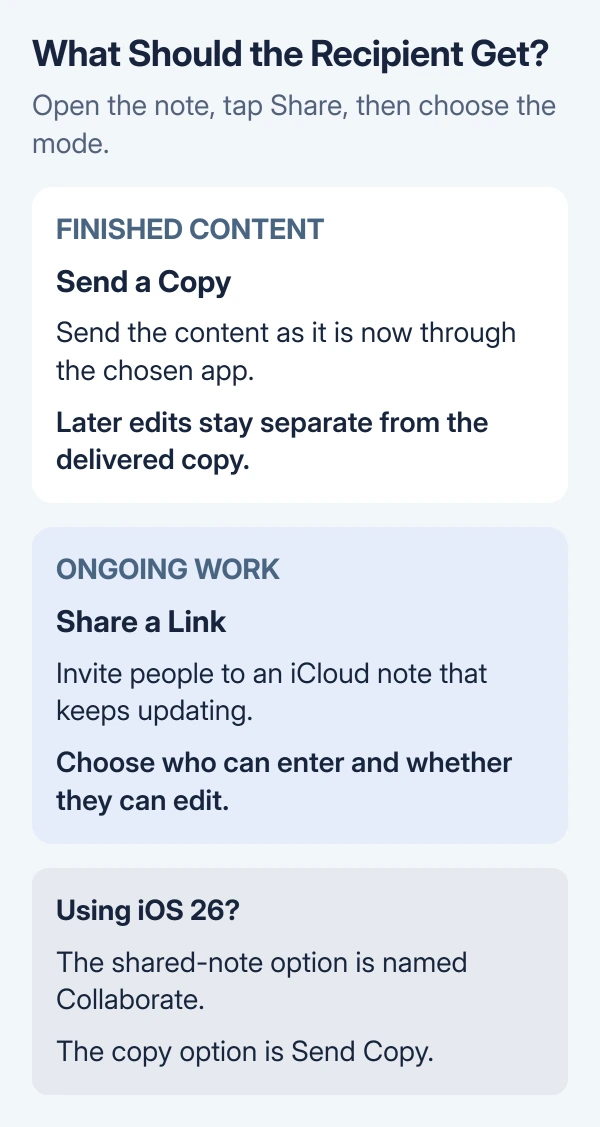
To share notes on iPhone, open the note and tap Share. In iOS 27, choose Send a Copy for a separate copy or Share a Link for a note that people can work on together. On iOS 26, the collaboration option is called Collaborate.
Choose the result first. A copy suits a finished list or message. A shared iCloud note suits a plan that several people need to update, with access and editing permissions set by its owner.
Start with the note and the right sharing mode
Open Notes, then open the note you intend to send. Check its contents and attachments before sharing. For collaboration, use a note in the iCloud section of the Folders list.
Apple's Notes sharing guide distinguishes sending a copy from sharing an updating note. The menu directly under the note title controls that choice.
Status: Apple's iOS 27 and iOS 26 sharing instructions checked October 29, 2026. Menu names differ by version. No note was shared or account changed during preparation.
For a separate copy, tap Share, open the menu under the title, then select Send a Copy. Choose the delivery app and recipient, review what will be sent, and send it.
On iOS 26, tap Collaborate in the share sheet to reveal Send Copy. The recipient gets the content sent at that time; later work on the original is not a shared editing session.
Invite someone to an iCloud note
Each participant needs an Apple Account with iCloud Notes enabled. Apple's iCloud setup instructions give the account controls.
Open Settings > your name > iCloud > Notes. Use See All or Show All first if Notes is not displayed. Turn on Sync this iPhone, then return to Notes and open the intended iCloud note.
For iOS 27:
- Tap Share, open the menu under the title, then choose Share a Link.
- Tap People you choose can edit to review access.
- Choose People you choose or Anyone with the link. The first option also offers Access Requests.
- Choose Edit or View and Download Only for the permissions.
- Send the invitation using the desired delivery option.
Use People you choose for a private plan. Anyone with the link allows broader access, so select it only when that is intended. View and Download Only allows reading and downloading without editing the shared note.
Apple says the first participant joins automatically in iOS 27. Additional people need access approval or an invitation through Collaborate > Manage Shared Note > Add Participant.
A delivered link alone does not mean every recipient has joined. Check the participant list if someone cannot open it.
Use the older labels on iOS 26
Open the iCloud note, tap Share, then choose Collaborate. Tap Only invited people can edit or Only participants can make changes to review access and permissions.
Apple's iOS 26 guide names the editing choices Can make changes and View only. It also lets editors invite others when that permission is enabled.
Send the invitation through Messages or Mail. Apple documents that AirDrop does not support collaboration in this version. Send a copy instead when the recipient only needs the content.
For iOS 26 collaboration, Apple also requires the recipient to use an Apple device with their Apple Account signed in. A copy sent by email or message is the alternative when that requirement is not met.
Check the account and lock when sharing is unavailable
Open All iCloud in Notes to locate the note. If it is missing, check the account holding your notes before making a replacement.
For a note stored elsewhere, touch and hold it in the notes list, choose Move, then choose a folder under iCloud. Apple's folder guide documents that move control.
A locked note cannot be used for collaboration. To remove its lock, open it, tap View Note, authenticate, then tap More > Remove. Only do this when the content should be available without that lock.
Apple states in its lock instructions that removal reaches other devices using that Apple Account. Merely opening a locked note for viewing is different from removing its protection.
A folder containing locked notes also cannot be shared for collaboration. Share an individual unlocked note when the remaining folder contents should stay private.
If the note opens from its folder but its words never appear in search results, use the separate Notes search checks. Search failure does not establish that the note is absent.
Resolve access requests and end sharing when finished
For a pending iOS 27 request, the owner opens the note and taps Collaborate to review requests. Apple's collaboration help also advises checking device updates and iCloud settings on both sides.
The owner can open Collaborate > Manage Shared Note to manage participants. Choose Stop Sharing to end access for the group. Apple warns that this removes the shared note from the other participants' devices.
If access still fails after the owner checks the invitation, contact Apple Support with both iOS versions and the exact message. Send a separate copy only when live collaboration is unnecessary.
The Short Version
Choose Send a Copy for content that travels separately. Choose Share a Link on iOS 27, or Collaborate on iOS 26, for an updating iCloud note. Check permissions, account location and lock status when an invitation does not work.

Isaac Smith is the founder and editor of PC Glance, a website that covers computers, laptops, and technology. He is a tech enthusiast and a computer geek who loves to share his insights and help his readers make smart choices when buying tech gadgets or laptops. He is always curious and updated about the latest tech trends.