Microsoft's holiday calendars for Outlook are missing many 2027 dates, and they still aren't fixed. The known issue page has listed only a workaround since September 4, 2026, and classic Outlook's own holiday list stops at 2026.
To get 2027 holidays now, subscribe to a holiday calendar from another source. The UK government publishes bank holiday calendars, and Google publishes holiday calendars for the US, Canada and Australia.
Their addresses are in step 3, each tested on November 8, 2026, with the paste-in steps for every Outlook after them.
In this guide
What Microsoft says is missing
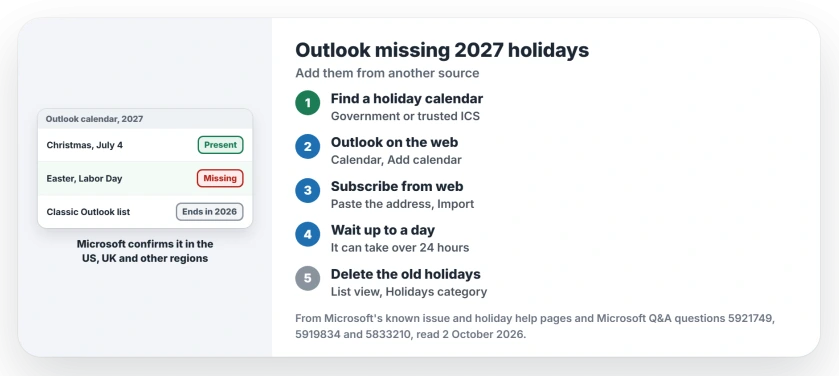
Microsoft's known issue page describes holiday calendars that stop partway through 2026, hold 2026 but nothing for 2027, or have single holidays missing or on the wrong date.
It hits the web version, the new Outlook app and classic Outlook alike. The countries named are Austria, China, Denmark, Germany, Hong Kong SAR, India, Israel, Japan, Malaysia, Poland, Singapore, Slovakia, Sweden, the UK and the US.
Canada and Australia aren't on that list, though the page adds that other regions may be affected too.
Its status line reads "STATUS: WORKAROUND". For holidays Outlook doesn't carry, it points to calendars your organization keeps, third-party calendar subscriptions and official government calendars.
On November 8, 2026 the page still showed September 4 as its last update, with no fix date.
1. Check a holiday that moves, not a fixed one
Fixed-date holidays mostly survive, and the ones that move each year go first. On Outlook.com, one owner found Labor Day 2027 missing while July 4 was still there.
A business IT owner lost every holiday tied to Easter, and another owner's Jewish holidays stopped in December 2026. So look at Easter Monday, Labor Day or Thanksgiving 2027 before you decide your calendar is fine.
2. Classic Outlook's own list ends in 2026
Classic Outlook has a second, older limit. Its Add Holidays button, under File > Options > Calendar, uses a built-in list that Microsoft's holiday help page says covers the years 2016 to 2026.
So that button can't give you 2027 at all, and running it again only adds a second copy of every holiday you already have.
3. Copy a holiday calendar address that has 2027
These addresses all opened and carried 2027 dates when I tested them on November 8, 2026. Copy the one for your country:
- England and Wales bank holidays (UK government):
https://www.gov.uk/bank-holidays/england-and-wales.ics - Scotland bank holidays (UK government):
https://www.gov.uk/bank-holidays/scotland.ics - Northern Ireland bank holidays (UK government):
https://www.gov.uk/bank-holidays/northern-ireland.ics - United States holidays (Google):
https://calendar.google.com/calendar/ical/en.usa%23holiday%40group.v.calendar.google.com/public/basic.ics - Canada holidays (Google):
https://calendar.google.com/calendar/ical/en.canadian%23holiday%40group.v.calendar.google.com/public/basic.ics - Australia holidays (Google):
https://calendar.google.com/calendar/ical/en.australian%23holiday%40group.v.calendar.google.com/public/basic.ics
The UK government files list bank holidays only, through 2028, with the substitute days worked out. Christmas Day 2027 falls on a Saturday, so it shows as Monday, December 27, and Boxing Day as Tuesday, December 28.
Google's calendars run to 2031 and add observances, such as Valentine's Day and Halloween, next to the public holidays. Open an event and its note says Public holiday or Observance.
In the Canadian and Australian calendars, a regional holiday's note names the provinces or states that get it.
For another country, look for your government's own holiday calendar, or a calendar your company's IT team keeps.
4. Add it to Outlook on the web or Outlook.com
Sign in at outlook.com, or your work account's web Outlook, and open Calendar. Select Add calendar, then Subscribe from web, paste the address, give the calendar a name such as "UK bank holidays", and select Import.
I'd do it here first even if you use the desktop app. Microsoft's servers keep a calendar added on the web up to date, and it shows up in the new Outlook and classic Outlook on the same account.
In classic Outlook it appears under Other calendars.
5. Or add it in the new Outlook or classic Outlook
In the new Outlook app on Windows, open the calendar, select Add calendar in the pane under the month grid, then Subscribe from web. Paste the address and select Import.
In classic Outlook, switch to the calendar. On the Home tab, select Add Calendar (Open Calendar in older versions) in the Manage Calendars group, then From Internet.
Paste the address and select OK. When Outlook asks whether to add the calendar and subscribe to updates, select Yes.
If the desktop app shows a progress window briefly and returns with no new calendar and no error, the calendar's server turned it away. Add it on the web instead, as in step 4: that's Microsoft's own workaround.
A subscribed calendar refreshes by itself, but not instantly. Updates usually arrive within a few hours and can take more than a day, so give a new subscription time before you add it twice.
6. Delete the old copies so you don't see double
Once the new calendar shows up, remove the stale copies. In the new Outlook app or on the web, right-click Microsoft's holiday calendar in the left pane, select Remove, and confirm.
In classic Outlook, go to View > Change View > List, choose Categories in the Arrangement group, scroll to the Holidays category, select those entries and press Delete. Switch back with View > Change View > Calendar.
7. Add one or two by hand if that's all you need
If you only miss a day or two, create them as all-day events yourself. It takes a minute per holiday, and nothing can sync it away.
Check them again in December, though. If Microsoft fixes its own data, its holidays may come back on top of yours and leave you with doubles.
Other Outlook calendar problems
A meeting that vanished from your calendar is a different story. If you declined it by mistake, Deleted Items still holds the request.
If events refuse to go when you delete them, the recurring event page explains why they come back. And if your iPhone shows a different set of events from Outlook, the iPhone calendar page helps you count them.
To let someone view your own schedule, share the Outlook calendar with a chosen access level. A subscribed holiday calendar stays separate from your own calendar, so sharing yours won't share it.
How do I add 2027 holidays to Outlook?
Subscribe to a holiday calendar that already has them. On outlook.com, select Add calendar, then Subscribe from web, and paste an address from step 3: the UK government's bank holiday calendars, or Google's US, Canadian or Australian holiday calendars.
When will Microsoft fix the missing 2027 holidays in Outlook?
Microsoft hasn't given a date. On November 8, 2026 its known issue page still listed only a workaround, unchanged since September 4.
Will re-adding holidays in Outlook fix it?
No. Owners removed and re-added them with no change, and classic Outlook's list stops at 2026. Re-adding mainly creates duplicates.
The Short Version
- Outlook's own holiday calendars miss many 2027 dates, and Microsoft offers only a workaround.
- Holidays that move, like Easter and Labor Day, go first.
- Classic Outlook's Add Holidays list ends in 2026.
- Subscribe to the UK government's or Google's holiday calendar: the addresses are in step 3.
- Add it once on the web, and the desktop apps on the same account pick it up.
- Remove Microsoft's old holiday calendar afterwards so you don't see doubles.
Checked November 8, 2026.