
You delete a repeating event, it disappears, and by the next morning it is back on every Tuesday exactly as before.
An appointment that refuses to leave your calendar is a genuinely annoying thing to fight, and I have watched people delete the same birthday four times. The reason is nearly always where the event actually lives.
Work down this list. The first three cover most of it.
Deleting one occurrence is not deleting the series
Apple's Calendar events page gives the instruction for a single event: "In Day view, tap the event, then tap Delete Event at the bottom of the screen."
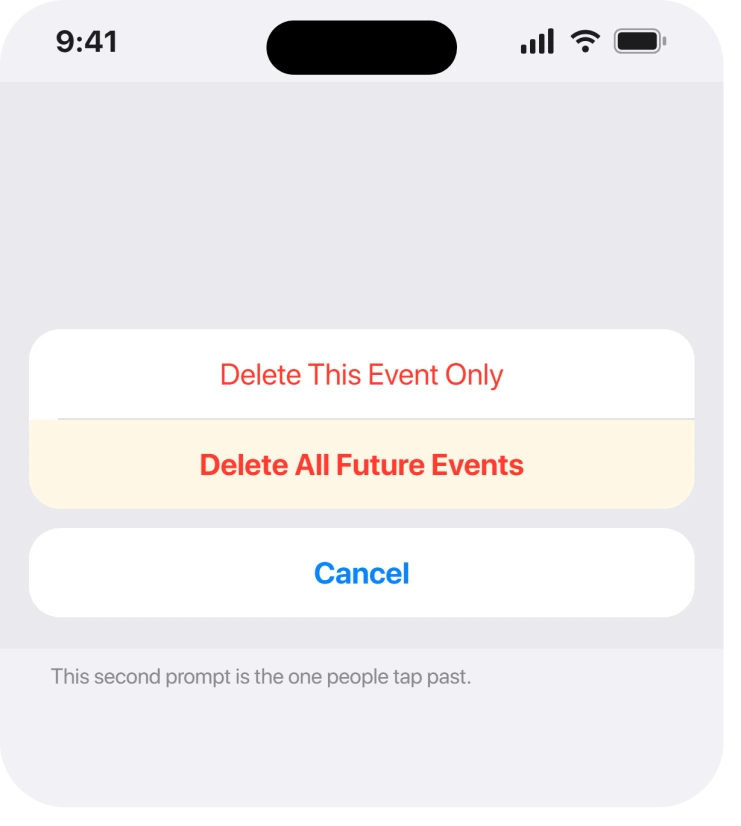
A repeating event asks you a second question after that, offering to delete only this occurrence or all future ones. Tapping past it too quickly leaves the series alive and removes one date.
So the event comes back next week because you only ever removed today's copy.
Delete it again and read the second prompt properly. Choose Delete All Future Events.
The event belongs to an account you do not control
This is the commonest reason a deletion genuinely does not stick.
Owners report it far more than any other cause. If the calendar came from Google, Outlook, a work Exchange account or a shared family calendar, your iPhone is showing you a copy.
Deleting the copy while the source still holds it means the next sync puts it straight back.
Open the Calendar app and tap Calendars at the bottom. The colour beside the event tells you which calendar owns it.
If it is not one of yours, delete it at the source instead: sign into that account in a browser and remove it there. The change reaches your phone within a sync cycle.
It came from a subscribed calendar, which you cannot edit at all
Subscribed calendars are read-only by design. Holidays, sports fixtures, birthdays pulled from somewhere else.
You cannot delete a single event from one of these. iOS will let you tap Delete and then quietly restore it.
The only way out is to remove the whole subscription. Tap Calendars, tap the i beside the subscribed calendar, scroll down, and choose Unsubscribe.
Ours, and marked as ours: we would check this before trying anything else on a birthday or a holiday that will not shift, because those are the two that are nearly always subscriptions rather than your own entries.
You are the invitee, not the organiser
An event somebody else invited you to is not yours to delete.
Declining it removes it from your view, but on some accounts a declined event stays visible in a greyed form, and on others it reappears when the organiser edits the series.
Open the event and look for the organiser's name. If it is not you, the fix is to leave the event or ask them to cancel it, not to delete it repeatedly.
The same event exists twice from two accounts
Deleting a duplicate that keeps returning often means you are deleting one of two copies.
This happens when the same account is added twice, or when a Google account is linked both directly and through another service. Each copy syncs independently, so removing one leaves the other to reappear.
Check Settings, Apps, Calendar, then Calendar Accounts. Two entries for the same address is your answer.
Removing the duplicate account clears its events with it. If Mail from that account is also arriving twice, duplicate emails in your inbox is the same cause seen from the other side.
Nothing above applies and it still returns
At this point the account itself is worth rebuilding, and this is the destructive option so it goes last.
Removing and re-adding a calendar account clears its local copy entirely and pulls a fresh one down. Anything stored only on the phone in that account goes with it.
Before you do that, move anything you cannot lose into your iCloud calendar. Apple never documents a repair for a stuck sync, so there is nothing gentler to try first.
If your calendar is also refusing to refresh at all, an iPhone saying Unable to Update Calendars covers that separately and is worth ruling out first.
If Outlook's holidays are what vanished from 2027, the Outlook holidays page explains Microsoft's fault and the way around it.
What does not help
- Restarting the iPhone. A synced event returns on the next sync regardless.
- Deleting the same occurrence repeatedly. If it is a series or a subscription, you are removing one date each time.
- Turning Calendars off in iCloud. It hides everything rather than removing the event, and turning it back on restores the lot.
- Resetting all settings. It does not touch calendar data and costs you every other preference.
Status: iOS 26.6.1 as of 19 August 2026. All six causes are normal sync behaviour rather than bugs, and which calendar owns the event decides every one of them.
Why does my deleted calendar event keep coming back?
Because the copy on your iPhone is not the original. If the event lives in a Google, Outlook, Exchange or subscribed calendar, deleting it locally is undone by the next sync, and it has to be removed at the source instead.
How do I delete all future occurrences of a repeating event?
Tap the event, tap Delete Event, then read the second prompt and choose Delete All Future Events. Tapping past that prompt removes only the single date you had open.
Can I delete one event from a subscribed calendar?
No. Subscribed calendars are read-only, so a deletion will not hold. Unsubscribing from the whole calendar under Calendars, the info button, then Unsubscribe, is the only way to remove its events.
Why do I have two copies of every calendar event?
Usually the same account added twice, sometimes directly and again through another service. Check Settings, Apps, Calendar, Calendar Accounts for two entries with the same address and remove the duplicate.
The Short Version
- Read the second prompt and pick Delete All Future Events.
- An event owned by Google, Outlook or Exchange has to go at the source.
- Subscribed calendars are read-only, so unsubscribe instead of deleting.
- An event you were invited to belongs to the organiser, not to you.
- Two copies usually means the same account added twice.
- Removing and re-adding the account is last, and it takes local events with it.
Where to Next
Almost every version of this comes down to one question: which calendar does the event actually live in? Answer that and the right move is obvious, and you stop deleting the same thing every Tuesday.
If you know the answer and it still returns, tell me in the comments which account it is. Exchange and Google behave differently enough here that the account name is genuinely the useful detail.

Isaac Smith is the founder and editor of PC Glance, a website that covers computers, laptops, and technology. He is a tech enthusiast and a computer geek who loves to share his insights and help his readers make smart choices when buying tech gadgets or laptops. He is always curious and updated about the latest tech trends.