
The same message is sitting in your inbox two or three times over, and deleting the copies just means doing it again tomorrow.
A duplicated inbox is exhausting to work through, and I know how tempting it is to just delete the account and start again. Hold off on that. Which copies you are seeing tells you which cause is yours.
Every message from one account is doubled
Owners report an account added twice more often than any other cause.
Both copies sync independently, so every message arrives once through each, and deleting one leaves the other.
Open Settings, tap Apps, then Mail, then Mail Accounts. Apple's email accounts page gives that route while explaining how to add one: "Tap Mail Accounts, then tap Add Account."
Look for the same address listed twice. It happens when an account is added both directly and through another service, or when a Google account is added as Google and again manually.
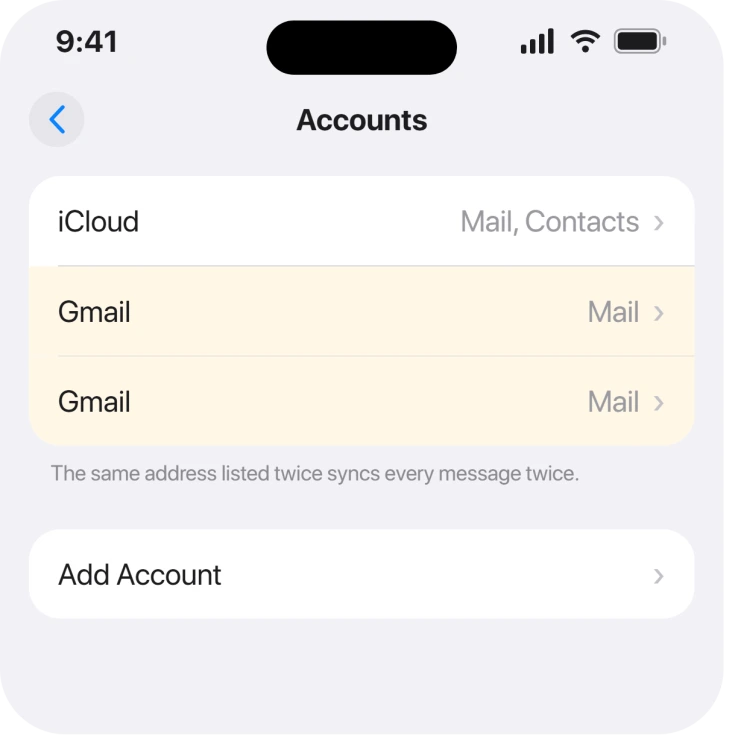
Remove the duplicate. Your mail lives on the server, so deleting the account entry on the phone does not delete any email.
Copies appear only in Gmail or Outlook, not in iCloud
That points at how the account was set up rather than at Mail itself.
An account configured as POP downloads messages and can pull the same ones repeatedly, especially across two devices. The same account set up as IMAP shows one server-side copy to everything.
You cannot convert one to the other. The account has to be removed and added again, choosing the right type. Apple documents the removal side on the same page as adding.
Ours, and marked as ours: we would check with the provider before rebuilding, because a few of them still default to POP in their own setup instructions while supporting IMAP perfectly well.
Duplicates appear after the phone has been idle
A fetch schedule that overlaps with itself can pull the same batch twice.
Apple describes the setting: "If you add an account that doesn't support Push notifications, you can set a schedule to check for new emails for the account." The route is "Tap Mail Accounts, then tap Fetch New Data."
Set that account to Manually for a day and see whether the doubling stops. If it does, the schedule was the trigger and a longer interval usually settles it.
Nothing Apple publishes says a fetch schedule causes duplicates. This is a test that isolates the cause, not a documented mechanism, and we would rather say so than assert it.
The same message shows in two mailboxes rather than twice in one
This one is not a duplicate at all, and it is worth ruling out before you change anything.
All Inboxes shows every account at once. A message can legitimately appear there and again inside its own account's inbox, which reads as two copies while being one message seen from two places.
The same happens with a rule that files a copy, and with iOS 26's Mail categories, where one message can sit in a category and in the main list. Mail categories putting things in the wrong box covers that properly.
Tap one copy and delete it. If both vanish together, there was only ever one message.
Duplicates that arrive on every device at once
If your Mac and iPad show the same doubling, the phone was never the cause.
Sign into the account in a browser. If the duplicates are there too, they were delivered twice by the mail server or by a forwarding rule, and nothing on any of your devices will fix that.
Forwarding is the usual culprit: an address that forwards to a second address you also collect from delivers each message twice, quite correctly.
If mail from that account is slow to arrive as well, an iPhone that says Cannot Get Mail is a different chain worth ruling out.
Nothing above fits and it keeps happening
Removing and re-adding the account rebuilds its local copy, and it is the last thing to try rather than the first.
Apple never publishes a repair for duplicated mail, so there is nothing gentler with documentation behind it.
Before you do it, check that the account is not the only place holding drafts or locally stored mail. Anything on the server comes back untouched; anything only on the phone does not.
What does not help
- Deleting the duplicates. They come back on the next sync, which is the whole complaint.
- Restarting the iPhone. A second account entry survives a restart, and so does a forwarding rule.
- Reinstalling Mail. It is built in, and the account configuration is what is duplicated.
- Turning Mail off in iCloud. That hides one account rather than removing a duplicate, and it takes your iCloud mail with it.
Status: checked 19 August 2026 on iOS 26.6.1. Every cause is account configuration or server behaviour rather than a Mail fault, and Apple publishes no troubleshooting for it.
Why am I getting duplicate emails on my iPhone?
Most often the same account is set up twice, so each message syncs through both entries. Check Settings, Apps, Mail, Mail Accounts for the same address listed more than once and remove the extra one.
Does deleting a mail account delete my emails?
No, as long as the account is IMAP or Exchange, which nearly all are. The messages live on the server and come back when the account is added again. Only mail stored solely on the phone would be lost.
Why do emails appear twice in All Inboxes?
Usually because they are not duplicates. All Inboxes shows every account together, so a message can appear there and in its own account inbox. Delete one copy, and if both disappear there was only ever one.
Can a forwarding rule cause duplicate emails?
Yes, and it is the commonest server-side cause. If one address forwards to another that you also collect on your iPhone, each message is delivered twice and no device setting will stop it.
The Short Version
- The same account added twice explains most of these.
- POP accounts can download the same messages repeatedly; IMAP does not.
- All Inboxes showing a message twice is usually not a duplicate at all.
- If a browser shows the duplicates too, it happened before your phone saw them.
- Forwarding to a second address you also collect delivers everything twice.
- Removing and re-adding the account is last, and your server mail is safe.
Where to Next
The useful question here is not how to delete them faster, it is where the second copy is coming from. Once you know that, the fix is usually one account entry or one forwarding rule.
And if deleted mail keeps reappearing rather than arriving twice, that is a different setting.
If you find the duplicate account and it still happens, say in the comments which provider it is. POP defaults vary between them more than anyone would expect, and that detail would help the next person.

Isaac Smith is the founder and editor of PC Glance, a website that covers computers, laptops, and technology. He is a tech enthusiast and a computer geek who loves to share his insights and help his readers make smart choices when buying tech gadgets or laptops. He is always curious and updated about the latest tech trends.