
That banner again. Cannot Get Mail. The connection to the server failed. Pull to refresh, and it comes straight back, while you have no idea what is sitting unread on the server.
I get how stressful that is, particularly when it is work mail.
The message points at the server, and the server is usually fine. What has broken is the path between your iPhone and it.
Seven separate things break that path. Work through them in this order, because the first three cost nothing.
1. Prove the problem is on your phone and not at the provider
Two minutes, and no settings changed. It tells you whether the rest of the page applies to you.
Open Safari and sign in to your email on the web. Gmail. Outlook. Yahoo. Whatever your work webmail is.
If webmail is also down, or refusing your password, then stop right there. Nothing on the iPhone will fix that, and you are waiting on the provider.
If webmail loads your inbox perfectly, the account and the password are both fine. The fault is in how the phone is reaching it. Everything further down assumes you got that result.
2. Turn off a VPN, because Apple names it and an owner proved it
This is the highest yield fix on the page. One switch.
Apple, in If iCloud Mail isn't working: "If you have VPN configured on your iPhone, turn it off, then try again."
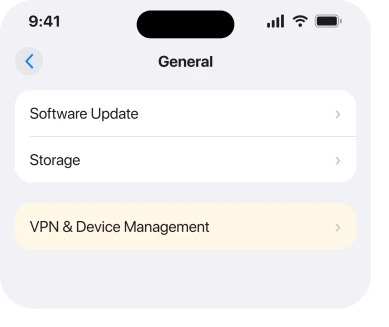
Turn off any VPN app. Then go looking for a profile you have forgotten about.
Apple, on configuration profiles: "You can see the profiles you have installed in Settings > General > VPN & Device Management." Work phones and school phones often carry one you never installed yourself.
An owner running iOS 26.2 (23C55) on an iPhone 15 Pro Max spent days on this. Mail would send perfectly well, and never once receive.
A Level 10 member, LD150, pointed them at that exact screen, and a paid VPN turned out to be incompatible with that release. Disabling it on the phone and the Mac restored mail immediately.
Turn it back on afterwards if you need it, and see whether mail dies again. That confirms it. No guessing.
3. Push works on one account only, and Apple says so
Apple documents a limit that almost nobody knows about. It produces a fault that looks exactly like a connection failure on your second and third accounts.
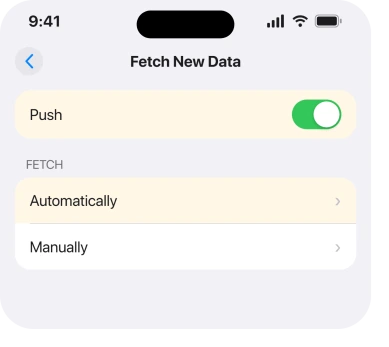
Apple, on the same page: "You can only use Push with one account at a time."
Go to Settings > Apps > Mail > Mail Accounts > Fetch New Data. Check which account has Push, and set the others to Fetch on a schedule rather than leaving them expecting something they cannot have.
Apple also says to keep Fetch set to Automatically. Then send yourself a message and check that Push is actually working.
4. Give the account an app password if your provider requires one
Now the cause that catches people whose password is definitely correct, because they just typed it into webmail in rung 1.
Several providers refuse a plain account password to any mail app that does not use their own sign-in page.
Yahoo, on its app passwords page, states it directly: "Third-party email apps (that do not use our Yahoo branded sign-in page) require you to enter a single password for login credentials."
So the password that works in a browser is the wrong credential for the Mail app. Generate a separate one in the provider security settings. Paste that into the iPhone instead.
This is a Yahoo requirement in Yahoo's own words. Other providers run schemes of the same shape under their own names. So if yours is not Yahoo, search its help pages for app password first.
Symptom to look for: mail worked for months, then stopped after a password change or a security prompt. And only on the phone.
5. Clear out the very old mail that is hanging the sync
Nothing in Apple's documentation covers this, and it surfaced on the forum instead. It fits accounts with a decade of history in them.
On the same iOS 26.2 thread, momtopj traced their failure to a handful of ancient messages, from 2019 and 2022, that stalled the sync every time it reached them. Deleting those messages let the account finish syncing.
Worth trying if your inbox is enormous. Or if the failure stops at the same point every time. Or if only one of your accounts is affected.
Use webmail to delete them, not the phone. The phone is the thing that will not sync.
6. Remove the account and add it back, after one check
This is the first fix on the page that can lose you something. So run the check before the instruction, not after it.
The check. Open webmail again, and confirm that everything you care about is visible there. If your mail lives on the server, removing the account from the phone removes a copy.
If something exists only on the phone, it goes with the account.
Once you are satisfied, go to Settings > Apps > Mail > Mail Accounts, tap the account, then Delete Account. Restart the phone. Then add the account back.
Choose your provider by name rather than the Other option, so iOS fills in the server settings itself.
Choosing Other is where a lot of hand-typed server addresses come from, and a wrong incoming server produces this exact banner.
7. When it is the release itself, and what to do while you wait
Sometimes none of it is yours to fix. Saying so beats a ninth reset.
The 26.2 thread collects several owners whose accounts never recovered. Motyoj called Apple Support and was told it was a confirmed bug awaiting a future update. Leeson76 could receive but not send and moved to the Gmail app instead.
pacopete reported the same fault returning on 26.3.1.
The older record is worse. On an iOS 16 thread, Gov_tech was managing more than 850 iPhones. The failure started exclusively after one point release. Their server was confirmed healthy from their end.
Reboots, reconnecting Wi-Fi, re-entering credentials, a reset and a factory reset all failed.
If you are in that position, use a second mail app for now. Keep the account on the phone so you notice when it recovers. And do not erase the phone over it.
If mail is stuck outgoing rather than incoming, email stuck in the Outbox is a different fault with a different fix, and if the mail is arriving but in odd places, Mail categories on iOS 26 covers that.
What does not help
- Force quitting Mail repeatedly. It reopens with the same account settings and the same VPN in the way.
- Reset All Settings as a first move. It clears your Wi-Fi passwords and keyboard learning, and none of the causes on this page live in that reset.
- Erasing the phone. Owners who went as far as a factory reset reported no change.
- Changing your password. If webmail signs in, the password is not the problem, and changing it can force every other device to re-authenticate.
Status: iOS 26.6.1, checked 18 August 2026. Reported across 26.2 and 26.3.1 with no Apple fix announced. The VPN and Push lines are Apple's own wording from its iCloud Mail page.
Why does my iPhone say cannot get mail, the connection to the server failed?
Usually something between the phone and the mail server rather than the server itself. A VPN, an app password the provider now requires, or an incoming server setting typed by hand are the three that produce this banner most often.
Does a VPN really stop iPhone Mail working?
Apple names it directly and tells you to turn a VPN off and try again. One owner on iOS 26.2 traced a total receive failure to a paid VPN and recovered mail the moment it was disabled.
Why does only one of my email accounts fail?
Push runs on one account at a time on iPhone. A second or third account left expecting it can behave as though it cannot reach the server. Set the others to fetch on a schedule.
Should I delete my email account to fix this?
Only after checking your webmail shows everything you care about. Removing the account removes the phone's copy, so make sure the server still holds your mail before you do it.
The Short Version
- Sign in to webmail first. That single test tells you whose problem this is.
- A VPN is the commonest cause and Apple names it in its own instructions.
- Push only works on one account at a time, which breaks the others quietly.
- Yahoo and providers like it require a separate app password for Mail.
- A few very old messages can stall a whole account's sync.
- Remove and re-add is safe once webmail proves your mail is on the server.
- Some releases have simply broken this, and a second mail app is the stopgap.
Where to Next
What makes this banner so frustrating is that it names the server, and the server is nearly always innocent. That one word sends people to their provider support line.
The answer is usually a VPN profile or a Push setting on their own phone.
So work outwards. Webmail first, then the phone's network path, then the account credentials, then the mailbox itself. In that order it takes about ten minutes to land on the real cause.
Where the messages arrive fine and refuse to stay deleted, that has seven fixes.
If it turns out to be a VPN for you, I would like to know which one and which iOS build you were on. The reports so far name paid services without naming products, and a proper list would save the next person several days.

Isaac Smith is the founder and editor of PC Glance, a website that covers computers, laptops, and technology. He is a tech enthusiast and a computer geek who loves to share his insights and help his readers make smart choices when buying tech gadgets or laptops. He is always curious and updated about the latest tech trends.