

You clicked Decline on an Outlook invitation by mistake, and the meeting vanished from your calendar. Your reply may already be with the organizer.
I would open Deleted Items before anything else. Outlook moves the invitation there when you decline, and you can answer it again from that copy.
Getting a declined invitation back has been a Super User question since November 2009, and it has 312,001 views. Microsoft Q&A threads on declined meetings in a series carry 20+ and 10+ same-question clicks.
Where a declined invitation goes
Microsoft states it on its support page: "If a meeting request is declined, the meeting is not saved to your calendar and the meeting request message is moved to the Deleted Items folder".
So the meeting is not lost. Your Decline went to the organizer, and the request itself waits with your deleted mail until that folder is emptied.
Ours: this laptop's classic Outlook 16 carries the dialog for that second chance. Its title is Recover Deleted Items. Two buttons: Restore Selected Items and Purge Selected Items.
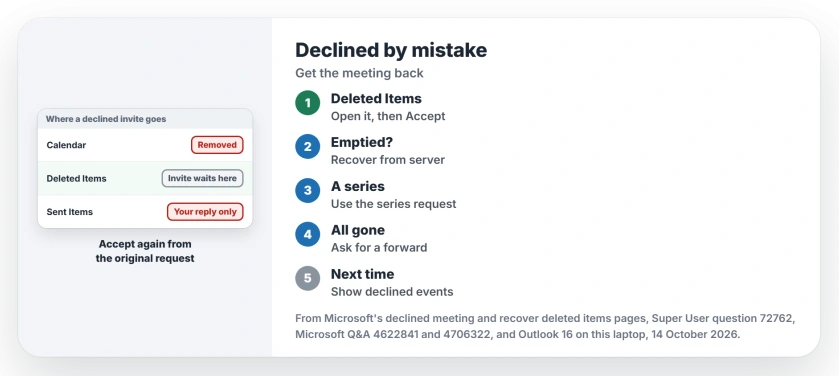
Status: checked 14 October 2026 against Microsoft's support pages. A declined request still moves to Deleted Items, and new Outlook can keep declined events on the calendar.
1. Accept it again from Deleted Items
Open the Deleted Items folder and find the invitation by its subject or the organizer's name. Search helps if the folder is long. Microsoft's steps are short: double-click the original request, "Then click Accept or Tentative".
The organizer gets your new answer and the meeting returns to your calendar. That is usually all it takes. Super User's accepted answer, from 2009, says the same.
Another answer drags the request back to the Inbox first, then opens it. That poster used it on requests deleted before replying, and the response buttons all displayed.
If you declined weeks ago and the folder looks short, Outlook may be keeping older mail off this PC. Look for the request in Outlook on the web too. I would check there before moving on.
2. Folder emptied? Recover it from the server
Microsoft documents a second chance for mailboxes that keep deleted mail on the server, such as work and Microsoft 365 accounts. In classic Outlook, select Deleted Items, then on the Home tab choose Recover Deleted Items From Server.
Select the request, then Restore Selected Items. It lands back in Deleted Items, where step 1 works again. In new Outlook, the same folder offers a Recover link at the top of the message list.
If your folder list shows Trash instead of Deleted Items, Microsoft says your account does not support this step. Go straight to step 4.
3. A whole series works differently
Series are the hard case. Declining a recurring meeting can leave nothing behind in Deleted Items. An answer on Super User found that declined meetings in a series "don't appear to show up in the Deleted Items folder".
A comment there suggests the way back: find the original series request, accept it again, and the declined dates should fill back in. That only works if you still have that first invitation.
It failed for one poster on Microsoft Q&A, in a thread with 20+ same-question clicks. They tried accepting the original series invite and still could not restore the occurrences. Then only a forward helps.
4. Ask the organizer to forward it
When the request is gone, Microsoft's own fallback is plain: "Ask the meeting organizer to forward you the original meeting request".
A forwarded request arrives with live Accept buttons. A 2026 answer on Microsoft Q&A explains why: forwarding makes Exchange create "a fresh request item for your mailbox".
An owner whose organizer had left the company named the same way out on Microsoft Q&A, having someone forward a copy. Any colleague who was invited can usually do that.
Keep declined meetings on your calendar from now on
New Outlook for Windows can stop this happening again. I would turn it on today. In Calendar, on the View tab, open Calendar Settings, then Calendar, Events and invitations.
Under Save declined events, turn on Show declined events on your calendar. Declined meetings then stay visible, with your time shown as free.
Two limits come with it. Microsoft says it is "only available for M365 work or school accounts", so Outlook.com and Hotmail addresses miss out.
And the decline has to happen in new Outlook, Outlook on the web, Outlook for Mac, the phone apps or Teams. Microsoft states that declining in classic Outlook means "no declined events will appear".
The Microsoft Q&A thread with 30+ same-question clicks was people whose settings lacked the switch in 2023 and 2024. The asker later edited the post: "The feature is now available for me".
Can the Decline reply in Sent Items bring it back?
No. Your Decline reply sits in Sent Items, but a commenter on Super User found it "doesn't allow me to re-accept the meeting". Use the original request instead.
Once the meeting is back, it is a good moment to check that its reminder will not hide behind your other windows.
The Short Version
- Declining moves the invitation to Deleted Items. Open it there and choose Accept or Tentative.
- Emptied the folder? Use Recover Deleted Items From Server on a work or Microsoft 365 mailbox.
- A declined series may leave nothing behind. Accept the original series request if you still have it.
- Otherwise ask the organizer, or anyone invited, to forward the meeting to you.
- In new Outlook with a work account, turn on Show declined events on your calendar.
Where to Next
Which Outlook did the declining, and was it a lone meeting or a series? Drop both details in a comment. I answer each one, and a forward that arrived without buttons interests me most.

Isaac Smith is the founder and editor of PC Glance, a website that covers computers, laptops, and technology. He is a tech enthusiast and a computer geek who loves to share his insights and help his readers make smart choices when buying tech gadgets or laptops. He is always curious and updated about the latest tech trends.