
You scroll down a folder in Outlook and the mail simply stops, often about a year back. Your phone or Outlook on the web still shows the older messages. They were never deleted.
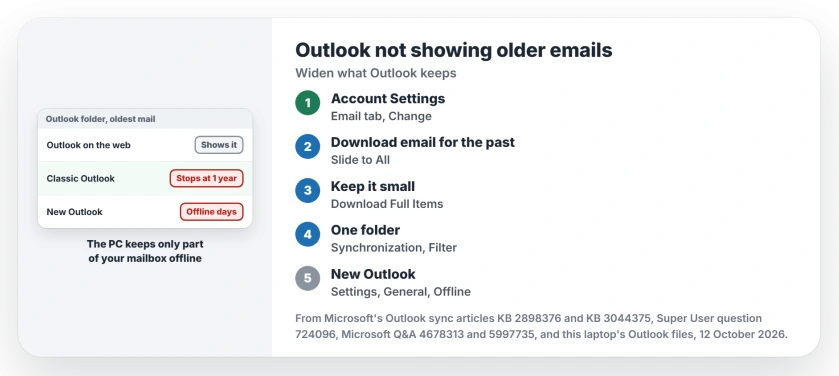
I would check one account setting before anything else. Classic Outlook keeps only part of your mailbox on the PC, and the new Outlook caps it in a different place.
Super User logged the question in March 2014, and it has 210,013 views. New versions of it kept reaching Microsoft Q&A through 2026.
Where the older mail went
Open Outlook on the web and look in the same folder. Are the old messages there? Then your PC is holding a shorter window of mail, and steps 1 to 3 apply.
Outlook says so in its own words. Ours: classic Outlook's account dialog file on this laptop, MAPIR.DLL, holds the line "To save disk space and to improve performance we are only storing a portion of your messages for offline use."
Microsoft describes folders that "display only newer items". Its troubleshooting article ties that to the Download email for the past setting, which "is named Mail to keep offline" in some versions.
Status: reviewed 12 October 2026 with Microsoft's Outlook sync articles, the strings in this laptop's Outlook 16 files and owners from 2014 to 2026.
Missing from Outlook on the web too? Then the mail has moved on the server. Skip to the last section.
1. Classic Outlook: set the slider to All
Click File, then Account Settings, then Account Settings again. Select your account on the Email tab and click Change.
Under Offline Settings, drag Download email for the past, or Mail to keep offline, all the way to All. Click Next, then Done. Restart Outlook so it starts downloading.
Reported working by owners. On Super User, the asker found it after moving a colleague to Office 365, and accepted their own answer.
A Microsoft Q&A owner in 2024 found theirs set to one year. They moved it to sync all and wrote "That appears to have solved the problem."
Expect a bigger mail file on your PC. A large mailbox can take hours to sync. On a slow connection I would raise it a step at a time rather than jump straight to All.
Before exporting mail to a separate Outlook file, let the required older messages finish downloading so the copy includes them.
Ours: this laptop's classic Outlook (Version 16, build 20430) carries both names for the slider in MAPIR.DLL, plus its one-year step. No account is set up in it, so nothing was changed.
2. Or keep the slider and fetch old mail on demand
You may want the PC copy small. Classic Outlook can then show a link at the end of a folder that pulls older mail from the server.
Microsoft says that link appears only when Download Preferences is set to Download Full Items. On the Send/Receive tab, click Download Preferences and choose Download Full Items.
The same 2024 owner had been using that link. They said it "causes Outlook to hang for ages" on their slow line, which is why they moved the slider in the end.
3. One folder short: check its sync filter
Is only one of your folders missing old mail? It may carry its own filter. Microsoft's article on mismatched item counts says: "This issue occurs when a synchronization filter is configured for a folder."
Right-click the folder and pick Properties, then open the Synchronization tab. It shows how many items the server holds and how many your offline copy holds.
Click Filter, then Clear All. Run Send/Receive, since Microsoft notes the change waits for it.
A folder showing an unread count with nothing unread in it has a different cause, and that message is often hidden rather than missing.
The new Outlook has its own limit
A Microsoft support moderator spelled it out in September 2026: "new Outlook has an offline setting that can limit locally saved email to 7, 30, 90, or 180 days."
Their route is Settings, General, Offline. An adviser gave the same route in July 2026 to a new Outlook user who could see only one month of their inbox.
Ours: the new Outlook sits on this laptop next to the classic one. Look at the window you actually use before you hunt for either setting.
When Outlook on the web is missing them too
Then no PC setting will bring them back. Work and school mailboxes can move old mail to an Online Archive, which shows as a separate mailbox in your folder list.
A Microsoft moderator told one 2026 asker to check with their admin for "a Retention Policy with a retention period of 2 years". That asker ran their own Microsoft 365. Several policies turned out to apply.
Search has the same blind spot, since a short sync window leaves little for Windows to index. Our Outlook search page covers that side, and our page on mail that never arrives covers rules that file mail away.
The Short Version
- Check Outlook on the web first; mail there means a local setting.
- Classic Outlook: Download email for the past, set to All.
- Or Download Full Items, then use the server link.
- One folder short: Properties, Synchronization, Filter, Clear All.
- New Outlook: Settings, General, Offline.
- Missing online too: ask about archive and retention.
Where to Next
How far back did your Outlook stop, and which Outlook was it? Leave the details in a comment, and I can tell you which setting matches.

Isaac Smith is the founder and editor of PC Glance, a website that covers computers, laptops, and technology. He is a tech enthusiast and a computer geek who loves to share his insights and help his readers make smart choices when buying tech gadgets or laptops. He is always curious and updated about the latest tech trends.