
You went to turn your iPhone off and it told you the phone is still findable, which is not what anybody expects from a phone that is off. Fair enough if that made you look twice.
Three different iPhone screens mention being findable. Two of them are the same ordinary feature announcing itself, and the third is a flat battery being mistaken for a fault.
The one under the Power Off slider is the ordinary one, and a single switch in Settings controls it. Let me show you which screen you are actually looking at.
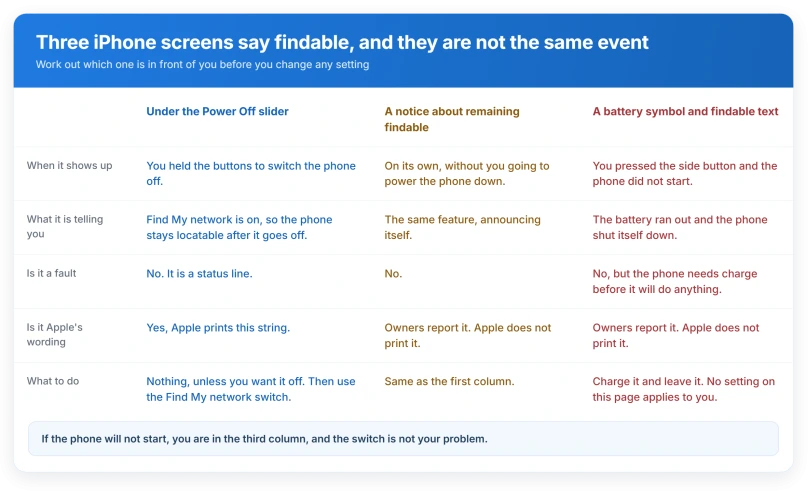
Which of the three screens are you looking at
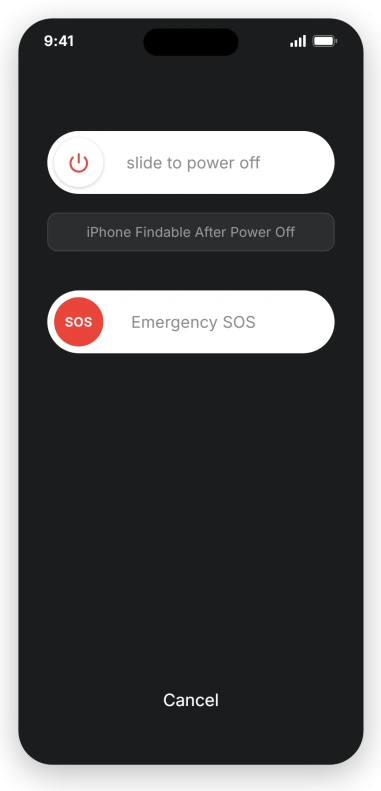
Under the Power Off slider, reading iPhone Findable After Power Off. You held the buttons, the sliders came up, and the line is sitting underneath them.
The phone is running normally and you chose to switch it off. That is the screen this page is about.
A notice reading iPhone Remains Findable After Power Off. Owners describe this arriving on its own rather than when they went to switch the phone off.
It is the same feature, and it is the wording an Apple Community thread carries in its title.
A battery symbol and the words iPhone is Findable. This one arrives without you asking for it.
That third screen is where nearly all the alarm comes from, and it is not a fault. The phone ran out of charge and shut itself down.
It cannot show you the Power Off slider, because that slider only exists while iOS is running.
If that is what you are looking at, the phone is empty rather than broken.
Put it on a charger and leave it alone, and our page on an iPhone that will not turn on has the waiting times Apple asks for.
One caveat on the wording. Apple prints only the first of those three strings. The other two come from owners describing what they saw, so treat the exact capitalisation loosely and go by which situation you are in.
What Apple says the line means, and the one page it says it on
Apple prints that string on one page of everything we read, and it is not a Find My page.
It is the Personal Safety User Guide, written for somebody worried about being tracked by a person who knows them.
Apple, on that page: "you can temporarily turn off the Find My Network when you power off the device by tapping iPhone Findable After Power Off (under Slide to Power Off) and following the onscreen instructions".
The same page gives the duration. Apple: "When Find My iPhone is turned on, your device may be found through the Find My network for up to 24 hours after it has been powered off or disconnected from the internet."
Apple's own guide page for turning an iPhone on or off lists four ways to reach that slider, three of which apply to any one iPhone, and never mentions the line printed on it.
The behaviour behind the line is documented, in the iPhone User Guide and on apple.com. The words on the screen are explained in one place, a guide about being tracked by somebody who knows you.
If that is genuinely why you are reading, the switch below is not enough on its own. It only covers a phone that is off or offline.
Location Sharing, Family Sharing and Significant Locations all keep working while the phone is on, and Apple's personal safety guide covers those separately on the same page.
The switch, and exactly what it costs you
Apple prints the warning before it prints the route, and so will we.
Apple: "CAUTION: When you turn off Find My [device] and Find My network, you aren't able to locate, lock, or erase your device if it's lost or stolen."
That caution names both switches together, and they are not the same decision.
Apple gives the narrower one its own sentence, on the same page: "Disabling this feature means you can't use it if your device is lost or stolen and powered down."
So switching off Find My network alone costs you exactly that and no more.
Apple, on Activation Lock: "Activation Lock turns on automatically when you turn on Find My on your device." It keys off Find My, not off this sub-switch, so leaving Find My iPhone on keeps the thing that stops somebody else wiping the phone and setting it up as their own.
Apple's route: Settings, then your name, then Find My, then Find My iPhone, then Find My network. All three switches sit behind that one route, which is how Apple presents them.
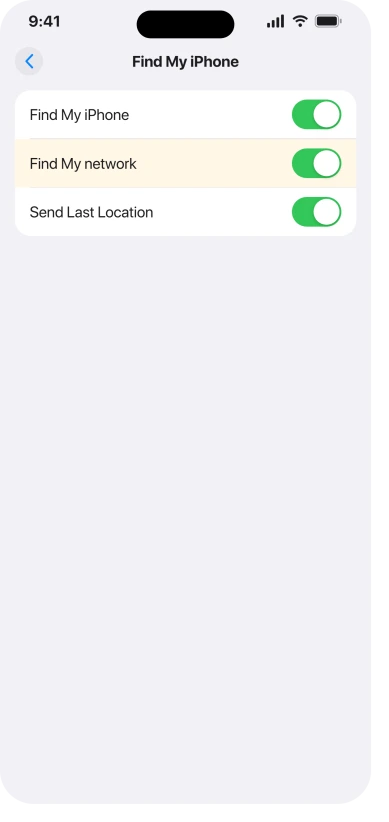
It stops the phone answering after it is switched off. Whether the line itself vanishes from the shutdown screen, Apple never actually says.
Expect it to go, and hold that loosely, because it is our reading and not a promise.
The switch is a plain toggle and turning it back on restores the feature straight away. Nothing about it is one-way.
Find My network is not Send Last Location
These two sit next to each other and get treated as one thing. Apple describes them separately in the iPhone User Guide.
Find My network, in Apple's words: "If your device is offline (not connected to Wi-Fi or cellular), Find My can locate it using the Find My network."
Send Last Location, in Apple's words: "If your device's battery charge level becomes critically low, its location is sent to Apple automatically."
Ours, from those two sentences: only the first produces the line under the slider.
Send Last Location fires once, when the battery is nearly gone, and does nothing at all when you switch the phone off yourself. Switching it off will not remove the message.
If you only want it off for this one shutdown
Apple's instruction ends at "following the onscreen instructions" and never names the thing you tap next.
User-reported, not documented: owners on MacRumors and Reddit describe the next step as a button reading Temporarily Turn Off Finding, and say it asks for the passcode or Face ID before it will go through.
The most recent of those descriptions comes from an iOS 26 thread earlier this year.
We could not find that label on any Apple page, so expect the wording on your phone to differ. The behaviour is documented; the button name is not.
Is the phone genuinely off
Apple describes the mechanism for one case only, and it is the case where the battery ran out rather than the one where you chose to shut down.
Apple, on Express Cards with power reserve: "If iOS isn't running because iPhone needs to be charged, there may still be enough power in the battery to support Express Card transactions."
And on the same page: "This feature isn't available when a standard user-initiated shutdown is performed."
Read that second sentence carefully, because this feature there means Express Cards, not power reserve as a whole. Apple is saying your travel card stops working after a deliberate shutdown.
It is not describing the Find My beacon at all.
That distinction matters, because Apple's own user guide gives finding a figure in both states, 24 hours after you switch the phone off and 5 hours in power reserve. So the beacon works in both.
Only the mechanism is documented in one.
What Apple does not say anywhere on the pages listed at the end of this article: what keeps the phone answering after a deliberate shutdown, or whether that costs you any battery.
The nearest thing is a 2021 security page calling the battery impact of offline finding "minimal", and that describes a phone which is still switched on.
Apple prints 24 hours twice and seven days once, and means something different each time
- How long the phone keeps answering: up to 24 hours after it is powered off or disconnected from the internet, and up to 5 hours if it shut down flat instead.
- On iCloud.com: the last known position is displayed for up to 24 hours, then it goes.
- In the Find My app: the last known position is kept for up to seven days.
Ours, from those three: open the app, not the website, because the app keeps a last known position the website has already dropped. Then read that pin for what it is.
If iCloud.com has stopped showing it, what you are looking at is over a day old, and Apple ties the seven day window to Find My network being on, so switching that off costs you this too.
Which iPhones can actually do this, and why the usual answer is wrong
The rule people repeat is "iPhone 11 and later". Apple's own list says otherwise, and it is one click from the sentence everybody quotes.
In the iPhone User Guide sentence about the 24 hours, the words supported iPhone are a link. It opens a list headed Models that support Ultra Wideband, and that list is the answer.
It runs iPhone 11 through iPhone 17 Pro Max plus iPhone Air. It does not include iPhone SE second generation, iPhone SE third generation, iPhone 16e or iPhone 17e, every one of which is newer than the iPhone 11.
So "iPhone 11 and later" tells four groups of owners their phone can do something it cannot. The rule that works is Ultra Wideband, not release date.
Apple adds one line under the list: "Availability varies by country or region."
If the line is not on your screen, check the switch before you blame the phone. Find My network being off is the ordinary reason, and it is the same route as above.
Only if that switch is on, and the line still does not appear, is your model the answer, and Apple's list settles it in a few seconds.
One condition Apple never mentions, from owners who tested it
If you want this feature to work rather than to go away, there is a catch worth knowing, and it is not in any Apple documentation we read.
User-reported: three separate owners on MacRumors, one of them a forum moderator, report that a phone which had Bluetooth switched off before shutdown was not findable afterwards.
Leaving Bluetooth on at shutdown is what they found made the difference.
That fits how Apple describes the Find My network, which relays through other people's devices, but Apple states no such requirement anywhere.
Treat it as three owners rather than a rule, and check it if the feature has never once given you a location.
What does not help
- Turning off Send Last Location. Wrong switch, as above.
- Turning off Find My completely. It works, and it also removes Activation Lock, which is the protection that makes a stolen iPhone worthless to whoever took it. Use the narrower switch. The other side of that protection is worth seeing before you buy a used phone, and our page on what a password prompt during setup means covers the screen it produces.
- Airplane mode before shutting down. One forum reply claims this suppresses the message. Nothing else supports it and it does not match how Apple describes the feature, so do not rely on it.
- Waiting for a point release. Nothing here is a bug. It is the feature doing what Apple documents, and the only thing that changes it is the switch.
Status: verified against iOS 26.6 on 14 August 2026, including Apple's Ultra Wideband model list, which is what decides whether your iPhone shows this line at all.
What does iPhone Findable After Power Off mean?
It means Find My network is switched on, so for up to 24 hours after you power the phone off it can still report roughly where it is. It is a status line rather than an error, and it is the feature working as Apple describes it. Tapping it lets you turn that off for this shutdown only.
Does this drain the battery?
Apple publishes no figure for it on any page we read, and does not claim it is free either. It also never describes the mechanism for a phone you switched off deliberately, so nobody outside Apple can answer this from documentation. If your battery is disappearing overnight, the causes worth checking are in our iPhone battery drain guide instead.
My iPhone shut itself off and says it is findable. Is it broken?
Almost certainly not. That screen appears when the battery ran out, not when something failed, and the phone cannot show the Power Off slider once iOS has stopped. Put it on a known good charger and leave it there before you conclude anything, and our page on an iPhone that will not turn on carries the timings Apple actually asks for.
Can I stop being findable without losing Find My?
Switch off Find My network on its own and leave Find My iPhone on. This is our reading of Apple's caution rather than a sentence Apple writes. You give up locating the phone while it is off or offline, and you keep Activation Lock, which is what stops a thief setting the phone up as theirs.
The Short Version
- The line under the Power Off slider is a status, and it is the Find My network switch reporting itself.
- A battery symbol with findable text is a different screen entirely. That phone is flat, not faulty.
- Apple documents the string on exactly one page, the Personal Safety guide, and not on its own page about turning the phone off.
- The switch is Settings, your name, Find My, Find My iPhone, Find My network.
- Send Last Location is a different switch and turning it off will not remove the line.
- The models that support it are Apple's Ultra Wideband list, not "iPhone 11 and later". The SE, the 16e and the 17e are newer and are not on it.
Where to Next
The habit worth taking away is to read which screen you are on before you react to it. Two of the three are your phone telling you a feature is working, and only the third is a phone that has run out of charge.
None of the three is a fault.
And if it powers off by itself the instant you unplug it, that pattern points somewhere specific.
If the switch is off and the line still shows, or if you are seeing wording I have not covered, leave it in the comments and I will take a look.

Isaac Smith is the founder and editor of PC Glance, a website that covers computers, laptops, and technology. He is a tech enthusiast and a computer geek who loves to share his insights and help his readers make smart choices when buying tech gadgets or laptops. He is always curious and updated about the latest tech trends.