
Apple documents four separate reasons your battery reads Unknown, and a counterfeit is only one of them. One of the four is a genuine Apple battery that a technician simply never finished linking.
So read the exact word on the screen before you accuse anybody of anything.
Find the label first, because there are several
Two screens carry different information and people mix them up.
Vendor-documented. For the part label, Apple's genuine batteries page says you can see this on "iPhone XR, iPhone XS models, and later".
For the health warning, Apple's route is: "Tap Battery, then tap Battery Health."
The part label lives in Parts and Service History. The health warning lives in Battery Health. They can disagree, and neither one is a verdict on your phone.
What each label actually means
Apple publishes four labels for the battery. Only one of them gets talked about.
Vendor-documented, all four from Apple's own page:
- Genuine. "If the repair was done using genuine Apple parts and processes, you'll see Genuine next to Battery."
- Used. "With iPhone 15 and later using iOS 18, you'll see a Used message if the battery was already used or installed in another iPhone."
- Finish Repair. "After a new Apple battery has been installed, you'll see Finish Repair next to Battery until you finish the repair with Repair Assistant."
- Unknown. The one that causes the alarm, and it has several documented causes of its own.
Ours: Used is not a fault. Apple says a genuine battery can be reused on another iPhone of the same model, and warns only that it "might not perform as well as a new genuine Apple battery."
Unknown has four causes and only one is a fake
Apple sets these out across two pages, neither of which mentions the other's wording.
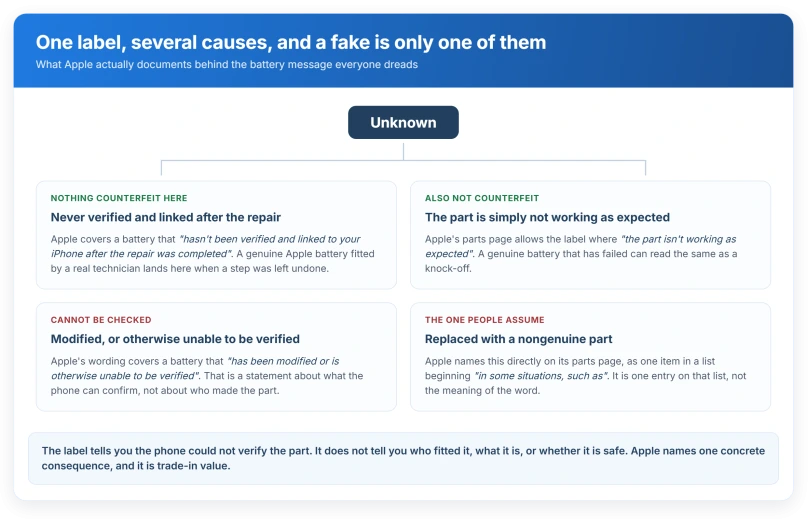
Vendor-documented, from the genuine batteries page. Apple introduces its list with "You'll see an Unknown message if the battery:" and then gives two entries under it:
- "Hasn't been verified and linked to your iPhone after the repair was completed"
- "Has been modified or is otherwise unable to be verified"
Vendor-documented, from the Parts and Service History page, which words it differently: "Unknown: In some situations, such as if the part was replaced with a nongenuine part or the part isn't working as expected, you see this label."
Put both pages together and Apple has named four separate routes to the same word:
- Never verified and linked to the iPhone after the repair finished.
- Modified, or otherwise unable to be verified.
- Replaced with a nongenuine part.
- Not working as expected.
Read the first and the last again. A real Apple battery, fitted by a real technician, reads Unknown if the linking step was never completed. And a genuine Apple battery that has simply failed can produce the same word as a knock-off. Apple's own definitions allow both.
Ours, and it is the practical point: the label tells you the phone could not verify the part. It does not tell you who fitted it, what it is, or whether it is safe.
Those are four different questions and the screen answers none of them.
If it says Finish Repair, this may cost you nothing
Of everything on this page, this is the one with an actual fix attached.
Vendor-documented. Apple says the label stays "until you finish the repair with Repair Assistant". So the phone is telling you a step is outstanding, not that anything is wrong.
Ours: if your battery was replaced recently and you see this, go back to whoever did it before you pay anybody else.
Finishing the repair is the documented route out, and an unfinished one that later reads Unknown is a worse position to be in.
What the warning does not say
Worth being precise, because the fear here runs ahead of the documentation.
Vendor-documented, and this is the whole consequence Apple states for health: "Genuine batteries are designed to work with iOS to function properly, including to report charge levels and battery health. If a battery is unverified, the battery health information might not be accurate."
And in Battery Health itself, Apple names the exact string and the exact consequence: where the screen reads Unable to verify this iPhone has a genuine Apple battery, Apple says "the battery-health information might not be accurate".
Might not be accurate. That is a statement about a number on a screen. Apple does not say the phone is slowed, locked, throttled or damaged, on either page.
Vendor-documented, the one concrete cost Apple does name: "An Unknown part might affect the trade-in value of your device."
Ours: so the real loss is at resale, and it is worth knowing before you accept a cheap repair rather than after.
Status: iOS 26.6, checked 16 August 2026. Across two Apple pages the Unknown label has four separate causes, and only one of them is a nongenuine part.
The safety wording is separate, and it is not about the label
Apple does publish a real warning here, but it is about who does the work, not about what your screen says.
Vendor-documented: "Lithium-ion batteries are sensitive components and should be serviced with care. To avoid damage that could cause overheating, fire, or injury, only a trained technician should replace an iPhone battery."
And on the parts themselves: a nongenuine replacement "might be" poorly designed or manufactured, or "an incorrect battery for your iPhone model", which "could lead to insufficient battery capacity, improper fit, or performance issues".
Ours: notice that every one of those is written as a possibility rather than a certainty, and none of them is triggered by the label.
Do not read a label as a safety diagnosis, and do not read a clean label as proof the work was done well.
If the phone is also running down quickly, that is a different question with its own causes, and our page on what actually drains an iPhone battery covers the ones that have nothing to do with the part.
The other message you might see alongside it
Vendor-documented. Apple says you might see an additional message reading Apple has updated the device information for this iPhone.
That one is about Apple's own records rather than about your battery, and it appears for the display too. It is not a second warning.
The front camera is another of the parts that screen lists, and it turns up in an unexpected place: our page on a phone stuck on Call Ended covers why Apple names it as the fix for a failed proximity sensor.
If you are chasing hardware messages generally, the port has its own set with different meanings, and our page on what your USB-C port is wired for sets out which alert means service and which does not.
Does an Unknown battery mean mine is fake?
No. Across two pages Apple names four routes to that word, and a nongenuine part is one of them. The others are a battery that was never verified and linked after the repair, one that has been modified or cannot be verified, and one that "isn't working as expected". A genuine Apple battery can land on any of those three.
Will an Unknown battery slow my iPhone down?
Apple does not say so anywhere on either page. What it states is that the battery-health information "might not be accurate", and separately that an Unknown part "might affect the trade-in value of your device". Those are the only two consequences Apple publishes.
Can I get rid of the Unknown message?
Only by having the part verified and linked, which means going back to a provider with access to Apple's process. If the label instead reads Finish Repair, that is the fixable one: Apple says it stays until the repair is completed with Repair Assistant, so the outstanding step is the whole problem.
The Short Version
- Apple publishes four battery labels: Genuine, Used, Finish Repair and Unknown.
- Unknown has four documented causes and only one of them is a nongenuine part.
- A genuine Apple battery that was never linked after the repair reads Unknown.
- Finish Repair is the one with a documented fix, and it points back at whoever did the work.
- Apple says the health figure "might not be accurate". It never says the phone is throttled.
- The one cost Apple names is trade-in value.
- Used is not a fault. Apple allows a genuine battery to be reused on the same model.
Where to Next
Find the label first, then read what it actually claims. Only one of the four means somebody has put a non-genuine part in your phone, and the other three do not.
Unknown does not mean fake, and I would not let a shop tell you otherwise until you have checked the other three causes.
If yours says Unknown after a repair you paid for, that is worth taking back to whoever did it. Tell me how you get on.

Isaac Smith is the founder and editor of PC Glance, a website that covers computers, laptops, and technology. He is a tech enthusiast and a computer geek who loves to share his insights and help his readers make smart choices when buying tech gadgets or laptops. He is always curious and updated about the latest tech trends.