
Your iPhone works perfectly while the cable is in. Pull it out and the screen goes black within seconds, so you are now carrying a phone that only lives near a plug socket.
I know how limiting that is, and how much it feels like the phone has simply ended.
It probably has not. This symptom has a name, and running these six tests in order tells you what it is before you spend anything.
I will walk it the way a technician would, because Apple publishes that order on a page written for repairers and it is not one owners ever get sent to.
Start here: Apple files this under the battery, not the charger
That one fact reorders everything you are about to do.
Apple, on battery, charging and power issues, lists among the issues to act on: "iPhone turns off immediately after disconnecting it from a power adapter".
It sits in the battery group. Not the accessories group, not the connector group. Apple documents no cable step for this symptom at all, so your cable is not the first thing to establish.
Test 1: Charge it properly for half an hour first
The cheapest test, and it catches the case where nothing is broken at all.
Apple: "The iPhone may have entered a deep discharge state that requires 20 to 30 minutes of charging to turn on. The charging icon should be visible after two minutes of charging."
So plug it into a wall adapter, not a computer port. Leave it genuinely alone for half an hour. If the charging icon never appears in the first two minutes, that is information too.
A phone that then holds a charge normally was flat rather than failing, and you can stop here. Ours: this is the only rung on the ladder where nothing is wrong with the phone.
Test 2: Put it on a wireless charger, which clears the port in two minutes
This is Apple's own way of separating the connector from everything else, and almost nobody runs it.
Apple: "Attaching a wireless charger turns on iPhone if it's off. You can attach a wireless charger to help confirm whether the iPhone turns on or not. This is helpful when the charging connector might be damaged."
There is one condition, and it is easy to get wrong. Apple: "Disconnect the wired charge cable before you test wireless charging. When both are used simultaneously, charging defaults to the wired connection."
Otherwise you will think you are testing the pad while the cable quietly does the work. If it charges happily on the pad and still dies the moment it comes off, your connector is fine.
Test 3: Read Battery Health, which usually answers this outright
One screen, and it ends the article for a great many readers.
On iPhone 15 and later, the route is Settings, then Battery, then Battery Health.
Apple says you will see the maximum capacity, "if a battery replacement is recommended, the cycle count, when your battery was manufactured, and when it was first used".
On iPhone 11, 12, 13 or 14, it is Settings, then Battery, then Battery Health & Charging.
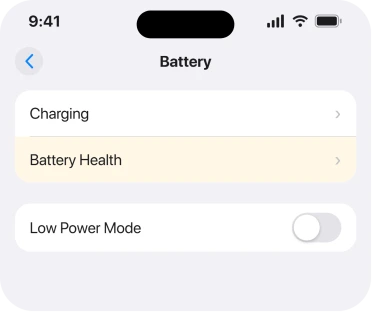
Cycle count is the number to look at, and Apple publishes what to expect. Batteries in iPhone 14 and earlier "are designed to retain 80 percent of their original capacity at 500 complete charge cycles under ideal conditions".
For iPhone 15 and later it is 1000 cycles.
Well past that, with maximum capacity in the seventies or lower, and your explanation is sitting on the screen.
Test 4: Wiggle the cable, which is the cheapest of the lot
Do this even if test 2 already cleared the port. It is free.
Apple: "Gently move the cable around at the connection to ensure that there is no intermittent connection. If the connection appears to be intermittent using a functioning charge cable, the iPhone charging connector may be faulty or damaged."
Then look into the port with a light. Apple's instruction is to clean it "using a small, non-metallic, soft-bristled brush". Phone off, and no compressed air.
Test 5: Understand why it looks perfect while plugged in
The explanation that makes the whole symptom make sense comes from the repair trade rather than from Apple.
On iFixit's thread about a phone that turns off when unplugged, the chosen answer from Minho sets out the mechanism:
"When the Tigris IC detects power from the Lightning port, it allows USB voltage to power the device instead of the battery. The U2 IC (Tristar) controls charging. Typically, no-charge or fake-charge indicates a Tristar problem."
Read that first sentence again. While the cable is in, your phone is running off the cable, not off the battery. So a cell that can no longer deliver current stays completely invisible until the moment you unplug.
Apple describes the same failure from the other end.
Apple, on battery and performance: "A battery with a high impedance might not be able to provide sufficient power to the system that needs it."
And: "A battery's impedance can increase if a battery has a higher chemical age."
Minho's answer names a second possible culprit, and it matters for test 6. The charging IC itself can be the fault rather than the cell, which is why a new battery does not always end this.
Test 6: Replace the battery, and know what to do if that fails
The last rung, and the one that costs money, so go into it with the right expectations. If tests 2 and 3 point at the cell, a battery replacement is your answer, and it is also the cheapest real repair an iPhone has.
Our page on what the part labels mean afterwards covers what your phone will say about it once it is done.
Now the part that explains why this test is last. Across the two iFixit threads on this exact symptom, seven answers between them, not one person reports a confirmed fix.
The consensus is a defective battery or a charging IC, and Minho's advice is to test with a known-good battery or to have "a qualified micro-soldering repair shop perform diagnostics".
One owner on the other thread does report a software recovery, restoring to factory settings without a backup, turning on battery saving and deleting apps she suspected, and describing the phone as "working perfectly again".
That was an iPhone 5, and nobody else reports the same, so I would treat it as a long shot rather than a step.
Battery first. And if a new battery does not fix it, ask about the charging IC by name rather than accepting that the phone is finished.
What this is not
Three other faults get called the same thing and none behaves like yours.
- A phone that will not turn on at all, cable or no cable. Different symptom, and the fix starts with a long charge.
- A phone that restarts on its own and comes back by itself. That is a reboot loop, and our page on an iPhone that keeps restarting sorts the kinds.
- A battery that runs down fast. Draining over an afternoon is a different problem from dying in three seconds off the cable.
What does not work
- Resetting All Settings, or erasing and restoring. No setting can raise the current a worn cell will deliver.
- Turning off Optimized Battery Charging. It changes when the phone charges, not what the battery can supply.
- A new cable or a bigger adapter. They matter for a phone that will not charge. This phone charges perfectly.
- A battery case as a permanent answer. It hides the fault, and you are still carrying a phone that cannot stand alone.
- Waiting for an iOS update. Apple treats the shutdown as intentional protection, so there is nothing for an update to correct.
Status: iOS 26.6, checked 17 August 2026. Apple lists this symptom by name in its battery group, doc 101969, and explains the shutdown mechanism on doc 101575 without linking the two.
Why does my iPhone turn off as soon as I unplug it?
Because while the cable is in, the phone is running on power from the cable rather than from the battery.
A cell that can no longer deliver enough current is therefore invisible until you unplug, at which point the phone loses its supply and shuts down to protect itself.
Does this mean I need a new battery?
Usually, and Battery Health will normally say so. But the repair trade's consensus on this exact symptom names two possible culprits, the cell and the charging IC, which is why a replacement battery does not always end it.
Could it be the charging port instead of the battery?
Test it in two minutes rather than guessing. Put the phone on a wireless charger with the cable unplugged. If it charges there and still dies when you take it off the pad, the connector is not the problem.
The Short Version
- Apple files this symptom under battery issues, not charging issues, which reorders everything.
- Charge it properly for half an hour first. A deep-discharged phone needs 20 to 30 minutes.
- A wireless charger clears the connector in two minutes, but unplug the cable first or the test is meaningless.
- Battery Health answers it for the majority. Look at cycle count against Apple's 500 or 1000.
- While plugged in the phone runs off the cable, which is why a dead cell only shows when you unplug.
- The repair trade names the charging IC as a second cause, so a new battery is not always the end.
- Nobody on either iFixit thread reports a confirmed fix, so go in expecting a repair rather than a trick.
Where to Next
A phone that works flawlessly on the cable feels like it should be an easy fix, and that appearance is exactly what the fault is made of.
Do test 2 and test 3 today. Twenty minutes, no money. Between them they tell you whether you are buying a battery or having a longer conversation.
And if a VPN reappears after you switch it off, that is not the phone deciding on its own.
A phone that is off raises a fair question about tracking it. Whether an iPhone is findable after power off has a clearer answer than most people expect.
If Battery Health looks healthy and it still dies off the cable, tell me the maximum capacity and cycle count in the comments, because that combination points somewhere quite specific.

Isaac Smith is the founder and editor of PC Glance, a website that covers computers, laptops, and technology. He is a tech enthusiast and a computer geek who loves to share his insights and help his readers make smart choices when buying tech gadgets or laptops. He is always curious and updated about the latest tech trends.