
The worst part of User Busy is not that your call failed. It is the small suspicion that creeps in afterwards, that the person you rang has decided not to take it. Two words, no ring, and a whole story invented in your head.
I know how frustrating that is when you need to reach somebody. Let me give you the answer straight away, because it will save you a lot of pointless tapping.
Your iPhone did not write those words. They came from the phone network, and the standard they come from says the network can send them by itself, with the person you called never knowing you rang.
What those two words actually are
User Busy is a telephone network status code. Your carrier tried to set the call up, something at the far end refused it, and the reason came back down the line to your screen.
The code is defined in the ITU standard Q.850, the shared list of reasons phone networks give each other when a call does not connect. Cause 17 is the one you are looking at.
The standard's definition, quoted from a published cause-code reference: "This cause is used to indicate that the called party is unable to accept another call because the user busy condition has been encountered. This cause value may be generated by the called user or by the network."
Read that second sentence twice. By the called user or by the network.
So it does not prove the person is on another call. It proves something between your carrier and their handset would not take it.
Fix 1: Ring three numbers, because that splits the whole problem
Two minutes, and it decides which half of this page you need.
Ring three different numbers you know work. A landline. A friend. Your own voicemail if you can.
- Only one fails. The problem sits at that number's end or on the route between the two carriers. Go to fix 2.
- Every number fails. That is your line, and fixes 4, 5 and 6 are yours.
- Your own callers hear it while your phone stays silent. That is a different fault again, and fix 3 is where to start.
- It changes depending on where you are standing. That is a coverage problem wearing a different label, and our page on an iPhone stuck on SOS or No Service is the better read.
Fix 2: If it is one number, stop trying to fix your phone
Several ordinary things produce this at the far end. None of them is personal.
- They are already on a call with no call waiting. The classic case, and the only one most pages mention.
- Their phone is off or has no signal, and their carrier answers for it rather than passing you to voicemail.
- Their line has a barring or billing block. Incoming calls get refused at the network before their handset is asked.
- You are blocked, but by their carrier rather than their phone. An iPhone block behaves differently, and our page on what blocking actually does explains why that one sends you to voicemail instead.
- Two carriers that route badly between each other. Rare, real, and it shows up as one specific number failing from one specific network.
Test it before you assume. Ring the same number from a different phone on a different network. If it fails there too, your iPhone was never involved.
Fix 3: If your callers hear it, check two switches in Phone
This is the version that costs people work, and its causes are nothing like the ones above.
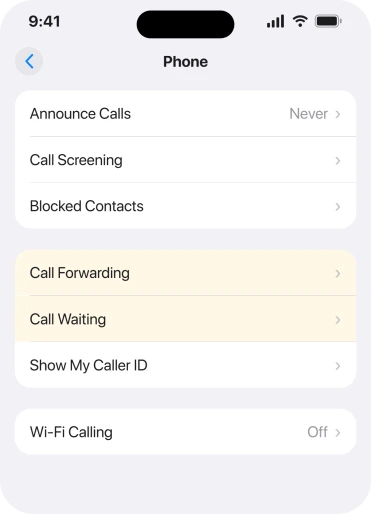
Start with Call Forwarding. If it is on and pointing at a number that cannot answer, your callers hit a wall while your phone stays silent all day. Check at Settings, then Apps, then Phone, then Call Forwarding.
Then check Call Waiting in the same place. With it off, a second caller is refused while you are on the first call, which is correct and reads to them as a rejection.
Then think about what else occupies the line. A FaceTime Audio call, a WhatsApp call and a data-only call all tie you up in ways your carrier may or may not know about.
Fix 4: Switch Voice and Data from 5G to LTE
This one came from owners rather than from Apple, and it is the fix I would try first if your callers keep hearing User Busy.
On Apple Community threads about not receiving calls because callers get User Busy, posters report going to Settings, Cellular, Cellular Data Options, then Voice & Data, choosing LTE instead of 5G, and calls starting to come through.
One describes calls from both contacts and unknown numbers arriving afterwards. This is user-reported and Apple documents no such fix, so give it ten seconds rather than treating it as a guarantee. It is free and it reverses instantly.
What makes it plausible sits on Apple's own page. Apple, on cellular data settings: "Depending on your network connection, you may not be able to receive calls while your iPhone transfers data over the cellular network".
Apple extends this to GSM's EDGE and GPRS connections, saying "incoming calls may go directly to voicemail during data transfers", and the same on CDMA 1xRTT. Apple documents a network state where data traffic stops calls reaching you.
Ours, and stated as reasoning: that is the same shape as what these owners describe, which is why changing how the phone registers on the network is a sensible thing to try.
I had this wrong in an earlier version of this page, where I listed turning 5G off under what does not work. The owner reports and Apple's own sentence together say otherwise, so it is fix 4 now.
Fix 5: Climb Apple's ladder once, in its order
If every number fails, run this sequence properly rather than at random.
Carrier settings update first, at Settings, General, About. Wait ten seconds on that screen for a prompt to appear.
Then any waiting iOS update.
Then, and only then, Reset Network Settings, which Apple warns "will erase all current saved settings, including Wi-Fi passwords, preferred networks, and VPN and APN settings that you've used before".
Our page on an iPhone showing Call Failed covers that ladder in full, including the one Wi-Fi test that separates your line from your handset.
Fix 6: Ring your carrier, with these four things written down
The last rung, and the one that ends it when the phone is genuinely not at fault.
Ask them to check four things by name. Whether your line is fully provisioned for voice. Whether any barring is applied to incoming calls. Whether there is a billing block on the account.
And whether the call reaches their network at all when somebody rings you.
That fourth one is the useful one. They can see whether the call arrived and what their own network did with it, which is the one piece of evidence neither of us can get at.
If they start telling you to reset network settings and reinstall things, bring them back to the account. The message came from their side, not from iOS.
What does not work
- Erasing the phone. The message is generated off your device. A clean install produces the same result on the same line.
- Taking the SIM out and putting it back. Useful when a phone cannot read the card at all, which shows a different message entirely.
- Calling repeatedly. If the network generated the code, repeating the call reproduces it. Wait a few minutes.
- Blaming the person. The standard lets the network send this without their handset ever ringing, so they may genuinely not know.
- Looking for a User Busy setting in iOS. There is not one, and Apple never uses the phrase.
Status: iOS 26.6, checked 17 August 2026. User Busy is ITU cause 17 and is passed to your iPhone by the network. Apple's page for failed calls, doc 118427, does not use the phrase.
What does User Busy mean on an iPhone?
It is a network status code, ITU cause 17, meaning the far end could not accept the call. The standard allows the network to send it on the called party's behalf, so it does not prove they are on another call or that they rejected you.
Does User Busy mean I have been blocked?
Not by an iPhone. Apple's blocking sends you to voicemail rather than producing this code. A carrier-level block on their line can produce it, which is a different thing and not something either of you sets in Settings.
Why do my callers hear User Busy when my iPhone is free?
Check Call Forwarding and Call Waiting at Settings, Apps, Phone first. Owners also report that switching Voice and Data from 5G to LTE clears it, and Apple documents network states where data traffic stops incoming calls reaching you.
If neither helps, ask your carrier whether the calls are reaching their network.
The Short Version
- Your iPhone did not write those words. The network did, and the standard lets it send them alone.
- Ring three known-good numbers first. One failing and all failing are different problems.
- One number failing means their end. Nothing on your phone reaches it.
- If your callers hear it, check Call Forwarding and Call Waiting before anything else.
- Owners report switching Voice and Data to LTE fixes the incoming case, and it is free to try.
- Apple's own ladder is carrier settings, then iOS, then Reset Network Settings, in that order.
- Ask your carrier whether the call reaches their network at all, which is the evidence you cannot see.
Where to Next
Two words with no explanation anywhere official, arriving at the exact moment you need to reach somebody, is a rotten combination.
Ring three numbers first. That one test tells you whether to keep reading or to stop worrying, and it is quicker than any fix on this page.
If your callers keep hearing it after the LTE change, tell me which carrier you are on and whether it happens on every call or only some, because that pattern points at very different things.

Isaac Smith is the founder and editor of PC Glance, a website that covers computers, laptops, and technology. He is a tech enthusiast and a computer geek who loves to share his insights and help his readers make smart choices when buying tech gadgets or laptops. He is always curious and updated about the latest tech trends.