
You are holding a brand new iPhone, you have just signed in, and the screen that was meant to list your backups says there are none.
Of all the moments to see that, this is the worst one, and I am sorry you are standing there with your stomach dropping.
Read the next line before you do anything else. An empty backup list does not mean your photos, messages and contacts are gone.
Apple keeps two completely different things in iCloud and only one of them shows up on that screen. Work down these seven and stop at the one that is yours.
Read this before you do anything: an empty list is not an empty account
Two things. iCloud Backup is a snapshot of your old phone. iCloud sync keeps things like Photos and Messages living in iCloud all the time.
The setup screen lists only the first. Sync is invisible on it, and sync is where most of what you care about actually lives.
Apple, on backup methods: "iCloud backups include all the information and settings stored on your device that don't already sync to iCloud."
Read that the other way round. Anything already syncing is deliberately left out of the backup, because it does not need to be in there.
So finish setting the phone up as new. Sign in with the same Apple Account, get on Wi-Fi, and give it an hour. A great deal may simply arrive.
Fix 1: Sign in and wait, because much of it comes back by itself
Apple prints exactly what a backup leaves out, because it is already in iCloud. That list is your recovery list.
Apple: iCloud backups do not include "Notes that you already store and sync in iCloud", "Photos, if you turned on iCloud Photos", "iMessages, text (SMS) and multimedia (MMS) messages, if you sync messages with iCloud", "Data stored in other cloud services, like Gmail and Exchange mail", and "Apple Mail data".
Photos. Messages. Notes. Mail. That is the overwhelming majority of what you were probably afraid of losing.
The condition matters, so check rather than hope. On the old phone, or at iCloud.com in any browser, look at whether Photos and Messages were switched on for iCloud.
If you can still see your photos at iCloud.com, they are not lost. It does not matter what the setup screen said.
Contacts, Calendars, Safari bookmarks and passwords all behave the same way. Account data, not backup data.
Fix 2: Check the account, the region and the connection
An empty list is often a wrong-account problem, not a missing-backup one. Sign in with the exact account the old phone used, not a newer one and not a work one. Two accounts is by far the commonest cause of this screen.
Check the country or region on the account too, if you have more than one Apple Account across countries. Wi-Fi matters as well, since the list is fetched over the network, and a weak connection at a phone shop can show nothing at all.
A software version mismatch is another cause. Apple: "If a message says that you need a newer version of software, follow the onscreen steps to update." A backup made on a newer iOS will not open on an older one.
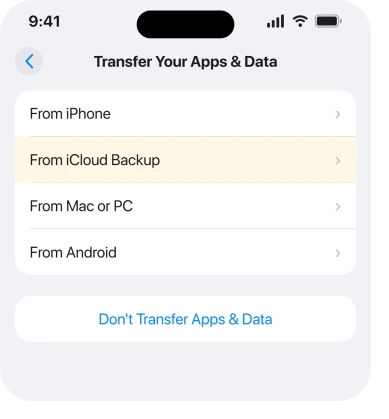
Fix 3: If you still have the working old phone, skip backups entirely
I would say this before you spend another minute on that screen.
A direct transfer from your old phone to the new one does not need a backup to exist at all. It copies across without iCloud being involved in the decision.
Our page on transferring straight from the old iPhone covers that route, including what to do when it stalls.
Fix 4: Prove from the old phone whether a backup exists at all
Do this from the old phone if you still have it. It takes a minute and it settles the question.
Open Settings, tap your name, tap iCloud, tap Storage or Manage Account Storage, then tap Backups.
Every device that has ever backed up to that account is listed there, with a date. No entry means no backup was made, and Apple does not keep a second hidden copy anywhere. Retrying on the new phone will not produce one.
If the old phone is gone, sign in at iCloud.com on a computer with the same account. Look at what is there. Photos, notes and contacts showing up is the good news you need.
Fix 5: If the backup was made on a newer iOS, update first and then erase
This is the case people give up on, and there is a documented way through it. A backup made on a newer version of iOS will not open on an older one. Apple's setup screen asks you to update when it hits that case.
Apple: "If a message says that you need a newer version of software, follow the onscreen steps to update."
The route that gets you there is well known among owners, and Apple does not spell it out in one place. Finish setting the phone up as new, then go to Settings, General, Software Update and install the latest iOS.
Then Settings, General, Transfer or Reset iPhone, Erase All Content and Settings, and choose to restore from the iCloud backup during setup.
Only do that on a phone you have just set up as new and have not put anything on it yet. Erasing is not reversible, and anything you have added since will go with it.
Once your phone is on the same iOS version or newer, the backup appears in the list where it was invisible before.
Fix 6: Check the date, because a backup expires 180 days after it stops
This one explains a backup that used to exist and does not now.
Apple, on managing iCloud storage: "iCloud backups are available for 180 days after you disable or stop using iCloud Backup."
So a phone that stopped backing up keeps its last backup for six months, then loses it. Storage filling up is enough to start that clock.
Do one thing for the phone you are holding now. Turn iCloud Backup on and let it run overnight, so the next time you are in this position the list is not empty.
Our page on an iPhone that says storage is full while iCloud has space explains why those two numbers disagree.
Fix 7: If the old phone is gone, recover what was syncing
Then a backup either exists in that account or it does not. Nothing you do on the new phone changes that answer.
What you can still recover is everything that was syncing. Sign in and wait. Then check Photos, Messages, Notes, Contacts and Calendar, one at a time.
What you will not get back is app data that lived only on the phone, your Home Screen layout, and settings. Apple documents those as backup-only, so they live there and nowhere else.
Check your computer too, if you ever plugged the old phone into one. A backup made through Finder or iTunes is a separate copy. It is not listed on that setup screen at all.
What does not work
Erasing the new phone and starting again does not help. The list is read from your account, and the same account gives the same result. Waiting on the setup screen does not help either. If no backup exists, no amount of time produces one.
Buying more iCloud storage now does not help either. Storage governs new backups. It does not resurrect a deleted one.
A recovery app that promises to pull a deleted iCloud backup will not work either. Apple deletes them, and nothing on your new phone can reach a backup that is not there.
Signing in with a family member's account will not work either. Backups are not shared through Family Sharing, and you will only add a second wrong account to the confusion.
Status: iOS 26.6, checked 17 August 2026. Apple states that a backup excludes anything already syncing to iCloud, and that a backup survives 180 days after iCloud Backup is switched off.
Why does my new iPhone say no backups available?
Usually because you signed in with a different Apple Account than the old phone used, or because iCloud Backup was never on, or because it was switched off more than 180 days ago.
It can also mean a weak connection, since the list is fetched over the network rather than stored on the phone.
Will I lose my photos if there is no iCloud backup?
Not if iCloud Photos was on. Apple leaves photos out of the backup precisely because they already live in iCloud, so they come back when you sign in. Check at iCloud.com from any browser before assuming anything is lost.
Can I get an iCloud backup back after it is deleted?
No. Apple keeps a backup for 180 days after you stop using iCloud Backup and then removes it, and there is no restore path afterwards. Anything that was syncing rather than backing up is unaffected by that.
The Short Version
- An empty list means no snapshot exists. It does not mean your data is gone.
- Apple leaves photos, messages, notes and mail out of backups because they already sync.
- Sign in with the same Apple Account, get on Wi-Fi, and give it an hour before drawing conclusions.
- The commonest cause of an empty list is signing in with the wrong account.
- Still have the working old phone? Transfer directly and skip backups altogether.
- Check whether a backup exists at all from the old phone, at Settings, your name, iCloud, Storage, Backups.
- A backup made on a newer iOS is invisible until you update, then erase and restore.
- A backup lasts 180 days after iCloud Backup is switched off, then Apple removes it.
Where to Next
That screen is written as though a missing backup means a missing life. It does not. It lists one specific thing, and it says nothing about the much larger pile already sitting in your account.
Sign in. Wait. Then open Photos and Messages and look. More often than not the fright turns out to be worse than the loss.
If you sign in and Photos really is empty at iCloud.com too, say so in the comments and tell me whether the old phone still switches on. That changes what I would try next.

Isaac Smith is the founder and editor of PC Glance, a website that covers computers, laptops, and technology. He is a tech enthusiast and a computer geek who loves to share his insights and help his readers make smart choices when buying tech gadgets or laptops. He is always curious and updated about the latest tech trends.