
You tried to send a text and got back the words Message Blocking Is Active, and the first thing your brain did with that was decide the other person has blocked you. I know exactly how that reads, and it is worrying.
I would have thought the same.
They have not. That message is not about them at all. It came from your own carrier, refusing to carry that particular text, and it only ever appears on green messages. Work down these six and stop where yours lands.
The short answer, and what it rules out straight away
Your iPhone handed the message to your carrier's network and the network sent it back. Nothing about that involves the person you were writing to.
That is also why the message says blocking rather than failed. A block is something the network applies to your line or to that destination, deliberately, on somebody's instruction.
Two things follow immediately. The recipient's phone is not involved, and no setting on your iPhone caused it.
There is a small amount to check on your end anyway, and then the conversation moves to your carrier.
Fix 1: Look at the bubble color, which proves whose problem this is
Blue and green are two completely different delivery systems, and only one of them touches your carrier.
This is documented by Apple, in the difference between iMessage, RCS and SMS or MMS: RCS "is a carrier-provided service", and Apple says that when your device connects, "it communicates with your carrier and their partners to set up RCS".
iMessage does not work that way. It goes over the internet through Apple, which is why a blue thread keeps working while a green one refuses. Apple does not route a green message at all, so it has no part in this.
So look at the bubble before anything else. If your blue messages are sending normally and only green ones fail, you have just confirmed this is a carrier matter without making a single phone call.
Our page on why Messages will not send photos covers the blue and green split in more detail, including the switch that has to be on for a green thread to carry a picture at all.
Fix 2: Turn on MMS Messaging and Send as SMS
None of these is likely to be the cause, and doing them first means the carrier cannot send you away to try them.
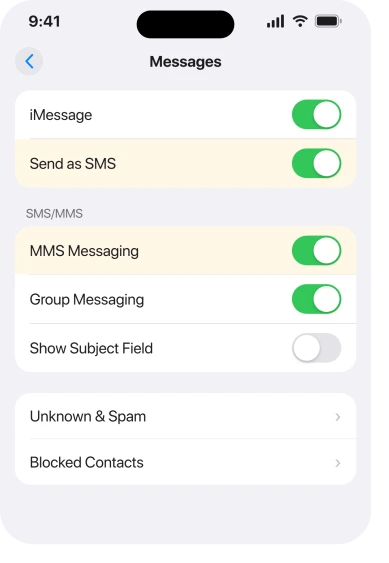
Go to Settings, tap Apps, tap Messages, and check that MMS Messaging is switched on, since without it a green thread cannot carry a picture or a group message.
Send as SMS lives on the same screen, and it lets a failed iMessage fall back to a text. If it is off, some messages simply never try the other route.
A number saved without a country code can fail on some networks too, and adding the code to the contact is free to try.
Fix 3: Force a carrier settings update, which is free
Do this one before you ring anybody. It takes twenty seconds. Go to Settings, tap General, tap About, and wait on that screen for about ten seconds. If a carrier settings update is waiting, a prompt appears and you tap to install it.
Carrier settings carry the provisioning your line uses for messaging, and a stale set can leave a phone behaving as though a restriction is in place when the account is fine.
This is not a documented fix for this alert, and Apple makes no such claim. It is still the one phone-side step that touches the same machinery the carrier controls, which is why it belongs here rather than in the things that do not work.
Fix 4: Work out which of the five kinds of carrier block you have
This part is ours rather than Apple's, since Apple never documents what a carrier restricts. A network can refuse messages on your line for several reasons, and they are not all punitive.
An unpaid or past-due account is one: messaging is often the first service restricted while calls and data carry on, which is why it reads as a phone fault.
A plan without text messaging is another, or one where SMS and MMS are bought separately from data, common on prepaid and on very cheap plans.
If it is premium or short-code messages being blocked, that is the one that catches people out.
Short codes are the five and six digit numbers used for verification codes and business replies, and many carriers block them by default on some plans.
A parental or usage control on the line is another cause, and on a family account the account holder can restrict messaging for one number without the person on that number knowing.
And the carrier's own message-blocking service, sold as a spam or cost control, is sometimes switched on during a plan change without anybody mentioning it. None of those five is a fault on your iPhone, and none can be fixed from Settings.
Fix 5: Run the two-phone test to narrow it down
Two minutes with a second phone narrows it right down. Send a plain text, no picture and no group, to a number you know works, then send the same thing to the number that failed.
Everything failing, to every number, points at the line itself: unpaid, restricted, or a plan without messaging.
Only one destination failing points at a block on that kind of destination instead. If it is a five or six digit number, it is almost certainly the short-code block.
Plain texts working while pictures fail is MMS specifically, a separate permission on many plans.
And if it started the day something changed on the account, like a plan switch or a new line, that points at a setting applied during that change.
Our page on blocked numbers that still get through is the one to read if you actually do want to know how iPhone blocking behaves, because it works nothing like this.
Fix 6: Ring the carrier, and ask about short codes by name
Being specific gets this fixed in one call rather than three.
Ask them to check four things by name: is there any messaging restriction or block on the line, does the plan include SMS and MMS, is short code or premium messaging blocked, and is a parental or usage control applied to your number.
Then ask them to reprovision the line for messaging. That is routine and it takes them minutes.
If the person on the phone starts telling you to reset network settings or reinstall Messages, politely bring them back to the account. The message you received is generated on their side.
What does not work
Restarting the phone does nothing here. The restriction lives on the network and survives everything you do to the handset, and a carrier settings update is the one exception, which is why it is fix 3 rather than here.
Reset Network Settings costs you every saved Wi-Fi password and still cannot reach an account restriction. Erasing and restoring fails for the same reason, at far greater cost.
Turning iMessage off and on only affects the blue path, and the failure is on the green one. Removing and re-inserting the SIM does not touch it either. A phone that cannot read its SIM shows a different message entirely.
Waiting does not help, no matter how long. A block stays until somebody removes it.
Status: iOS 26.6, checked 17 August 2026. Apple documents SMS, MMS and RCS as carrier-provided services, and publishes no page for this message, which is generated by the carrier network.
What does Message Blocking Is Active mean on an iPhone?
It means your carrier refused to send that text. The restriction sits on your line or on that type of destination, and it is applied by the network rather than by your iPhone or by the person you were messaging. It only affects green messages, because those are the ones that travel through your carrier.
Does Message Blocking Is Active mean someone blocked me?
No. Blocking on an iPhone works differently and does not produce this message. If somebody blocks you, your message usually appears to send normally. This alert comes back from your own network before the message ever reaches the other person.
How do I turn off message blocking on my iPhone?
You cannot, because it is not a setting on the phone. Ring your carrier and ask them to check for a messaging restriction on the line, whether the plan includes SMS and MMS, whether short code messaging is blocked, and whether a parental or usage control is applied to your number.
The Short Version
- The message comes from your carrier, not from the recipient and not from your iPhone.
- Check MMS Messaging and Send as SMS, then force a carrier settings update at Settings, General, About.
- It only appears on green messages, because those are the ones your carrier carries.
- If blue messages still send normally, that alone confirms it is a carrier matter.
- Check MMS Messaging and Send as SMS at Settings, Apps, Messages, so the carrier cannot send you away.
- Failing to every number points at the line. Failing to one destination points at a block on that kind of number.
- Five and six digit numbers are short codes, and many plans block them by default.
- Ask the carrier about restrictions, plan inclusions, short-code blocking and parental controls, by name.
Where to Next
One word on that alert does an enormous amount of damage, because blocking sounds personal and this is the least personal thing your phone can tell you.
Look at the bubble color, do the two-minute check in Messages, then ring the carrier with the four questions written down. That sequence ends it.
Unwanted invitations arrive through a different door entirely. iPhone calendar spam explains why blocking a number does nothing about it.
If your carrier insists there is no restriction on the line and green messages still fail, tell me whether it is every number or only some, and I will help you work out what to push them on.

Isaac Smith is the founder and editor of PC Glance, a website that covers computers, laptops, and technology. He is a tech enthusiast and a computer geek who loves to share his insights and help his readers make smart choices when buying tech gadgets or laptops. He is always curious and updated about the latest tech trends.