
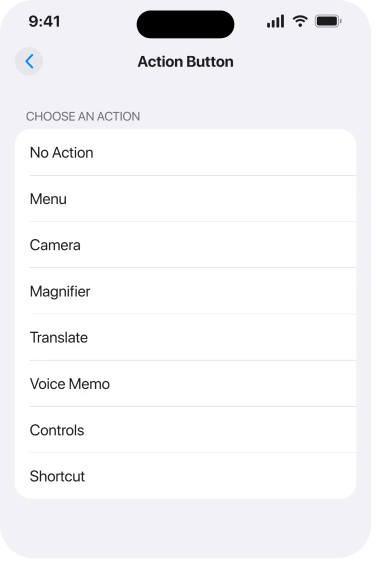
You updated, went to set the Action button back to silencing your phone, and Silent Mode is not in the list. Shortcut is there, Camera is there, Translate is there. The one thing that button existed for has gone.
I know how daft that feels on a phone that cost what yours did, so let me tell you exactly what this is.
Status: reported from 23 September 2025 on iOS 26, on some iPhone 15 Pro and iPhone 16 Pro units. One owner reported a later iOS update clearing it. Last checked 17 August 2026 on iOS 26.6.
This does not affect everyone, and that is the confusing part
Say this early. It changes how you read every other page on the subject.
Plenty of owners on the same builds still see Silent Mode at the top of their Action button list, exactly where it belongs. One poster on a forum thread wrote that it showed up as the first option for them.
So this is not a feature Apple removed. It is a fault that lands on some phones and not others.
Apple does not acknowledge it anywhere I could find, which is why the advice you meet is contradictory and nobody can reproduce it on demand.
1. Check what your list actually says
Do this before anything else, because two different problems get called the same thing.
Go to Settings, then Action Button. Swipe through the carousel. Read every option properly.
An owner who hit this listed what remained on their iPhone 16 Pro: no action, menu, shortcut, controls, magnifier, translate and voice memo. Silent Mode simply was not among them.
If yours shows Silent Mode and it just does not work when pressed, that is a different problem, and our page on iPhone buttons not working is the right read.
2. The suggested fix that does not work
I am putting this second on purpose, because it is what you will be told everywhere and it is worth knowing before you spend time on it.
A community moderator on the Apple forum thread suggested the ring switch had to be visible first:
"Turns out if it wasn't on, it won't be an option in Action Button options", pointing at Show in Status Bar under Settings, Sounds & Haptics.
The owner tried it. The toggle put the phone straight into silent mode, so the feature itself was working perfectly. Silent Mode still did not appear in the Action button list.
So by all means check Sounds & Haptics while you are there. Do not expect it to fix this.
3. Update, because that is what cleared it for the one person who got it back
The only reported resolution, and it came from waiting rather than from a setting.
The owner who opened the forum thread on 23 September 2025 came back on 18 October and wrote: "latest iOS update delivered and the bug is gone."
That is one person and one outcome, not a guarantee. But it is the only thing here that has restored the option for anybody. Reading it as a likely fix rather than a proven one is ours.
Go to Settings, General, Software Update and install whatever is offered. Already current and still missing it? Then you are where they were before that update landed.
4. Use Control Center in the meantime
The stopgap. One gesture rather than none.
Swipe down from the top right and tap the bell icon, which is the same silent mode by a different route.
Apple gives Control Center as the route on supported models in its ringtone documentation, and then adds the line that stings a bit when you are in this position.
Apple: "You can also configure the Action Button to turn the ringer on or off."
Also. As though it were the easy alternative rather than the thing you came here about.
5. Build it as a Shortcut and assign that
The workaround that gets your button back, and it came from another owner rather than Apple.
The Action button can run a Shortcut. A Shortcut can toggle silent mode. So even with the option missing, you can put the same behaviour on the button by a longer route.
In Shortcuts, make one that sets silent mode on or off. Then go to Settings, Action Button, choose Shortcut, and pick it.
It is not identical to the built-in option, though. A shortcut takes a moment to fire, and you may see a banner when it runs.
For a button you press in a cinema, that delay is the whole difference. That is why this is rung 5 rather than rung 1.
6. If nothing has worked, get it recorded
Because a fault that only some phones have needs volume behind it to get attention.
Send Apple feedback with your model, your exact iOS build and what your Action button list contains. If you can reach a Genius Bar, let them log it.
If your ringtone also changed on its own after the update, that is a separate thing with its own causes.
The owners who reported this had it for weeks. It cleared for one of them with an update, which suggests Apple did fix something. Cases are how the next one gets found.
What does not help
- Resetting the Action button to No Action and back. The option is missing from the list, so there is nothing to select.
- Reset All Settings. No report supports it, and it clears your Wi-Fi passwords, wallpaper and every app permission.
- Toggling Show in Status Bar. Tried and reported as not working, which is rung 2.
- Restoring from a backup. Nobody reports this restoring the option, and it costs you a day.
- Assuming your button is broken. If a long press still opens the menu, the hardware is fine and this is software.
Status: iOS 26.6, checked 17 August 2026. Apple has published nothing about this. Everything here comes from owner reports, and the only reported resolution was a later iOS update.
Why is Silent Mode missing from my Action button in iOS 26?
Nobody has established why. Owners reported it from September 2025 on some iPhone 15 Pro and 16 Pro units, while other owners on the same builds still see the option.
Apple has published nothing about it and has not acknowledged it in release notes.
Does turning on Show in Status Bar bring Silent Mode back?
It did not for the owner who tried it. Toggling that setting silenced their phone immediately, proving the feature worked, but Silent Mode still did not appear in the Action button list. Check it anyway, then move on.
How do I silence my iPhone without the Action button?
Open Control Center and tap the bell icon, which is Apple's own documented alternative.
You can also build a shortcut that toggles silent mode and assign that to the Action button, though it fires slightly more slowly than the built-in option.
The Short Version
- It is a fault on some phones, not a feature Apple removed. Others on the same build still have the option.
- Read your whole Action button list first, because a button that does nothing is a different problem.
- Show in Status Bar is the advice everywhere and it did not work for the owner who tried it.
- A later iOS update restored it for the one person who reported getting it back.
- Control Center silences the phone in one gesture in the meantime.
- A Shortcut assigned to the button gets the behaviour back, with a slight delay.
- Do not reset or restore over this. Nothing supports either.
Where to Next
The thing to hold on to is that your phone is not broken and Apple did not take the feature away.
Some phones came out of the update with an option missing from a list, and at least one of them got it back from a later update without the owner doing anything clever.
Update, use Control Center while you wait, and put a shortcut on the button if you press it every day.
If you have this, tell me which iPhone and which exact iOS build you are on, because the reports so far are 15 Pro and 16 Pro and nobody has worked out what those two have in common with each other and not with everybody else.

Isaac Smith is the founder and editor of PC Glance, a website that covers computers, laptops, and technology. He is a tech enthusiast and a computer geek who loves to share his insights and help his readers make smart choices when buying tech gadgets or laptops. He is always curious and updated about the latest tech trends.