
Your phone rings and it is the wrong sound. Not the tone you have used for years, and on some phones not even the person's own tone any more. Nobody touched it.
That is a small thing that nags at you every time the phone rings, and I can usually name which of six things did it.
Most of them are recoverable. One of them is not really a fault at all.
1. The tone you had is now a text tone, not a ringtone
Start here if the tone that vanished was an older Apple one, because this is a rule rather than a bug.
Apple keeps ringtones and text tones in separate lists. It has moved tones between those lists over the years. A tone that used to be a ringtone can end up classed as a text tone only.
At that point your phone has nowhere to put it and falls back to the default.
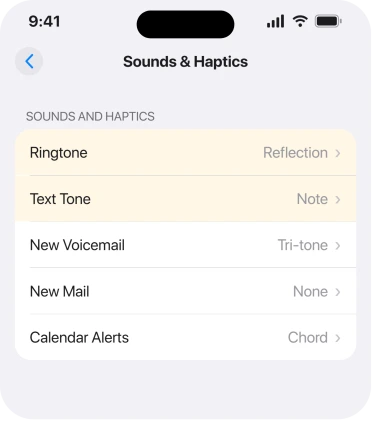
Apple documents Ringtone and Text Tone as separate choices in the same screen.
A Community+ member on Apple's forum explained what that means in practice, on a thread from somebody whose ringtone had changed to Reflection.
"With the launch of iOS 17, Apple introduced a distinction between Ring Tones and Text Tones. Minuet is a text tone. It can no longer be selected as a ringtone."
So if your old tone is missing from Settings, Sounds & Haptics, Ringtone, scroll to Text Tone and look there. Finding it in the wrong list is your confirmation.
There is no way to move it back. Pick the closest replacement and stop wondering.
2. Your per-contact tones are being reset by iCloud Contacts
This is the one that will actually annoy you, and it is user-found rather than documented.
Per-contact ringtones live on the contact card, not in Sounds & Haptics. Apple's route: open Contacts, tap a person, tap Edit, then Ringtone.
Because they live on the card, they sync. And on a community thread about ringtones reverting, the owner traced it exactly there. Their custom tones kept reverting to the default whenever iCloud Contacts sync was on with a second device.
In their words, "iCloud must not recognize them and reverts to whatever it wants". If that matches what you are seeing, rung 3 is your decision to make.
The same owner noticed the boundary, and it is the useful part: "It does not change it to the default if I change the ring or text tone to one of Apple's tones." Apple's own tones survive the sync. Custom ones do not.
Another owner on the same thread reported the same thing happening to tones they had paid for.
3. The workaround, and what it costs you
Only one thing was reported as stopping it, and it is a trade.
The same owner found that turning iCloud Contacts sync off kept their assignments: "If I turn off contacts for iCloud it of course will keep whatever ringtone I assigned."
That switch is at Settings, your name, iCloud, Contacts. If your alarm rather than your ringtone is the problem, that is a different screen entirely.
Think before you flip it. With iCloud Contacts off, your contacts stop syncing to your other devices, and they stop backing up to iCloud too.
Make sure they exist somewhere else first. This is the one step here that can lose you data. For one custom ringtone, that is a bad trade. For somebody who has assigned forty of them, it might not be.
4. Purchased tones that vanished can be pulled back
Quick and free, and almost nobody knows the button exists.
If you bought tones from Apple and they disappeared after an update or a restore, they are not gone.
Apple: "Tap Download All Purchased Tones. You might not see this option if you already downloaded all the tones that you purchased or if you haven't purchased any tones."
The route: Settings, Sounds & Haptics, then tap any item under Ringtone and Alerts. The button sits at the foot of that list.
Apple adds the reassurance on the same page: when you purchase ringtones from Apple you also have the option to permanently download them to a compatible device.
5. Tones you made yourself do not survive the same way
Narrower, and it turns on the difference between two kinds of custom tone.
A tone you bought is tied to your Apple Account and can be redownloaded. That is rung 4. A tone you made on a computer and synced across is not. It lives on the phone as a file, and a restore, a reset or a new phone can leave it behind.
Was your missing tone homemade? Then check the computer you made it on before you assume the phone lost it.
And if calls are arriving with no sound at all rather than the wrong sound, start here instead.
That is also why the Download All Purchased Tones button will not bring it back. Nothing was purchased, so there is nothing to redownload.
6. Check whether it is one contact or the whole phone
Last, because it decides which of the other five you are in. Ten seconds, tops.
Ask someone to ring you. Or ring yourself from another phone. Then compare it against what happens when a different person rings.
- Every caller gets the wrong tone: your main ringtone changed. That is rung 1, or somebody changed it in Sounds & Haptics.
- One caller gets the wrong tone and everybody else is fine: that contact's assignment was wiped. That is rung 2.
- Everyone gets the default and your old tone is missing from the list entirely: that is rung 1, rung 4 or rung 5, depending on where the tone came from.
Doing this first would save most people the rest of the page, which is why I would run it before changing a single setting.
What does not help
- Restarting. None of these is a temporary glitch, and all of them survive a reboot.
- Reset All Settings. It clears your Wi-Fi passwords, wallpaper and permissions, and it does not restore a tone or an assignment.
- Updating iOS. Reported as making no difference to the contact-sync problem, and rung 1 is a deliberate change rather than a bug awaiting a patch.
- Toggling iCloud Contacts off and on again. Reported as not fixing it. Only leaving it off held the assignments.
- Re-buying the tone. Check Download All Purchased Tones first. You already own it.
Status: iOS 26.6, checked 17 August 2026. Apple documents the separate ringtone and text tone lists and the redownload button. The iCloud Contacts sync reset is user-reported only.
Why did my iPhone ringtone change by itself?
Usually because the tone you had is now classed as a text tone rather than a ringtone, so the phone fell back to the default. Check Settings, Sounds & Haptics, and look for your old tone under Text Tone instead of Ringtone.
Why do my contact ringtones keep reverting to default?
Owners have traced this to iCloud Contacts sync with a second device, which appears to reset custom tones while leaving Apple's own tones alone.
Turning iCloud Contacts off held the assignments for the owner who reported it, at the cost of syncing and backup.
How do I get back a ringtone I paid for?
Go to Settings, Sounds & Haptics, tap any item under Ringtone and Alerts, then tap Download All Purchased Tones. Apple notes you will not see the option if you have already downloaded everything you bought or have never bought a tone.
The Short Version
- Apple keeps ringtones and text tones in separate lists, and a tone can move between them.
- If your old tone is missing, look for it under Text Tone before assuming it was deleted.
- Per-contact tones live on the contact card, so they sync, and custom ones get reset.
- Apple's own tones survive that sync. Custom and purchased ones are the ones that revert.
- Turning off iCloud Contacts held the assignments, but it stops contacts syncing and backing up.
- Download All Purchased Tones brings back anything you bought from Apple.
- A tone you made yourself is not purchased, so that button will not help.
- Test with two different callers first. It tells you which problem you have in ten seconds.
Where to Next
The thing that makes this feel worse than it is: two completely different problems share the same symptom. One is Apple reorganising its own tone lists, which is permanent and harmless.
The other is a sync that quietly undoes work you did on your contacts, which is not harmless at all.
Run the two-caller test before you change anything, then read only the rung it points you at.
If your contact tones keep reverting, tell me whether you have a second Apple device signed in to the same account, because every report of that one involves a second device and it would be good to know if that holds.

Isaac Smith is the founder and editor of PC Glance, a website that covers computers, laptops, and technology. He is a tech enthusiast and a computer geek who loves to share his insights and help his readers make smart choices when buying tech gadgets or laptops. He is always curious and updated about the latest tech trends.