
Your group chat has no box to type in. Everyone else is talking away, and at the top of the screen sits the word Encrypted with a little padlock.
Being shut out of a conversation you can still read is genuinely annoying, and I need to take that word off the table first. The padlock is not your problem. It is the normal label on a normal iMessage group.
A Level 4 member told somebody in your exact position the same thing: the Encrypted label is normal and not the root issue. So the real question is why the text field went. There are six answers.
1. Somebody removed you from the group
Start here, because it is the commonest cause and because nothing you change on your phone will fix it. Get removed from an iMessage group and the conversation stays in your list.
You can still read every message in it. But the text field goes, because you are no longer a participant. That is the whole trick of it. Nothing looks broken. You just cannot speak.
Apple documents the action from the other side, on its group conversation page:
"To remove someone from a group conversation in iMessage, touch and hold their icon, then tap Remove from Group."
So it is one long press for whoever did it, deliberate or not.
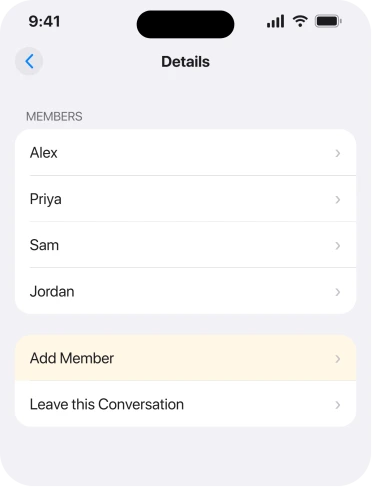
The test is the participant list. Tap the row of icons at the top of the conversation. If your own name is not among them, this is your answer, and the fix is to ask somebody in the group to add you back.
2. Ask to be removed and re-added
The direct follow-on from rung 1, and the step the community reply pointed at. That Level 4 member's advice, for the case where the text box is missing in one specific group only, was to ask someone to remove and re-add you to the chat.
It sounds circular. It works because being re-added rebuilds you as a participant, which is what restores the field.
Be straight about the limits. No reply on that thread came back to confirm it. So this is advice from an experienced member, not a fix somebody proved. Still the right thing to try, because rung 1 explains why it should work.
3. Check iMessage is actually on
Quick, and it explains the case where every group is affected, not just one. Go to Settings, Apps, Messages, and confirm iMessage is on.
If it is off, or stuck on Waiting for activation, a blue group conversation has nothing to send through.
Close Messages fully first, then restart the phone, then look again. A stuck activation often clears on the way back up.
If whole conversations have gone missing rather than just the text box, that is a different fault and our page on disappearing messages covers it.
If yours will not activate at all, that is its own fault and our page on iMessage refusing to activate goes through it properly.
4. The group is green, and you are missing two switches
Narrower, and it catches the mixed groups where somebody is on Android. Apple: "If one or more of your recipients isn't using iMessage, messages appear in green bubbles instead of blue ones."
A green group is not iMessage. It runs on your carrier, and it needs MMS Messaging and Group Messaging switched on at Settings, Apps, Messages. Either one off can leave you unable to contribute.
Those two rows only appear on some carriers and plans. Cannot see them at all? Then your plan does not carry group MMS. That is a call to your network, not a setting on your phone.
5. It is a two-person chat wearing a group's clothes
Small, specific, and it catches people out. Apple states the rule plainly: "If you only have one other person in the conversation, you need to start a new group conversation to add someone else."
So a thread you think of as a group, with only two people left in it, stops behaving like one. People leave one by one, two of you remain, and what you are looking at is no longer a group.
There is one route out. Start a fresh group with the same people.
6. Force close, restart, and only then rebuild the thread
Last, and it is the destructive one. Rungs 1 to 5 explain most cases anyway. Swipe Messages away from the app switcher and reopen it. If that does nothing, restart the phone properly.
Field still gone in that one conversation, with your name in the participant list? Then the thread itself has broken, not your membership.
Deleting the conversation deletes your copy of it permanently. Before you do that, save anything in it you want, because leaving a group and deleting a thread are not undoable from your side. Then start a new group with the same people.
What does not help
- Chasing the word Encrypted. It is the standard label on every working iMessage group.
- Turning iMessage off and on for a single broken group. That affects every conversation and leaves this one unchanged.
- Updating iOS. No report ties this to a version, and it happens on green and blue groups alike.
- Asking the sender to resend. You can already see the messages. The missing thing is your ability to reply.
- Resetting network settings. It wipes your saved Wi-Fi passwords and does not restore group membership.
Status: iOS 26.6.1, checked 18 August 2026. Apple documents the removal action, the green-bubble rule and the two-person rule. The remove-and-re-add step is a community answer, unconfirmed.
Why can I not type in a group chat on my iPhone?
Most often because you were removed from the group. The conversation stays in your list and stays readable, but the text field goes because you are no longer a participant. Check whether your name is in the group's icon list.
What does Encrypted mean at the top of a group chat?
Nothing is wrong. It is the standard label telling you the conversation is end-to-end encrypted iMessage. It appears on working groups too, so it is not the reason your text box is missing.
How do I get back into a group chat I was removed from?
Only somebody still in the group can add you. Ask them to remove and re-add you, or to start a fresh group, because there is no way to rejoin an iMessage group from your own phone.
Why is my group chat green and missing the text box?
A green group is carrier messaging rather than iMessage, so it needs MMS Messaging and Group Messaging turned on at Settings, Apps, Messages. If those rows are absent, your plan does not carry group MMS.
The Short Version
- The Encrypted padlock is the normal iMessage label and never the cause.
- Being removed from a group leaves the conversation readable but takes the text field away.
- Tap the icons at the top and look for your own name, which settles it in seconds.
- Only somebody inside the group can add you back, so this is not fixable from your phone.
- A green group needs MMS Messaging and Group Messaging switched on.
- A conversation down to two people stops behaving as a group and needs starting again.
Where to Next
This sends people searching for the wrong word because Messages never tells you what happened. No banner. No notice. Nothing at all to say you were removed. The only visible change is a box that used to be there and is not.
So stop reading and go and look at that icon row. Your name is either in it or it is not, and that one check tells you whether the next step is a setting or a message to a friend.
When the thread works but the three dots never appear, that indicator has its own conditions and one of them is not on your phone.
Where the problem is getting out rather than typing in, leaving a group chat depends on who else is in it.
When reactions come through as text rather than as icons, that is the thread type rather than a fault.
Where the keyboard appears but stops suggesting anything, that is a separate problem with a clear status.
Name there and the field still missing? Then say which iPhone you have and whether the group is blue or green. That exact combination is the one case none of the threads I read managed to explain.

Isaac Smith is the founder and editor of PC Glance, a website that covers computers, laptops, and technology. He is a tech enthusiast and a computer geek who loves to share his insights and help his readers make smart choices when buying tech gadgets or laptops. He is always curious and updated about the latest tech trends.