
Your phone has gone on the same pad every night for a year, and this morning it is flat. Or it claims to be charging while the number falls, which is the more worrying version, because now the phone looks like it is lying to you.
Let me be straight before we start.
Third-party chargers really are failing after iOS 26, and no fix has been published for the owners reporting it. So the first job is not fixing it.
It is working out whether the pad or the phone is at fault, because those two go to completely different places.
1. Borrow a different charger, and make it an Apple one if you can
Start here. It is the most useful thing you can do, and it takes one evening.
A Level 10 member gave this as the whole diagnostic on a community thread about an iPhone 14 Pro:
"If this is a third party charger, we have seem similar posts. All you can do is borrow an Apple charging puck and if that one works, there is nothing to be done."
Blunt, and correct.
Two outcomes, and they mean opposite things. If the Apple puck charges it, your phone is fine, and the fault sits between iOS 26 and that pad, so go to rung 5.
If nothing charges it wirelessly, it is the phone, and rungs 2 to 4 are what to work through before you book anything.
2. Take everything off the back
Second. It is free, and Apple documents one item as a genuine blocker.
Apple's instruction on its MagSafe page names one accessory specifically:
"If iPhone Leather Wallet is attached, remove it before placing MagSafe Charger on the back of iPhone."
A wallet on the back of your phone is not a maybe. Apple says take it off.
Then everything else: thick cases, metal plates from old car mounts, credit cards, stickers, PopSockets, and anything magnetic or metal sitting between the coil and the phone.
Check alignment properly too. Apple's wording for a Qi charger is "Place iPhone face up on the center of the charger." Dead middle, not roughly on it. A pad that used to be forgiving can stop being forgiving.
3. Check the plug, not just the pad
Narrower, and it catches the case where the charger looks innocent because it lights up.
Apple is specific about the power side: "Connect the charger to power. Use the power adapter that came with your charger or a power adapter recommended by the manufacturer."
A wireless pad needs more power than a cable does. Plug it into an old low-wattage adapter, a USB port on a monitor, or a hub, and it can light up while delivering nowhere near enough.
Swap the adapter for one you know is good. Do that before you blame the pad.
4. Clean Energy Charging, which is designed to delay you
This one produces a phone that says it is charging and is not. And it is working as intended.
Apple: "When you connect your iPhone to a charger, it may wait to begin charging. iPhone does this automatically when cleaner energy is forecasted to be available soon."
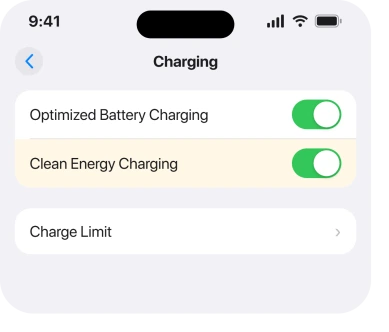
It is on by default, and it is United States only. So if you are in the US, your phone may be holding off on purpose.
To override it once: Settings, Battery, then Resume Charging.
To turn it off on an iPhone 15 or later, go to Settings, Battery, Charging, and switch Clean Energy Charging off. On an iPhone 14 or earlier the route is Settings, Battery, Battery Health & Charging.
If your phone shows the charging symbol and gains nothing at all, the cause is more likely heat or an override than the pad. Our page on the charging bolt separates those properly.
5. The third-party charger split, and a manufacturer that confirmed it
Now the rung that matters most, and the reason this page exists.
On the same thread, an owner reported this on 3 October:
"Mine stopped right after upgrading to iOS 26 and still does not work after iOS 26.0.1. I have an iPhone 16 Plus and atomi charging station 3-in-1. My wife's with iOS 18 still works."
Then the line that lifts this out of guesswork: "Contacted Atomi and they confirmed it is an issue with iOS 26 update."
Ours: a charger manufacturer telling a customer that iOS 26 broke it beats another forum guess by a mile. One company, one product, so it proves nothing about your pad, but the pattern is real enough that a maker has admitted it.
So, the practical read. Did your pad work on iOS 18 and stop on iOS 26? Then contact whoever made it before you contact Apple. They may already know, and they may have firmware waiting.
Check the same for a car charger. In-car pads fail this way too, and our page on the slow charger warning covers the accessory alerts you may see alongside it.
6. What is left when none of that works
Last. I am not going to invent an ending here.
The owner who started that thread ran an iPhone 14 Pro with a Qi2 pad.
They described it much as you might: "not charging on Qi2 wireless charger. You place the phone on that charger the battery keeps draining even through it indicates charging."
Case removed. Restarted. Force restarted. Nothing. Other iPhones in the house on iOS 18 charged fine.
No fix appeared on that thread. A separate owner on an iPhone 15 Pro Max, reporting the same thing in August, tried several different chargers and was sent to the Genius Bar.
So what is genuinely left. Use a cable while you wait. If cable charging is normal, your battery is still taking power fine. It says nothing about the wireless coil. A cable never goes through it.
Report it through the Feedback Assistant, naming your iPhone model, your pad, and the iOS version it last worked on. That last detail is the one Apple can act on.
Book a Genius Bar appointment only after rung 1. Walking in without knowing whether an Apple puck works wastes the visit.
What does not help
- Updating and hoping. Owners report it unchanged from iOS 26 through 26.0.1 and beyond.
- Buying a second pad of the same brand. If the brand is the problem, you have bought the problem twice.
- Resetting all settings. Nothing in the reports ties this to a setting other than Clean Energy Charging.
- Cleaning the back of the phone. Reasonable, but no owner reports it fixing this.
- Assuming the charging symbol means power is flowing. One owner watched the battery fall while it showed charging.
Status: iOS 26.6.1, checked 18 August 2026. Apple documents the wallet, alignment, adapter and Clean Energy rules. The third-party split is user-reported, one maker confirmed it, no fix exists.
Why did wireless charging stop after the iOS 26 update?
Owners report third-party pads failing while Apple chargers keep working, and one charger maker confirmed to a customer that iOS 26 was the cause. Borrow an Apple puck to find out which side yours is on.
Why does my iPhone say charging but the battery goes down?
Either Clean Energy Charging is deliberately holding off, which is US-only and on by default, or the pad is delivering too little power to keep up. One owner reported the battery falling while the charging indicator stayed on.
Does a case stop MagSafe charging?
A thick case can, and Apple specifically says to remove an iPhone Leather Wallet before charging. Metal plates, cards and magnetic mounts between the phone and the pad are the usual culprits.
Should I take my iPhone to Apple for this?
Test an Apple charger first. If that one works, the phone is fine and the issue is your pad, so a Genius Bar visit will not help and the charger maker is who to contact.
The Short Version
- Borrowing an Apple charger is the one test that splits a pad problem from a phone problem.
- Apple says to remove an iPhone Leather Wallet before wireless charging.
- A pad plugged into an underpowered adapter can light up and still not charge.
- Clean Energy Charging delays charging on purpose, is US-only, and is on by default.
- A charger manufacturer confirmed to one owner that iOS 26 broke their product.
- No published fix exists, so use a cable and report it while you wait.
Where to Next
Hold on to this. Two very different faults look identical on the pad. One is your phone. The other is your charger and iOS no longer agreeing, and no setting anywhere tells you which you have.
That is why rung 1 is a borrowed charger rather than a setting. Ten minutes with somebody else's puck saves a wasted appointment, or a wasted purchase.
Trace it to a particular pad and come and name the brand for me. One manufacturer has already admitted iOS 26 broke theirs. A running list of which ones are affected would serve the next person better than anything else on this page.

Isaac Smith is the founder and editor of PC Glance, a website that covers computers, laptops, and technology. He is a tech enthusiast and a computer geek who loves to share his insights and help his readers make smart choices when buying tech gadgets or laptops. He is always curious and updated about the latest tech trends.