Tapping FaceTime on a contact opens Snapchat when your iPhone has saved Snapchat as the video app for that person. The quick fix takes seconds: open their contact card, touch and hold the FaceTime button, and choose FaceTime from the list.
It usually hits one or two people while the rest of your contacts ring normally, because iOS keeps a separate choice for each contact. If every call you make jumps to Snapchat, fix 3 is the one to check.
In this guide
Why Snapchat takes over the FaceTime button
Snapchat, like WhatsApp and Telegram, can sign itself up as a calling app on your iPhone. It then shows in the list behind a contact's call and FaceTime buttons, and a single tap opens whichever app is the default there.
A Snapchat call to that person, or one stray tap on Snapchat in that list, can be enough to make it stick. Nothing on the contact card shows the change, so it feels as if the phone swapped apps on its own.
The thread about it on Apple's forum passed 1,276 Me too clicks by November 8, and a late October reply still had Snapchat as the only choice for some contacts.
Apple hasn't commented, and the iOS 27.2 notes don't mention it, so don't wait for an update to sort it out.
1. Hold the FaceTime button and pick FaceTime
Open Contacts, tap the person, then touch and hold the FaceTime button under their name. A short list slides up with every app, number and email that can reach them by video.
Tap FaceTime, and from then on a normal tap on that button goes through FaceTime again. It's the same move Apple gives for changing a contact's default: hold the button, then choose from the list.
Messages works too: open the conversation, tap the name or picture at the top, and hold the FaceTime button on the card that opens. Three owners on Apple's forum fixed it this way, and it's the fix I'd try first.
2. Remove the email address from their card
When the hold-and-pick fix doesn't stick, look at the email address saved on that contact. Two owners stopped the Snapchat jump by deleting it, and it worked straight away for them.
Open the contact, tap Edit, tap the red minus beside the email, tap Delete, then Done. One of the two said the FaceTime button then offered the phone number first and Snapchat second, instead of opening Snapchat by itself.
Copy the address into a note first if you write to that person by email. Apple hasn't explained why the email matters, but losing it from the card was enough for both of them.
3. Check the default calling app
When every contact goes to Snapchat, or ordinary calls do too, look at the app your iPhone uses for calls. Open Settings, tap Apps, then Default Apps, then Calling, and make sure no app you never call with is picked.
The FaceTime settings carry the same choice under Default Calling App: Settings > Apps > FaceTime. App settings moved into that Apps list a while ago, which is why the main Settings page doesn't show them (where app settings went).
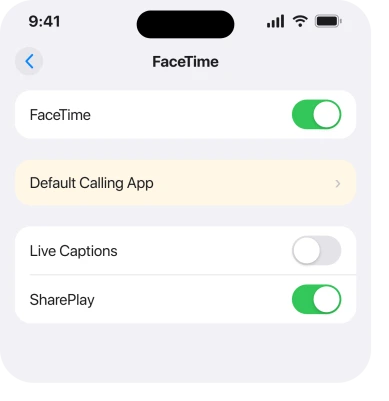
That setting covers audio calls, so it won't undo a Snapchat choice saved on one contact's FaceTime button. For that one person, go back to fix 1.
4. Call from the FaceTime app or Messages instead
Two routes always use FaceTime, whatever the contact card is set to. In the FaceTime app, tap New Call, type the person's name, then tap the FaceTime button to start a video call.
In a blue iMessage conversation, tap the video button at the top right and choose FaceTime Video. Either way you're on an ordinary FaceTime call, and sharing your screen works from the call controls as usual.
These double as a test. If the call won't go through from New Call either, the contact card isn't to blame: FaceTime can't reach that person on the details you have, and fix 5 deals with that.
5. When FaceTime isn't in the list at all
Sometimes the list behind the button shows only Snapchat. Check FaceTime first: in Settings > Apps > FaceTime, the FaceTime switch should be on, and the FaceTime app should still be on your iPhone.
If the app was deleted, contact cards stop offering FaceTime until you download it again from the App Store. Screen Time limits can hide FaceTime too, so check Settings > Screen Time if a parent or a school set up the phone.
When FaceTime is missing for one person only, it may not reach the number or email you saved. FaceTime only rings the addresses each person chose to be reached at, so ask which number or email they use for FaceTime and add it to their card.
If they're on Android, FaceTime can't ring them directly, but a FaceTime link lets them join from a web browser on their phone.
6. Delete the contact and add them back
This is the heavy fix, and it's the one Apple Support gave an owner over the phone. It worked for them, and it makes sense: the Snapchat choice is saved with the contact, so a fresh card starts clean.
Save the details before you delete anything. Tap Share Contact on their card and send it to yourself by Mail or Messages, then tap Edit, scroll down, tap Delete Contact and confirm.
Add the person again with just their phone number at first, and test the FaceTime button before you put an email back.
If your trouble is calls being picked up rather than placed wrongly, our page about an iPhone answering calls by itself covers that fault.
Why does my iPhone open Snapchat when I try to FaceTime?
Snapchat is set as the default app for that contact's FaceTime button. It can sign up as a calling app, and iOS keeps a separate default for each contact, so one Snapchat call or mis-tap can make it stick.
How do I make FaceTime the default again?
Touch and hold the FaceTime button on the contact's card and pick FaceTime. For calls in general, check Settings > Apps > Default Apps > Calling.
Why does it only happen with one contact?
The choice is saved on each contact, not for the whole phone. Only the people you once reached through Snapchat, or tapped Snapchat for by mistake, are affected.
Did iOS 27 fix FaceTime opening Snapchat?
Not as of November 8. Reports kept coming in late October, after iOS 27 came out, and the 27.2 notes don't mention it. The hold-and-pick fix still works.
Will deleting the contact fix it?
Yes for one owner, who got that advice from Apple Support on the phone. Try the hold-and-pick and the email fix first, and save the contact's details before you delete anything.
The Short Version
- Snapchat opens because it's saved as the app behind that contact's FaceTime button.
- Touch and hold the FaceTime button on their card and choose FaceTime.
- Still stuck? Remove the email from their card; two owners got FaceTime back that way.
- If every call goes to Snapchat, check Settings > Apps > Default Apps > Calling.
- New Call in the FaceTime app always uses FaceTime.
- Delete and re-add the contact last, after saving their details.
Checked November 8, 2026.