
You tap FaceTime on somebody's contact card and Snapchat opens. Not FaceTime. It happens for that one person, every single time, and I get why it feels like the phone has been hijacked.
It has not. Something quietly took over a job FaceTime used to do, and it is annoying precisely because nothing tells you.
iOS lets other apps register themselves as calling apps, and it remembers your choice per contact. Somewhere along the line Snapchat became the answer for that person, and nothing on their contact card says so.
1. Change the default calling app, which Apple documents
Start here. There is a real setting for this and hardly any page names it.
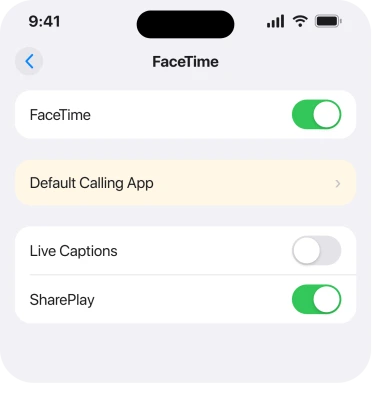
Apple's own route, from its Set up FaceTime page: Settings, tap Apps, tap FaceTime, then Default Calling App.
Apple's wording: "Optionally, tap Default Calling App, then choose a default calling option for audio calls."
So this is a supported choice rather than a fault. Set yours to FaceTime. That fixes the global default in one move.
The route matters here. It is Settings, Apps, FaceTime. App settings moved into that Apps list, which is why hunting the main Settings scroll turns up nothing. Our page on where app settings went covers the move.
2. Fix the one contact, from inside their message thread
Do this if rung 1 did not change that particular person, because iOS keeps a separate memory per contact.
An owner on a community thread gave the exact gesture.
"if you go to that person contact on iMessage to where the photos kinda show up hold down the facetime button between the call and mail button you can switch it to main facetime instead of snapchat it helped me with my issue"
In plainer words. Open the conversation. Tap their name at the top. Then touch and hold the FaceTime button rather than tapping it, and a list of calling apps appears. Pick FaceTime.
That per-contact memory is why one person misbehaves while the rest of your contacts stay fine.
3. Delete the contact and add them back
Blunt, and it is the fix Apple Support themselves gave somebody.
On the same thread, an owner reported: "Through apple support call the resolution was to delete the contact and add the contact back in. This did work for me."
Copy the details out first. Deleting a contact removes the number, the email, the notes and any photo you set, so write them down, or share the card to yourself, before you delete anything.
If the fault is a call being answered rather than dialled wrongly, that is a different mechanism entirely, covered on our page about an iPhone answering calls by itself.
Why it works is straightforward once you know rung 2 exists: the per-contact calling preference is attached to that contact record. Destroy the record and the preference goes with it.
4. Check what Snapchat is allowed to do
Narrower, and it stops the whole thing coming back.
Snapchat only appears in that list because it registered itself as a calling app. Go to Settings, Apps, then Snapchat. Read what it has been granted.
If you never use Snapchat for calls, removing its access to Contacts and Siri stops it presenting itself as an option in the first place.
Apple documents none of this as a cause, so that reasoning is ours rather than vendor-documented. It follows from the fact that the choice exists at all.
5. Confirm it is not simply the last thing you used
Small. It explains a fault that nobody actually introduced.
iOS remembers the calling method you last used for a person and offers it again. Call somebody through Snapchat once, deliberately or by a mis-tap, and it can become their default without any announcement.
So if it started right after a Snapchat call, nothing broke. Rung 2 undoes it in one gesture.
Check that before you delete a contact you have had for years.
6. When every contact does it, not just one
Last, because it is a different problem wearing the same clothes.
One owner on that thread reported it happening "everytime I try to FaceTime anybody", which is not the per-contact memory at all. That is the global default, so rung 1 is your fix rather than rung 2.
If rung 1 is already set to FaceTime and every call still routes to Snapchat, remove Snapchat, restart the phone, then reinstall it. That clears its registration and rebuilds it.
No reply on that thread confirmed the reinstall, so treat it as the reasonable next step rather than a proven one. Send Apple a report through the Feedback Assistant if it survives.
What does not help
Turning FaceTime off and on does nothing. The routing choice survives it, because it lives on the contact.
Signing out of your Apple Account is no better, since the routing choice is not tied to it.
Updating iOS will not do it either. Reports run from mid-2026 across point releases with no change.
Blocking Snapchat notifications changes alerts, not which app places a call.
And it is worth not assuming this is a Snapchat bug in the first place. The mechanism is an iOS setting that Apple documents and supports.
Status: iOS 26.6.1, checked 18 August 2026. Apple documents the Default Calling App setting. The per-contact gesture and the delete-and-re-add fix are user-reported and both confirmed.
Why does FaceTime open Snapchat on my iPhone?
Because Snapchat has become the default calling app, either globally or just for that contact. iOS remembers the last calling method you used per person, and other apps are allowed to register themselves as calling options.
How do I set FaceTime as the default calling app?
Settings, Apps, FaceTime, then Default Calling App. Apple documents that choice, and it fixes the global default. A single contact may still need the touch-and-hold fix on their FaceTime button.
Why does it only happen with one contact?
iOS stores the calling preference per contact, not just globally. One Snapchat call to that person, even by accident, can set it, which is why the rest of your contacts keep working.
Will deleting the contact fix it?
One owner was given that fix by Apple Support and reported it worked. Copy the contact's details out first, because deleting removes the number, email, notes and photo along with the preference.
The Short Version
- Apple documents a Default Calling App setting at Settings, Apps, FaceTime.
- iOS also remembers a calling app per contact, which is why one person misbehaves alone.
- Touch and hold the FaceTime button in their message thread to change just that person.
- Deleting and re-adding the contact worked for one owner on Apple Support's advice.
- One accidental Snapchat call can set the preference with no warning at all.
- If every contact does it, the global setting is the fix rather than the per-contact one.
Where to Next
The part that makes this feel sinister is that nothing tells you it happened. No prompt, no confirmation, no marker on the contact card. A button that said FaceTime yesterday quietly means something else today.
Once you know iOS keeps a per-contact memory, the whole thing stops being mysterious and becomes two settings, one global and one local.
If the touch-and-hold gesture does not bring up a list for you, say which iPhone you are on. That gesture is the fix I would most like confirmed by more than one person, because it is far less destructive than deleting a contact.

Isaac Smith is the founder and editor of PC Glance, a website that covers computers, laptops, and technology. He is a tech enthusiast and a computer geek who loves to share his insights and help his readers make smart choices when buying tech gadgets or laptops. He is always curious and updated about the latest tech trends.