
Your video plays back in total silence. Or the sound is there but thin, cutting in and out. Losing audio on something you cannot re-record is genuinely upsetting, so let me split this before you touch anything.
Two completely different faults get searched with the same words.
Playback silent means the sound was recorded and something is muting it now. Recording silent or ragged means it never got captured. The first is usually fixable in seconds. The second, on iOS 26, may not be fixable at all.
1. The mute icon inside Photos, which is not your ringer
Start here. It is the commonest cause and it is one tap.
Open the video in Photos. Look at the bottom right corner.
A speaker icon with a line through it means that video is playing muted, and Photos remembers the choice.
Tap it once. The line goes. The sound comes back.
This catches people because it is a Photos setting, not a phone setting. So every volume button and every switch you try leaves it exactly as it was.
2. Nudge the volume, which unstuck it for one owner
Second. One button press, and somebody confirmed it.
On a community thread about videos playing silently in Photos, an owner wrote: "The solution that has been working for me is to move the volume. If I press volume down at least once to move the volume slider, the audio starts playing."
Press volume down once while your video plays. That is the whole thing.
Another owner on the same thread got there by turning the ringer on with the side switch. Same underlying state, different route into it, so try whichever is nearer your thumb.
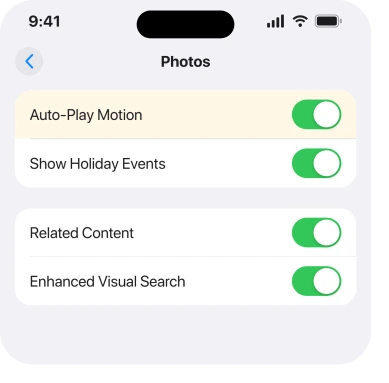
3. Turn Auto-Play Motion on, which brings the control back
Narrower, and it explains a missing mute button rather than a muted video.
A third owner gave this one: "In photo settings toggle the Auto-Play Motion on. The volume button will show in the lower right hand corner."
So rung 1 sent you hunting a speaker icon and there was nothing there? That is why. The control only appears when that setting is on.
The route is Settings, Apps, Photos, then Auto-Play Motion.
4. Check what the Camera is set to record
Now we cross over from playback to recording, and this one is a real setting with real consequences.
An owner traced their silent videos to it: "The issue is related to the spatial recording. Go to settings, camera, record sound and choose stereo."
Spatial audio needs compatible playback to sound right. On some setups it arrives thin, wrong, or seemingly absent.
Apple's video recording settings page covers the sound recording options. Go to Settings, Apps, Camera, then Record Sound.
Pick Stereo to rule it out, and do it before you conclude the microphone is broken. A recording setting and a dead microphone look identical from the Photos app.
5. Prove the microphone actually works
Small, quick, and it saves an unnecessary repair booking.
Open Voice Memos, in the Utilities folder. Record ten seconds of yourself talking. Play it back.
Clear audio? Then the microphone is fine and your problem sits in Camera or Photos.
Silence or muffle instead points at hardware. Rule out a case or screen protector covering the microphone openings first.
If your recordings are missing entirely rather than silent, that is a different problem and our page on Voice Memos disappearing covers it.
6. The iOS 26 Camera recording fault, which has no fix
Last, and I am not going to pretend this one ends well.
A separate complaint runs through iOS 26. It is about quality, not silence.
An owner on an iPhone 15 Pro Max described it in September: "I recorded some videos and the audio is awful! It's not steady ( keeps cutting out and in ) and not even did record background sound!" That thread carries 18 Me Too.
A second owner confirmed it on iOS 26.0.1 on the same model. A third was blunt about where the fault sits: "It's definitely an issue with the camera app. I've started using blackmagic app these last few weeks."
No setting fixed it for any of them. The only thing that worked was recording in a different app entirely.
So if your audio is present but filtered, unsteady, or missing the room around you, rungs 1 to 5 will not help.
Record anything that matters in a third-party camera app until Apple moves, and send a report through the Feedback Assistant naming your model and iOS version.
If the sound is fine but the video will not play at all, that is a different fault, and our page on Photos not showing your library is the better read.
What does not help
- Turning the volume up with the buttons. A muted video in Photos ignores them completely.
- Restarting the phone. No report on either thread ties a restart to the audio coming back.
- Re-saving or duplicating the video. If the audio was never captured, copying it copies the silence.
- Cleaning the speaker. This is a recording or playback setting far more often than hardware.
- Assuming one fix covers both. Playback silence and recording silence are separate problems.
Picture trouble is its own case. If a video plays with a faint grid over it on iOS 27, three quick checks show whether the file itself is fine.
Status: iOS 26.6.1, checked 18 August 2026. The playback fixes are user-reported and confirmed. The iOS 26 Camera recording fault has no fix, and a third-party app was the only workaround.
Why does my iPhone video have no sound?
Most often your video is muted inside Photos, shown by a crossed-out speaker in the bottom right corner. Tap it once. If no icon appears at all, turn on Auto-Play Motion at Settings, Apps, Photos.
Why is the sound bad on videos I record on iOS 26?
Owners report the Camera app filtering out background sound and cutting audio in and out since iOS 26, with 18 people marking the same thread. No setting has fixed it, and recording in another camera app was the only workaround found.
Does spatial audio cause silent iPhone videos?
It can produce audio that sounds thin or absent depending on playback. Switching Settings, Apps, Camera, Record Sound to Stereo rules it out, and one owner traced their problem to exactly that.
How do I test whether my iPhone microphone is broken?
Record ten seconds in Voice Memos and play it back. Clear audio means your microphone is fine and the fault is in Camera or Photos, so the problem is a setting rather than hardware.
The Short Version
- Playback silent and recording silent are two different faults with different answers.
- A crossed-out speaker in the bottom right of Photos mutes that video and ignores your volume buttons.
- Pressing volume down once while a video plays restored audio for one owner.
- No speaker icon at all means Auto-Play Motion is off in Photos settings.
- Switching Record Sound to Stereo fixed silent recordings for another owner.
- The iOS 26 Camera audio fault has no fix, and a third-party app was the only way round it.
Where to Next
This wastes so much time because Photos gives you no clue which half you are in. A silent video looks identical whether the microphone failed as you shot it or a mute button got tapped last week.
So do rung 5 early even though it sits low on this page. Ten seconds in Voice Memos tells you whether you are hunting a setting or a fault, and that decides everything after it.
Landed on the iOS 26 recording problem? I want to know which iPhone, and whether background sound is missing altogether or merely uneven. Those two descriptions may turn out to be different bugs, and no one has separated them yet.

Isaac Smith is the founder and editor of PC Glance, a website that covers computers, laptops, and technology. He is a tech enthusiast and a computer geek who loves to share his insights and help his readers make smart choices when buying tech gadgets or laptops. He is always curious and updated about the latest tech trends.