
Find My hands you a grey line and no map. No location found. Or Location Not Available. Your mind goes to the worst version of that within about two seconds, and I understand why, because the wording gives you nothing to hold on to.
They are not the same bad news. One is usually a flat battery. The other usually means somebody changed a setting.
There are four of these messages, and each one narrows the problem in a different direction.
1. Read which message you actually have
Thirty seconds. It decides everything after it.
Open Find My and look at the grey line under the name, not at the map. The four you can land on are No location found, Not sharing location, Location Not Available and Can see your location.
They are not interchangeable. Two of them are about a device that cannot report in, one is about a person's settings, and one is not a problem at all.
Note which tab you are in as well. Devices and People behave differently, and the same words mean different things across the two.
2. No location found on a device usually means offline
This is the commonest of the four, and Apple explains it with a number almost nobody quotes.
Apple, in Use Find My to locate your lost Apple device or AirTag: "If Find My can't display your device or item's current location, for example if your device's battery has run out, you can see its last known location for up to seven days in the Find My app."
Then the part that matters: "If more than seven days have passed since your device last sent its location to Apple through the Find My network, Find My can't display a location. Instead it shows 'No location found.'"
So a device that has been dead in a drawer for a fortnight shows exactly what a device lost yesterday shows. The message is not telling you the search failed. It is telling you the clock ran out.
An AirTag that shows up a kilometre from where it really is has a different cause. Since iOS 27, removing it and adding it back has fixed that.
A Mac missing from Devices altogether may never have had Find My turned on, because its switch keeps sliding back. Location Services is where that fix starts.
3. Turn on Notify When Found, which Apple gives you on the same screen
Apple's own instruction for this exact message, and it is one tap.
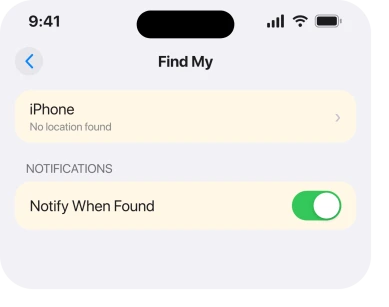
Apple, in Locate a device in Find My on iPhone: "If the device can't be located: You see 'No location found' below the device's name. Below Notifications, turn on Notify When Found. You receive a notification when it's located."
Do that before you do anything else, because it works while you are asleep. The moment the device gets power and meets any passing Apple device, you get a notification.
Apple documents a condition worth checking: "Make sure you allow notifications for the Find My app." A notification you never see is no use.
4. Not sharing location, Online means the phone is fine and the setting is not
A different message with a completely different meaning, and the two words at the end are the clue.
Apple: "If your device is online but is unable to send its location (for example, if there's an issue with Location Services), Find My can't display a location. Instead it shows 'Not sharing location • Online.'"
Online. The device is reachable. That word is doing a lot of work. Something on it is refusing to hand over a position, and Location Services is Apple's own example.
That is good news. The device is not lost, not dead and not out of range. On your own phone, check Location Services and check that Find My is allowed to use it. On somebody else's, only they can fix it.
5. Location Not Available on a person, and what actually stands behind that wording
The internet gets confident about this one and the documentation goes quiet, so I am going to be straight with you about what I could and could not verify.
Every page you will read says Location Not Available means the person stopped sharing with you. The nearest thing to a source sits on a community thread.
An Apple Community Specialist, posting as MichelleT18 in November 2021, quoted an Apple support article: "your friends see Location Not Available when they try to locate you" if location sharing is switched off.
There is a problem with that. I went looking for the sentence on Apple's current pages and we could not find it.
The phrase appears zero times in Apple's Find My troubleshooting article, zero times on the Locate a device and Locate a friend guide pages for iOS 26, and zero times on the Find My for Mac guide page I checked.
The article the specialist quoted was written for Find My Friends and no longer exists.
So treat it as widely reported and consistent with how Find My behaves, rather than as documented.
What that means practically: if you see this on a person, the likeliest explanations are that they stopped sharing, signed out of iCloud, or switched to a different Apple Account. None of those is something you can fix from your phone.
Our page on location sharing breaking after an update covers the case where they did not mean to stop.
6. Can see your location is not an error at all
The last one catches people out because it sounds like a warning and it is the opposite.
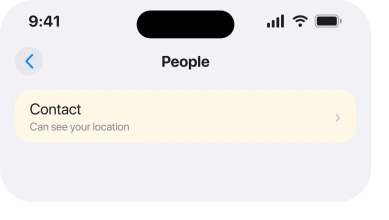
Apple, in the Locate a friend guide: "If you aren't following your friend: You see 'Can see your location' below their name."
Read it slowly. They can see yours. You are not following theirs. The sharing is one way, and it is one way because of how it was set up, not because anything failed.
Tap the person and use the option to ask them to share back. That converts a confusing label into a request, which is the actual fix.
And if the real annoyance is your phone nagging about items left behind, that is a separate feature. Find My left behind alerts covers it.
An AirTag that starts chirping while someone else carries it is the tag's own alarm, and sharing it in Find My stops the tracking alerts for the people you lend it to.
What does not help
- Restarting your own phone. None of the four messages is generated by your device except the ones about your own location settings.
- Removing and re-adding the person. It does not grant you sharing they have switched off, and it loses your history with them.
- Signing out of iCloud. It disrupts your own Find My rather than repairing theirs.
- Comparing the two messages on a map. Both leave the map empty, which is exactly why the wording underneath is the only thing worth reading.
Status: iOS 26.6.1, checked 18 August 2026. Three of the four messages are Apple's own current wording. Location Not Available is widely reported and on no current Apple page found.
What is the difference between No location found and Location Not Available?
No location found is about a device that cannot report a position, and Apple ties it to the seven day window on the Find My network. Location Not Available is reported to mean a person stopped sharing with you, which is a settings change rather than a failure.
How long does Find My keep a last known location?
Seven days. Apple states that a last known location is visible for up to seven days, after which Find My shows No location found instead.
Does No location found mean the phone is switched off?
Often, but not always. A flat battery, no network, or more than seven days since the last check-in all produce it. Turning on Notify When Found is the practical response, because it watches for you.
Why does Find My say Can see your location?
Because sharing is one way. They can see you and you are not following them. It is not an error, and asking them to share back is the fix.
The Short Version
- Four messages, not two, and each points somewhere different.
- No location found is about a device that cannot report in.
- Apple keeps a last known location for seven days, then shows that message.
- Notify When Found is Apple's own answer and it works while you sleep.
- Not sharing location, Online means the device is reachable but withholding.
- Location Not Available is widely reported to mean sharing was turned off, and no current Apple page states it.
- Can see your location means the sharing is one way, which is not a fault.
Where to Next
Most of the pages on this subject state the difference between the two messages with total confidence and no source. That confidence is why people jump to conclusions about a person who has simply run their battery flat.
What is actually documented is narrower and more useful: a seven day window, a notification you can arm in one tap, and a separate message that tells you the device is online.
Those three facts settle most cases without anybody having to be accused of anything.
The case I would most like to hear about is Location Not Available on a person who definitely never stopped sharing.
It is the one combination the documentation does not explain, and enough reports of it would tell us the wording covers something else too.

Isaac Smith is the founder and editor of PC Glance, a website that covers computers, laptops, and technology. He is a tech enthusiast and a computer geek who loves to share his insights and help his readers make smart choices when buying tech gadgets or laptops. He is always curious and updated about the latest tech trends.