
Settings is telling you it cannot verify that your iPhone has a genuine Apple battery, and your first thought is that somebody sold you a fake.
I would have thought the same, and I want to take that worry off you early, because it is usually not what happened.
One owner had never had their phone opened by anybody and saw it anyway. Their thread collected 1,551 Me Too votes.
Apple lists four separate reasons for this message and only one is a counterfeit battery.
1. Read Apple's four causes, because only one is a fake battery
Start here. It can save you an argument with whoever repaired your phone.
Apple, in About genuine iPhone batteries, lists what produces an Unknown message.
The battery either "Isn't a genuine Apple part", "Isn't functioning as expected", "Hasn't been verified and linked to your iPhone after the repair was completed", or "Has been modified or is otherwise unable to be verified".
Four causes. One counterfeit. One failure. One piece of unfinished paperwork, and one part that cannot be read at all.
That third one is the important one and it gets missed constantly. A real Apple battery, fitted properly, still shows the warning if the linking step was never finished. The part is genuine. The record is not.
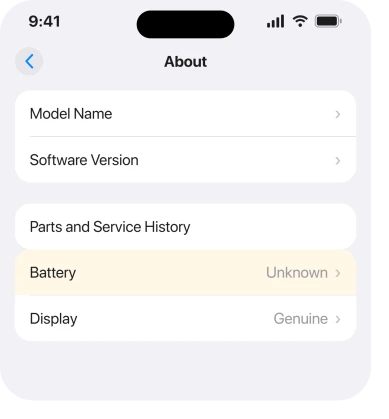
You will find the message in two places, and they use different words. Settings > General > About shows the part status.
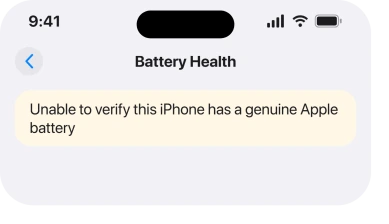
Settings > Battery > Battery Health is where "Unable to verify this iPhone has a genuine Apple battery" appears.
2. If a battery was just fitted, look for Finish Repair
This is the actual fix for the third cause, and it is the one people never hear about.
Apple: "After a new Apple battery has been installed, you'll see Finish Repair next to Battery until you finish the repair with Repair Assistant."
So go to Settings > General > About and read the line next to Battery. If it says Finish Repair, nothing is wrong with your battery at all. The repair simply was not completed, and Repair Assistant completes it.
If it says Genuine, you are done.
If it says Used, that is a third state, and Apple explains it: with iPhone 15 and later on iOS 18, "a genuine battery can be reused on another iPhone of the same model", and you will see Used rather than Unknown.
Ring the shop that did the work. Ask whether they ran Repair Assistant. It is a reasonable question, and a competent provider will know exactly what you mean.
3. If nobody has ever opened your phone, it is the second cause
This is the case that frightens people. It is worth naming plainly.
Apple's second reason is a battery that "Isn't functioning as expected". A genuine battery, never touched, that has degraded or developed a fault can stop reporting properly and lose its verification.
The owner in the intro was in exactly this position on an iPhone XS. A Level 9 member, Smilin-Brian, gave them the straightforward reading: when an internal component has failed, an error is expected.
Their advice was update, restart, force restart, and then book service.
Do those three in order. If the message survives all of them on a phone nobody has opened, this is a service question, not a settings one. Get the battery looked at.
4. Why a repair shop usually cannot clear it, even a good one
Now the mechanism, and I think this is the rung that explains everything you have read so far.
On iFixit, the chosen answer to this exact question comes from Jerry Wheeler: "The battery is now serialized to the motherboard. Apple uses a proprietary encryption algorithm so only Apple can re-serialize a battery."
That is why the warning follows a perfectly good third-party battery around forever. The pairing is cryptographic, and it is held between your battery and that one specific logic board.
A safety line here, before anyone goes hunting for workarounds. Apple: "To avoid damage that could cause overheating, fire, or injury, only a trained technician should replace an iPhone battery."
Answers on that same iFixit page describe transplanting the management board from the old battery, or reprogramming with third-party tools.
The original poster priced it up and concluded the equipment cost more than an authentic replacement from Apple. For most people that arithmetic settles it, and it is why I would not send you down that road.
5. What the message actually costs you, and what it does not
Two sentences from Apple settle the whole worry for you, and they point in opposite directions.
First, what it costs: "If you see 'Unable to verify this iPhone has a genuine Apple battery,' the battery-health information might not be accurate." So your percentage figure is no longer trustworthy.
If the Battery Health screen has gone odd on you, Battery Health not showing covers the related model differences.
Second, and read this one twice: Apple: "These messages don't affect your ability to use your iPhone or your battery."
Your phone is not throttled by this message. It is not disabled. It charges and runs exactly as it did the day before the warning turned up.
There is one real cost, though, and Apple states it in a single line: "An Unknown part might affect the trade-in value of your device." That is worth knowing before you plan a trade-in around a number you have not checked.
6. What Apple says about non-genuine batteries, so you can weigh it up
The last rung is for deciding whether to spend money, and it deserves Apple's actual words rather than a scare.
Apple lists what a non-genuine replacement might be: "Poorly designed or manufactured", "A previously used battery", "A damaged battery", or "An incorrect battery for your iPhone model".
It adds that these "could lead to insufficient battery capacity, improper fit, or performance issues".
Note the hedging. Apple says might and could, not will. I read that as a list of risks rather than a verdict on the cell in your phone.
Apple also names three routes to a genuine part: an Apple Store or Authorized Service Provider, an Independent Repair Provider, or Self Service Repair, which it says "is currently available in certain countries or regions for specific iPhone models introduced in 2021 or later".
If your phone is old, running fine and not being traded in, living with the message is a defensible choice.
If the health figure matters to you, or the trade-in does, that is when replacing it through one of those routes buys you something real.
Our page on the USB-C port and what Parts and Service History reports covers what else that screen tracks.
What does not help
- Resetting all settings. The pairing lives between the battery and the logic board, not in your settings.
- Restoring the phone. Same reason. A restore cannot re-sign a part.
- Waiting for an update to clear it. No release removes the check, and Apple documents the check on purpose.
- Reading the battery percentage as gospel afterwards. Apple explicitly says the health information might not be accurate once verification fails.
Status: iOS 26.6.1, checked 18 August 2026. Apple's page was last revised 26 May 2026. The four causes, the Finish Repair step and the trade-in note are all Apple's own wording.
Does the unable to verify battery message mean my battery is fake?
Not necessarily. Apple lists four causes, and only one is a non-genuine part. A real Apple battery that was never linked after the repair, or one that has stopped functioning as expected, produces the same message.
Does the message slow my iPhone down?
No. Apple states plainly that these messages do not affect your ability to use your iPhone or your battery. What they do affect is the accuracy of the battery health figure.
Can a repair shop remove the genuine battery warning?
Usually not. The battery is serialised to the logic board with Apple's own encryption, so only Apple can re-serialise one. That is why the warning follows a working third-party battery indefinitely.
Will an unknown battery affect my trade-in?
Apple says an Unknown part might affect the trade-in value of the device. If you are planning to trade in, check the part status under Settings, General, About before you set your expectations.
The Short Version
- Apple lists four causes and only one of them is a counterfeit battery.
- Check Settings, General, About first: Genuine, Used, Finish Repair or Unknown.
- Finish Repair means the job was never completed, and Repair Assistant completes it.
- A phone nobody has opened can show this when the battery itself has failed.
- The battery is serialised to the logic board, so only Apple can re-pair one.
- The message does not affect how the phone works, but it does affect the health figure.
- An Unknown part might reduce trade-in value, which is the one real cost.
Where to Next
The reason this message causes so much anxiety is that it sounds like an accusation. Unable to verify reads as somebody sold you a counterfeit, and for most readers that is not what happened at all.
Apple's own list is the calming part. Fake is one of four possibilities, one of the others is literally unfinished paperwork, and the phone keeps working either way.
Tell me what your About screen says next to Battery, because Genuine, Used, Finish Repair and Unknown lead to four completely different conversations and most people never look at that line at all.

Isaac Smith is the founder and editor of PC Glance, a website that covers computers, laptops, and technology. He is a tech enthusiast and a computer geek who loves to share his insights and help his readers make smart choices when buying tech gadgets or laptops. He is always curious and updated about the latest tech trends.