
Every second name in your Contacts list is there twice, and either the Merge All button does nothing or the option is not on the screen at all.
I know how annoying that is when you just want to find one person, so let me get it working for you.
Two different things go wrong here, and they need different fixes.
- You cannot find the duplicates option. Fixes 1 to 4.
- You can see it and Merge All stalls. Fixes 5 to 7.
1. Look at the bottom of All Contacts, not under My Card
Cheapest possible check. Apple documents the prompt in one place and owners keep finding it in another.
Apple's own instruction points you below My Card at the top. On plenty of phones the prompt sits somewhere else entirely.
Open Contacts on your iPhone and tap All Contacts. Scroll right to the very bottom, past the last name. Duplicates are announced there in blue text, as a count.
One owner found it exactly there after months of looking at the top of the list. Another tried the same on an iPhone and it was not there at all. So it is a check, not a guarantee.
2. Try the Phone app instead of the Contacts app
Odd, and free. One report only, from an owner whose Contacts app showed them nothing. Your mileage may differ.
Open Phone on your iPhone. Tap Contacts along the bottom. Look for the same prompt.
The two apps show the same list. There is no reason for them to differ. That owner said it worked for them and not for their partner, so give it ten seconds rather than hope.
3. Leave iCloud as the only contacts account, then pull to refresh
Owners report this more than anything else on the subject. It is the fix with two separate confirmations behind it, and it is the one I would put your ten minutes into.
Go to Settings, Apps, Contacts, then Contacts Accounts. Turn Contacts off for every one of your accounts except iCloud. Gmail, Outlook, Exchange, a work account, all of them.
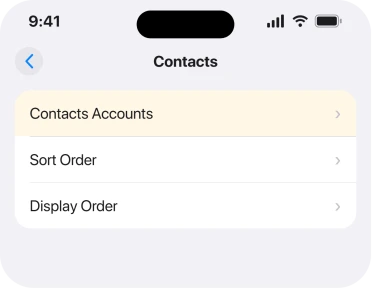
Now open Contacts and drag your list downwards to refresh it. The owner who worked this out reported that the duplicates count then appeared.
A second owner on the same thread had to go further and switch contacts off on every other device signed into the same Apple Account before it appeared on the phone.
That same account screen carries the Calendars switch as well, which is the one behind an iPhone saying Unable to Update Calendars.
Read the warning before you tap. Turning Contacts off for an account offers you a choice, and one of the options deletes that account's contacts from the phone.
Choose to keep them on the device, and remember that anything living only in that account is not in iCloud.
4. Give it time, because the scan is not instant
Small. It explains a prompt that turns up a day later on its own, with nothing from you.
The duplicate scan runs in the background. On a large list it is not quick. A phone that has just been restored, or has just had an account added, has not finished looking yet.
Plug in, lock the phone, leave it overnight and check again. If a count appears the next morning, nothing was ever broken.
5. When Merge All spins and gives up, merge in small batches
This is the second symptom, and it is the one with the most people behind it.
The pattern is identical every time. The phone finds the duplicates. It says it is merging them. A spinner appears. Then you are back at the same "Duplicates Found" prompt with nothing merged.
One owner posted a screenshot sequence of exactly that with 70 duplicates. Another had 1,498 and said plainly that Merge All merged nothing. Only merging one at a time worked for them.
So do not fight Merge All. Tap into your duplicates list and merge individual entries, or work through them in small groups. It is slow, and it is reliable.
6. Link two cards by hand when the phone will not pair them
Narrower. This is the tool for the pairs your phone refuses to recognise as duplicates.
Apple's own answer, in Get rid of duplicate contacts on iPhone, is to link the two entries yourself. Open one of the contacts, tap Edit, then Link Contacts, and choose the other entry.
Linked cards show as one contact and keep both sources intact. It is not the same as merging, and for a handful of stubborn pairs it is quicker than anything else here.
7. Do the clear-out somewhere other than your phone
Last, because it is the most work. It is what people fall back on when the built-in tool has beaten them.
Sign in at iCloud.com and open Contacts there. A proper keyboard makes short work of it. On a Mac, the Contacts app has its own Card, Look for Duplicates menu.
Neither is a magic route. One owner reported the Mac tool showing duplicates on screen and then answering that no duplicates were found, which is the same failure in a different window.
And a plain word about the third-party apps that advertise this. They need full access to every contact you have, and the built-in tool failing is not a good reason to hand your address book to a stranger.
Our page on what iPhone privacy settings actually control is worth a read before you install one.
Status: iOS 26.6.1, checked 19 August 2026. Owner reports run from 2022 to 2024 across iOS 16, 17 and 18, with 756, 377 and 337 Me Too on three threads and no Apple statement about it.
Why can I not see View Duplicates on my iPhone?
Usually because the scan has not finished, or because a non-iCloud account is holding contacts. Owners report the prompt appearing after switching every other account's Contacts off and pulling the list down to refresh. On some phones it sits at the bottom of All Contacts rather than under My Card.
Why does Merge All not merge anything?
Nobody has published an answer. Owners consistently describe the same sequence: duplicates found, a merging message, a spinner, then the same prompt again with nothing changed. Merging entries individually still works on the same phones.
Does merging contacts delete anything?
No. Merging combines the fields from two cards for the same person into one card. Linking is gentler still, since it leaves both source entries in place and only shows them as one.
Why did my contacts duplicate in the first place?
Almost always two accounts holding the same people. A Gmail or Exchange account syncing alongside iCloud gives you two of everybody. A restore from a backup on top of an already-syncing account does the same.
The Short Version
- Look at the bottom of All Contacts, not only under My Card.
- The Phone app shows the same list and is reported to work when Contacts does not.
- Switching every non-iCloud account's Contacts off, then refreshing, is the most reported fix.
- Choose to keep contacts on the device when you turn an account off.
- Merge All stalling is widely reported and merging individually still works.
- Link Contacts is Apple's answer for pairs the scan will not pick up.
- iCloud.com and the Mac are alternatives, and the Mac tool fails for some people too.
Where to Next
This is not a setting you got wrong. A feature Apple ships is quietly failing for a lot of people, and there is no official word on why.
That is why the order above matters more than usual. Fixes 1 to 4 are about making the tool visible, and 5 to 7 are about getting work done when it appears and then stalls.
If the account trick was what made your duplicates prompt appear, tell me which account you had to switch off. Gmail comes up most in the reports and I would like to know whether that matches what you found.
If duplicates are not the problem but finding anyone is, Contacts search after iOS 27 has its own workaround.
If the account itself is the trouble rather than the contacts in it, our guide to an iPhone that keeps asking you to sign in is the nearer starting point.

Isaac Smith is the founder and editor of PC Glance, a website that covers computers, laptops, and technology. He is a tech enthusiast and a computer geek who loves to share his insights and help his readers make smart choices when buying tech gadgets or laptops. He is always curious and updated about the latest tech trends.