
Halfway through a sentence your keyboard changes language, and the word you meant comes out as something else entirely. I know how maddening that is when you are only trying to answer somebody.
Let me start with the part that will annoy you: the phone is doing this on purpose.
Once you know that, the fixes make sense, and there are six of them in order of how much they cost you.
1. Apple built the switching in, and it is not a bug
Read this before you change anything. It reframes the whole problem.
Apple documents the behavior on its own keyboard page: "If you add keyboards for other languages, you can type in two languages without having to switch between keyboards. Your keyboard automatically switches between the two languages you use most often. (Not available for all languages.)"
So the phone watches which two languages you type in most, then moves between them by itself. Nobody asked for it. Nothing on screen announces it.
That one sentence explains the mid-sentence switch, the wrong autocorrect, and why restarting changes nothing.
There is no switch marked "stop guessing". Your only real control is the list it chooses from.
2. Cut the keyboard list down to what you actually use
The commonest fix. Under a minute.
Go to Settings, General, Keyboard, then Keyboards. You will probably find more languages than you remember adding. A keyboard arrives whenever you add a language anywhere on the phone.
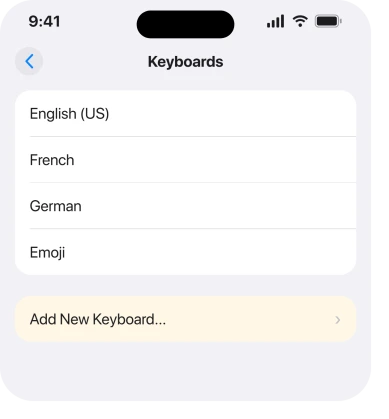
Apple's route to remove one: "Tap Edit, tap next to the keyboard you want to remove, tap Delete, then tap Done."
A senior member answering this exact complaint put it in one line: "What exactly do you have on the list in settings / general / keyboard / keyboards? Remove anything you do no actually need."
Leave Emoji alone. It takes no part in the guessing.
If your trouble is the keyboard lagging rather than switching, a slow iPhone keyboard is a different page.
3. Check the second list, the one nobody knows about
Narrower. This is the piece that catches people who already cleaned the keyboard list.
There is a language list separate from the keyboard list, and it feeds the same guessing.
Apple: "If you add a keyboard for a different language, the corresponding language is automatically added to the Preferred Language Order list. You can view this list and add languages directly to it in Settings > General > Language & Region."
So go to Settings, General, Language & Region, and look at Preferred Languages. Remove anything you do not read or write.
Keep English on the list even if it is not your main language. Apps that have not been translated fall back to it.
Removing a keyboard does not always clear the matching entry here. That is exactly why a tidy keyboard list can still misbehave.
4. Trim the dictation languages as well
More specific again. It is the answer when the switching only happens when you speak.
Dictation keeps its own language list. Clear the keyboards. Leave dictation set to three languages, and your spoken English can still come out as German.
Open Dictation Languages on the same Settings, General, Keyboard screen. Untick everything you do not dictate in.
A member answering an owner whose dictation kept producing German said the same: check that "Dictation Languages (in the same Keyboard settings) only has the languages you actually use".
That advice was never confirmed by the person who asked, so treat it as a sensible suggestion rather than a proven fix.
5. Rule out the globe key, properly
Cheap. Worth doing even though you are sure it is not this.
The globe key sits beside the space bar. One tap moves you to the next keyboard. Catching it with the side of a thumb is easy, and the change looks spontaneous.
There is a proper test rather than a guess. Type deliberately in an Apple app such as Notes, watching the space bar. If it switches there too, the globe key is not it.
That is the test a Level 9 member suggested on one of these threads, and the owner ruled it out that way: "No chance at all, I'm typing with my right hand and the globe is on the left."
You can also rule it out entirely. With one language keyboard on the list, the globe key has nowhere to go.
6. When one keyboard is genuinely the only answer
Last rung, and the plain one for anyone the first five do not fix.
Some owners clear both lists, keep the two languages they need, rule out the globe key, and it still happens.
One described it starting after a pause: "when I come back to my messengers (Whatsapp, Telegram) and start typing in one language, iPhone would randomly switch the language after several seconds of typing." Another confirmed the same thing a year later on the same thread.
Nobody in those threads reported a fix. Ours, and marked as ours: if Apple's automatic switching is choosing between your two most-used languages, then leaving it exactly one language is the only setting that can make the choice impossible.
That costs you something real, so decide deliberately. If you genuinely need both, correcting the odd word may beat losing a keyboard you use daily.
Third-party keyboards behave differently again. They manage their own languages, so their settings are where to look. And if the keyboard is vanishing rather than switching, an iPhone keyboard that will not appear is the page for that.
What does not help
- Restarting the phone. The switching is a feature reading your typing habits, and a restart does not change the lists it reads.
- Resetting the keyboard dictionary. It clears learned words, not language selection.
- Turning autocorrect off. You lose a useful thing and the keyboard still changes language underneath it.
- Waiting for an update. Owners have reported this across several iOS versions and it is documented behavior, so a point release is not coming for it.
Status: iOS 26.6.1, checked 19 August 2026. Apple documents the automatic switching as a feature. No owner on the threads read for this page reported a fix beyond removing keyboards.
Why does my iPhone keyboard change language on its own?
Because Apple designed it to. Apple states that with more than one language keyboard installed, the keyboard automatically switches between the two languages you use most often. Nothing announces the change, which is why it feels like a fault.
How do I stop my iPhone keyboard switching languages?
Cut the keyboard list at Settings, General, Keyboard, Keyboards down to what you use, then check Preferred Languages at Settings, General, Language & Region, because removing a keyboard does not always clear the language entry.
Why does dictation come out in the wrong language?
Dictation keeps a separate language list from your keyboards. Open Dictation Languages on the same Keyboard settings screen and remove anything you do not dictate in.
Is this a bug in iOS 26?
No. Apple documents the automatic switching as intended behavior, and owners have described it across several earlier versions. What changes it is the list of languages it has to choose from.
The Short Version
- Apple built automatic switching between your two most-used languages, and it is documented.
- Trim Settings, General, Keyboard, Keyboards to the languages you actually use.
- Then check Preferred Languages separately, because it does not always clear itself.
- Dictation keeps its own language list and needs the same treatment.
- Test in Notes to rule the globe key in or out rather than guessing.
- With one language keyboard installed, the switching cannot happen at all.
Where to Next
The useful shift here is from thinking something broke to thinking something is guessing. Everything you can do is about narrowing what it has to guess between.
If you have trimmed both lists and it still switches on you, tell me which two languages you use and which apps it happens in. Several owners have reported it only in messaging apps, and I would like to know whether that holds.

Isaac Smith is the founder and editor of PC Glance, a website that covers computers, laptops, and technology. He is a tech enthusiast and a computer geek who loves to share his insights and help his readers make smart choices when buying tech gadgets or laptops. He is always curious and updated about the latest tech trends.