
Status: still broken on iOS 26.6.1, checked 19 August 2026. Dated to iOS 26.0, reproduced by an owner this month, no fix from Apple. Every rung is an owner workaround.
Type "battery" into the search box at the top of Settings and get No Results, when the Battery row is sitting right there on the screen. That is absurd rather than merely annoying, and I have collected what has actually worked for people.
Nobody has a permanent answer. Owners report several workarounds and I have ordered them by what each one costs you.
1. Turn Beta Updates on and off again
Start here. It is free, it takes ten seconds, and it is the strangest fix on the page.
Go to Settings, General, Software Update, then Beta Updates. Whatever it is set to, switch it to something else. Then switch it straight back. Apple's own update page describes that screen and never mentions search.
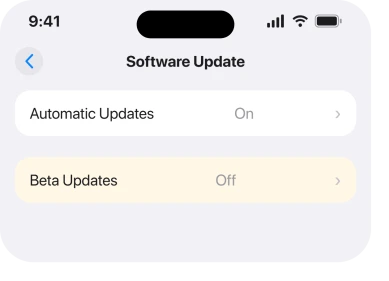
An owner on the Apple Community thread about this reported it in those words: "I had success without having to reset settings! General>Software Update>Beta Updates Mine was toggled 'off'. I toggled 'on'…then back 'off' Problem solved".
Ours, and marked as ours: touching that screen appears to make iOS rebuild something the search depends on. Apple describes no such link anywhere, so treat the mechanism as a guess and the toggle as a thing that worked for somebody.
You do not have to join a beta programme to do this. You are switching a setting and switching it straight back.
2. Switch your region or language to force a rebuild
Second, still free. It is the workaround most people on that thread landed on.
Go to Settings, General, Language & Region. Change Region to a neighboring country, or change the language between English (US) and English (UK). Let the phone settle. Then change it back.
One owner described the outcome after doing exactly that: "This is the ONLY fix that worked for me short of a full reset…It took hours to manually turn off every app in the list but that and switching language worked a treat."
Another came back nearly a year later, in August 2026, to report that the bug survived into iOS 26.6 and that a language and region change resolved it again on a new device.
Expect some cosmetic churn while you do this. Date formats, units and the App Store storefront all follow the region. Change it back once search is working.
3. Turn Apple Intelligence off
Narrower. A single switch, with one clean report behind it.
Go to Settings, then Apple Intelligence & Siri, and turn Apple Intelligence off.
The owner who found this wrote the whole thing in a line: "Settings➡️ Apple Intelligence and Siri - turn off Apple Intelligence. Issue sorted."
That is one report rather than a pattern, so I would try it before the longer routes below and turn Apple Intelligence back on afterwards to see whether search survives. If it does not, you have a choice to make rather than a fix.
4. Turn every app out of Search, then back in
More work. It is the piece the successful long fixes all had in common.
Go to Settings, then Apps, and work down the list turning Show App in Search off for each one. Then go back through and turn them on again.
Know the cost before you start. The owner who did it said it "took hours", and they only counted it a success in combination with the language change in rung 2.
If you would rather not spend an evening on it, do the language change first on its own. Several people got there without this step.
5. Reset All Settings
Heavier, and reversible only by setting everything up again. It is what Apple Support told one owner to do.
Go to Settings, General, Transfer or Reset iPhone, Reset, then Reset All Settings.
The owner reported it plainly: "I had this problem but was able to fix it by contacting Apple Support. The fix suggested was to Reset All Settings."
This keeps your photos, messages and apps. It clears every Wi-Fi password, your keyboard dictionary, your Home Screen layout and most preferences you have set since you got the phone.
Write down anything you will miss before you tap it.
A second owner found that even this needed pairing with the language change to stick, which is worth knowing before you spend the evening rebuilding your settings.
6. Check it is search that is broken and not something narrower
Worth ruling out. Two other faults look identical from where you are sitting.
If Spotlight search from the Home Screen is also failing, this is not a Settings problem, and an iPhone whose Spotlight has stopped finding things is the page for that.
And if Settings search works but a particular row genuinely is not there, the setting may have moved rather than gone. iOS 26 relocated a number of them under Apps, and where iPhone settings moved to covers the ones that shifted.
Test it with a word you can see on screen, as the owner who opened the thread did with "battery". If that returns nothing, it is the search.
7. Update, and what to expect from it
Last, and the one you may not want to hear.
Some owners reported search recovering after a point release, and one named an update fixing it on an iPhone 16 Pro. So install what is available to you at Settings, General, Software Update.
But do not expect it. The same thread carries a report from 1 August 2026 confirming the bug is still present on iOS 26.6, eleven months after it was first raised.
Apple never acknowledges this anywhere. No release note names it and there is no support document for it. That is where you stand as of iOS 26.6.1, and I update this page when it changes.
What does not help
- Restarting the phone. Several owners tried it first. It buys nothing here.
- Force closing Settings. Settings is not the app doing the searching.
- Erasing and restoring from a backup. The backup carries the settings, so it can carry the problem straight back.
- Waiting quietly. Eleven months of thread history says it does not clear on its own.
Why can I not search in iPhone Settings on iOS 26?
Because a search index the phone maintains has stopped returning results, and Apple has not published a cause or a fix. Owners report it from iOS 26.0 and confirm it is still present in iOS 26.6. Every known workaround forces that index to rebuild.
Is Settings search broken for everyone?
No, and that is part of why it has stayed unresolved. It affects some phones and not others on the same version, and it can appear on a brand new device restored from a backup.
Does Reset All Settings fix Settings search?
It worked for one owner on Apple Support's advice, and a second found it only worked combined with a language change. It also clears every Wi-Fi password and most of your preferences, so it belongs below the free workarounds rather than above them.
Will an update fix it?
Possibly. One owner reported a point release clearing it, and another confirmed the bug alive in iOS 26.6 in August 2026. Install updates, and do not put off the workarounds waiting for one.
The Short Version
- Still broken on iOS 26.6.1 with no Apple fix and no acknowledgement.
- Toggle Beta Updates on and off first. It is free and it worked for one owner.
- Then change region or language and change it back, which is the most reported workaround.
- Turning off Apple Intelligence sorted it for one person.
- Turning every app out of Search and back in works, and it takes hours.
- Reset All Settings is what Apple Support suggested, and it costs you every Wi-Fi password.
- If Spotlight is broken too, you have a different problem.
Where to Next
Try the two free rungs before you consider the expensive ones. Between them they account for most of the reported recoveries, and neither costs you anything but a minute.
If one of these holds for you for more than a week, that is genuinely new information and I would like to hear it. Everything on this page so far is a rebuild that eventually comes undone, and nobody has reported a permanent answer yet.

Isaac Smith is the founder and editor of PC Glance, a website that covers computers, laptops, and technology. He is a tech enthusiast and a computer geek who loves to share his insights and help his readers make smart choices when buying tech gadgets or laptops. He is always curious and updated about the latest tech trends.