
Everyone else in the group is replying, your friend keeps asking why you have gone quiet, and nothing has arrived on your phone at all.
Being left out of a conversation you are in is a particular kind of annoying, and I want to get you back into it.
Start by working out which kind of group it is, because a blue group and a green group break for completely different reasons.
1. The two switches a green group cannot work without
Do this first. It is the commonest cause and it takes under a minute.
A group with any Android phone in it is not iMessage. Apple states the rule plainly on its group message page: "If any of the recipients aren't using iMessage, then the message is sent as an MMS or SMS."
So it runs on your carrier, and it needs two switches your phone may never have had on.
Go to Settings, Apps, Messages, and turn on MMS Messaging, then Group Messaging directly below it.
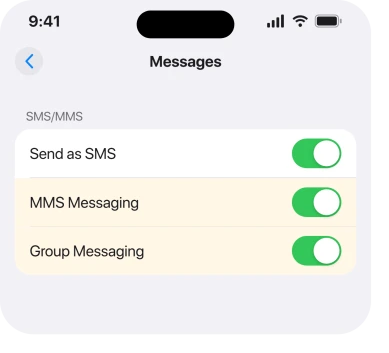
Apple names the consequence if the row is not there at all: "If you don't see an option to turn on MMS Messaging, contact your carrier to see if your plan supports Group MMS Messaging."
If the group arrives fine but there is no box to type your reply in, that is a separate fault and an iPhone with no text box in a group chat covers it.
2. Turn Wi-Fi off and see if the group arrives
This is the finding of the whole page. It is owner-reported rather than documented, and you can test it in a minute.
On a thread opened in January 2026, an iPhone owner could not receive group messages from an Android user. Individual messages worked fine.
Two other people arrived with the same thing as you, and both traced it to Wi-Fi.
The first: "Same happens with me and 26.2… I am the iPhone user not getting replies until I leave my house and am out of WiFi range."
The second was more specific: "I need to turn WiFi off to receive group text messages with at least one android user… problem is repeatable upon demand… been happening since 26.2."
So try it. Turn Wi-Fi off in Settings, Wi-Fi, wait a minute, and see whether the missing messages land.
Ours, and marked as ours: if a group MMS only arrives over cellular, the phone is choosing a delivery path that fails on your network. That reading fits both reports and it is reasoning, not documentation.
Apple describes no such behavior on any page read for this article.
3. Make sure your phone number is the one Messages is using
Narrower. It answers the case where individual texts arrive and group ones never do.
Group MMS is addressed to your phone number. Register Messages to an email address instead and a green group has nowhere to deliver to.
Apple's route, from its own troubleshooting page: "Tap Messages, then turn iMessage off and then back on. Tap Send & Receive. Tap the phone number that you want to use with Messages."
Do that check even if it looks obviously right. On a dual-SIM phone, also open Settings, Cellular, and confirm the line you actually use for texts is turned on and selected.
4. Send as SMS, which decides what happens when iMessage fails
More specific. It fixes the intermittent cases.
If iMessage cannot reach somebody, your phone needs permission to fall back to a normal text. Without it the message simply does not go. The thread then stops working for you, quietly.
Turn on Send as SMS at Settings, Apps, Messages. Apple's guidance for a message that will not go is the manual version of the same thing: tap the red exclamation point, "then tap Send as Text Message".
Carrier rates apply to those messages, which is the trade you are making, and it is a small one against being cut out of a group.
5. The group thread itself is broken, not your phone
Narrower again, and worth trying before anything drastic.
A group MMS thread is held together by the exact set of numbers in it. Change one and some phones keep talking to a thread that no longer matches.
Ask somebody in the group to start a fresh one with everybody in it, including you, and see whether that one works.
The owner who opened the January thread had already tried "deleting and recreating the thread" on their own side, and it did not help, which is why the request has to go to somebody else.
If the new group works and the old one does not, you have your answer and nothing on your phone needs changing.
6. Check your filters and your blocked list
Cheap and specific, and it catches the case where messages arrive silently.
If Messages is filtering unknown senders, a group containing a number you have never saved can land in a separate list with no alert at all.
Open Messages, tap Filters at the top left, and look in Unknown Senders. Then check Settings, Apps, Messages, Blocked Contacts, and read the list properly. One blocked number in a group can break the whole thread for you.
Our page on verification codes that never arrive covers the same filter from the other direction, and the Time Sensitive route in it is worth knowing.
7. When it is the carrier, and how to prove it
Last rung, and the one to reach for when six things have changed nothing.
Group MMS is a carrier service. Three things there produce this exact symptom while iMessage carries on perfectly. A plan with no MMS allowance. A line whose provisioning has gone stale. A carrier-side spam filter.
The proof is simple. Ask somebody to send you a picture message directly, not in a group. If a single MMS with a photo also fails, the problem is the carrier rather than the group.
Ring them, say you cannot receive group MMS messages, and ask them to check that MMS is provisioned on your line and to re-register it on the network.
What does not help
- Turning iMessage off entirely. Blue groups then break too, and you have doubled the problem.
- Deleting the thread on your side. The owner who opened the thread this page draws on had already tried it. The group has to be rebuilt by somebody else.
- Resetting network settings first. It sometimes clears a stale registration, and it costs you every saved Wi-Fi password. Try the Wi-Fi test in rung 2 before you pay that.
- Waiting for an update. The reports here run from January to March 2026 across several point releases with no fix.
Status: iOS 26.6.1, checked 19 August 2026. Apple documents the MMS switches. The Wi-Fi finding is owner-reported, dated to iOS 26.2, and confirmed by two people.
Why am I not getting group texts from Android users?
Almost always because MMS Messaging or Group Messaging is off at Settings, Apps, Messages. A group with any Android phone in it runs on your carrier rather than on iMessage, and both switches have to be on for it to reach you.
Why do group texts arrive only when Wi-Fi is off?
Two owners reported exactly that from January 2026 onwards, one describing it as repeatable on demand since iOS 26.2. Apple documents nothing about it, so it is a well reported pattern rather than a confirmed cause.
Why do I get individual texts but not group ones?
Because a group MMS is addressed to your phone number specifically. Check that Messages is set to send and receive from your number rather than an email address, and on a dual-SIM phone that the right line is selected.
Will turning iMessage off fix it?
No. It breaks your blue groups as well and does nothing for a green one, which was already running on the carrier rather than on iMessage.
The Short Version
- Turn on MMS Messaging and Group Messaging at Settings, Apps, Messages.
- Try the group with Wi-Fi off. Two owners found that was the whole answer on iOS 26.2.
- Confirm Messages is registered to your phone number, not an email address.
- Turn on Send as SMS so a failed iMessage falls back instead of vanishing.
- Ask somebody else to rebuild the group. Deleting it on your side is not enough.
- Check the Unknown Senders filter and your blocked list.
- A single picture message failing too means it is the carrier, not the group.
Where to Next
The split at the top is what saves the most time. A blue group and a green group are two different systems, and almost everything on this page only applies to the green ones.
Group texts with Android now travel over RCS, and whether that thread is actually encrypted is checkable.
Where a message bounces back instead of never arriving, Message Blocking Is Active is a carrier reply rather than a phone fault.
One Android number in the thread also decides whether you can leave it, and that rule catches people out.
The same split explains why a thumbs up arrives as a sentence, and tapbacks turning into words has one cause.
If the Wi-Fi test in rung 2 works for you, please say so in a comment along with your carrier. Two people have now described it and I would like to know how wide it goes, because nothing official acknowledges it yet.

Isaac Smith is the founder and editor of PC Glance, a website that covers computers, laptops, and technology. He is a tech enthusiast and a computer geek who loves to share his insights and help his readers make smart choices when buying tech gadgets or laptops. He is always curious and updated about the latest tech trends.