
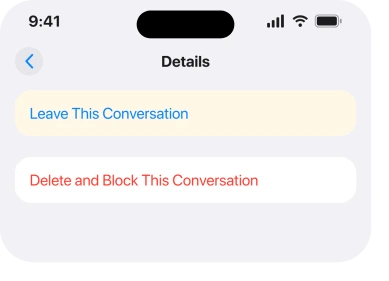
Leave This Conversation sits in grey and does nothing when you tap it. Or it is not on the screen at all, while the group has pinged you forty times since breakfast.
I know how trapped that feels, and I promise it is not you missing an obvious button.
Apple does let you out of a group chat. It attaches a condition that is stricter than almost anything written about it, and once you know the condition the grey button stops being mysterious.
Two of the six are ways out. The other four are what to do when the way out is genuinely closed.
1. Count the people, because Apple's rule is three others
Read Apple's own sentence carefully, because the numbers get repeated wrongly everywhere.
Apple, in Have a group conversation in Messages on iPhone: "You can leave a group chat if there are at least three other participants in the conversation."
Three other participants. Not three in total. So the smallest group you can walk out of holds four people, counting you.
That is the whole explanation for most grey buttons. A three person group is one short. iOS will not let you leave it, because doing so would silently turn the thread into a private chat between the two who remain.
Tap the group name at the top and count the faces. Two others? Then you have your answer, and rung 3 is your route out.
2. Look at the bubble colour before you try anything else
One glance. It decides whether any of this applies to you.
Apple on the same page: "If one or more of your recipients isn't using iMessage, messages appear in green bubbles instead of blue ones."
Apple documents no way round that. Green means the thread is running over your carrier as a text message, not over iMessage. Leaving is an iMessage function.
On a green group there is no Leave option to grey out, because the feature does not exist there at all.
So if your bubbles are green, skip to rung 5. Muting and blocking are your only two levers. No amount of restarting changes that.
3. Add a person to the group, then leave
This is the fix, and it came from an owner rather than from Apple. The thread carries 211 Me Too votes. That is how many owners report hitting this exact wall.
ZAK_11 was stuck in a two person iMessage group with Leave greyed out. Their solution was to add a second number of their own, from an old iPhone, until the group had enough participants.
Once it did, Leave This Conversation woke up and they left. They called it "some kind of glitch", which is fair enough from the inside.
Apple confirms the mechanics of the first half of it, if not the intent: "If you only have one other person in the conversation, you need to start a new group conversation to add someone else."
To do it, tap the group name at the top. Tap the row that adds a contact. Put in another number you control. Then tap the group name again, scroll down, and tap Leave This Conversation.
It is inelegant. It works. And it is the only reported route out of an undersized group.
4. Remove the other person instead, if the group is on iMessage
A different angle on the same problem, and it is documented rather than improvised.
Apple: "To remove someone from a group conversation in iMessage, touch and hold their icon, then tap Remove from Group."
If you cannot get yourself out, you may be able to empty the group instead. That works on iMessage groups. It is a blunt instrument socially, so it suits a group of strangers or a dead thread rather than family.
The same size rule bites here too. On a very small group there may be nothing to remove without collapsing the thread. That puts you back at rung 3.
5. Mute it, which is what Apple offers when leaving is closed
If the way out is shut, this is the fix that actually improves your day. Apple names it as the alternative in the same breath.
Apple: "If you want to stay in a group chat but stop receiving its notifications, mute the conversation instead."
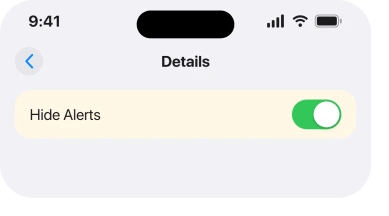
Apple gives two routes to it: "Swipe left on a conversation, then tap" the bell icon, or "Tap a conversation, tap the contact or icon at the top of the conversation, then turn on Hide Alerts." The messages keep arriving.
Your phone stops announcing them.
Two caveats before you rely on it, and the first one is not obvious at all. Apple: "Senders receive a note indicating that you have notifications silenced." So the group can see you have muted them.
And a mute is not total. Apple states that when somebody mentions you by name, "the person you mention may be notified even if they have the conversation muted", depending on settings.
6. Delete and Block, and where the conversation actually goes
The last resort. It is last because people expect it to be permanent, and it is not.
On the same screen as Leave, Apple lists a second option: "Scroll down and tap Leave This Conversation or Delete and Block This Conversation."
The useful part is what happens next. Apple: "Blocked conversations are moved to the Recently Deleted folder, where you can recover them."
So this is reversible for a while. That makes it far less frightening than it looks on a work thread, or on a group with a booking in it.
Go and read the thread before you decide, because blocking the group also affects how those numbers reach you elsewhere. Our page on blocked numbers that still get through covers what blocking does and does not stop.
If your problem is that you cannot write in the group rather than leave it, that is a separate fault entirely and cannot type in an iPhone group chat is the page for it.
What does not help
- Restarting the phone. The rule is a rule, not a glitch, so a restart changes nothing about a three person group.
- Updating iOS. No release has removed the participant requirement.
- Deleting the conversation on its own. It disappears from your list and reappears the moment somebody posts.
- Asking somebody else to remove you. On iMessage a member cannot be removed unless the group is large enough, which is the same wall from the other side.
Status: iOS 26.6.1, checked 18 August 2026. The participant rule, the green bubble behaviour and the mute alternative are all Apple's own wording from the current user guide.
Why is Leave This Conversation greyed out on my iPhone?
Almost always because the group is too small. Apple allows you to leave only when there are at least three other participants, so a three person group leaves the button dead. A green bubble group has no Leave option at all.
Can I leave a group text with an Android user in it?
No. A group with anybody not using iMessage runs as a text message rather than as an iMessage, and leaving is an iMessage feature. Muting or blocking are the options on those threads.
How do I leave a group chat with only 3 people?
Add a fourth participant, which can be another number you control, then leave. One owner did exactly that on a thread carrying 211 Me Too votes and it worked.
If I block a group chat, is it gone forever?
Not immediately. Apple states that blocked conversations move to the Recently Deleted folder, where they can be recovered, so it is a reversible step for a period rather than a permanent one.
The Short Version
- Apple requires three other participants, so four people including you.
- A three person group is one short, which is why the button is grey.
- Green bubbles have no Leave option, because leaving is an iMessage feature.
- Adding a number you control lifts the group over the line, then you can go.
- Removing the other person is the documented alternative on iMessage.
- Muting is Apple's own suggestion when leaving is closed to you.
- Blocking is recoverable from Recently Deleted rather than final.
Where to Next
It feels unfair because the button is visible and dead rather than absent. Your phone shows you the exit and refuses to open it, and it never once tells you why.
Now you know why, the choice is simple enough. Big enough group, walk out. Too small, add a number and then walk out. Green bubbles, mute it and stop fighting.
I would like to hear whether the add-a-number trick still works on iOS 26.6.1, because the report behind it is from an earlier release and Apple has changed a lot in Messages since.
Tell me the group size before and after and I will update this page.

Isaac Smith is the founder and editor of PC Glance, a website that covers computers, laptops, and technology. He is a tech enthusiast and a computer geek who loves to share his insights and help his readers make smart choices when buying tech gadgets or laptops. He is always curious and updated about the latest tech trends.