
Status: still broken on iOS 26.6.1, checked 19 August 2026. Dated to iOS 26.0, no fix from Apple, and the only workaround lasts about a minute.
Your keyboard still has its suggestion bar, with the two dividing lines and three empty boxes and no words in them. I know how much that slows your typing down, and I am sorry there is no clean answer yet.
Let me lay out what is actually known.
Who this is not about: if the bar has vanished entirely rather than gone blank, or if it never worked, that is a settings problem and rung 2 covers it. Owners report the blank version specifically, and it behaves in a way you can test.
1. What Apple documents, so you know the baseline
Read this first, because it tells you what the feature is supposed to do and where its switch lives.
Apple: "With predictive text, you can write and complete entire sentences with just a few taps." The suggestions come "based on your past conversations, writing style, and even websites you visit in Safari".
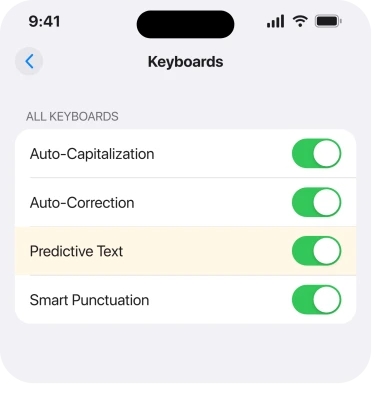
There are two halves to it, and one switch governs both. Apple, on its predictive text guide: "Turning off the Predictive Text setting turns off both predictive text and inline text predictions."
The route to that switch is not where most people look. Apple: "While using the keyboard, touch and hold [the globe]. Tap Keyboard Settings, then turn Predictive Text off or on." It is also at Settings, General, Keyboard.
That is the whole of what Apple publishes. No Apple page read for this article acknowledges the bar going blank, and no release note names it.
2. Rule out the settings version first, in one minute
Do this before you decide you have the bug, because a switched-off feature looks similar and is much commoner.
Open Settings, General, Keyboard and confirm Predictive or Predictive Text is on. Then check whether you are on a third-party keyboard. Those manage their own suggestions.
There is a language gate as well. Apple: "Inline predictive text may not be supported in your language." So a keyboard set to a language without support shows you less, by design.
If the bar is present but empty while you type, and it filled in correctly a minute ago, you have the fault this page is about.
3. The workaround, and be clear about what it buys you
This is what owners actually use, and it is a reset rather than a repair.
Switch to another keyboard and switch back. Tap the globe key to reach a different language keyboard or the emoji keyboard. Then return to the one you were using.
The owner who documented the fault most carefully described exactly that: "To reset/fix it, I just need to change the keyboard to a different one (a different language or the emoji keyboard) and then back, and it will work again for another minute or so."
A minute. That is the real measure of it, and it gets a sentence typed while solving nothing.
If you only have one keyboard installed, add Emoji at Settings, General, Keyboard, Keyboards, so the globe key has somewhere to go.
4. What has been tried and does not work
This is the most useful part of the page, because it is a list of evenings you do not have to spend.
The same owner ran through the obvious repairs and reported all of them failing:
- Switching from bilingual keyboards to a single language.
- Deleting every keyboard, rebooting, then adding them back.
- Reset Keyboard Dictionary.
- Turning iCloud Drive off and leaving it off, on the theory that it syncs keyboard data.
- Disabling predictive text, rebooting, and re-enabling it.
One of their observations narrows the fault usefully. Third-party keyboards "work and don't have the bug, it's an iOS integrated keyboard bug only".
So if you rely on predictions all day, a third-party keyboard is the only thing anyone has reported that lasts. It is a trade rather than a fix.
5. The timing, which is the clearest clue anyone has offered
Narrower, and worth knowing because it tells you what to watch.
The pattern the owner described is consistent: "Usually, after a fresh reboot it takes longer to happen, but once it starts creeping in, it will keep happening after 30-60 seconds of consistent typing."
So a restart buys you a longer good spell, not a permanent one, and the failure arrives after continuous typing rather than at random.
Ours, and marked as ours: that shape, working then degrading under sustained use and recovering when the keyboard is reloaded, reads like something running out rather than something misconfigured.
Apple has published nothing about the cause, so treat that as reasoning about a pattern and nothing more.
6. What to do while it is unfixed
Last, and it is the practical part.
Install updates as they arrive, at Settings, General, Software Update. This is exactly the class of fault a point release clears, and there is nothing you can do to bring that forward.
Report it to Apple at apple.com/feedback. Keep it short: your iPhone model, the iOS version, and the sixty-second timing. Volume is what moves these.
And do not erase your phone for it. Nothing in the reports read for this article suggests a restore helps, the fault appears on more than one device, and you would be spending a day to find out.
If your keyboard is changing language on you rather than going blank, that is a separate and documented behavior, and an iPhone keyboard that keeps switching languages explains it.
If the keyboard is lagging behind your typing, a slow iPhone keyboard is the page for that.
What does not help
- Reset Keyboard Dictionary. Tried and reported as no help, and it costs you every word you have taught the phone.
- Deleting and re-adding your keyboards. Same, tried and reported as no help.
- Turning iCloud Drive off. Tried on a reasonable theory, and it changed nothing.
- Erasing the phone. Nobody in these reports found a restore helped, and a backup would carry the settings back anyway.
Why is my iPhone predictive text bar empty?
Because of a fault owners date to iOS 26.0 in which the suggestion bar stays on screen with its dividers but stops filling in, usually after thirty to sixty seconds of continuous typing. Apple has published nothing about it and there is no fix.
How do I get predictive text working again?
Switch to another keyboard with the globe key and switch back. That restores it for roughly a minute. It is a reset rather than a repair and it is the only workaround anyone has reported.
Do third-party keyboards have this problem?
One owner reports they do not, describing it as an iOS integrated keyboard bug only. That makes a third-party keyboard the nearest thing to a lasting workaround, at the cost of changing how you type.
Will an update fix predictive text?
Very possibly, and nothing can bring that forward. Install point releases as they arrive and report it to Apple. As of iOS 26.6.1 there is no fix and no acknowledgement.
The Short Version
- The bar stays on screen and goes empty, typically after 30 to 60 seconds of typing.
- Dated by owners to iOS 26.0 and unfixed as of iOS 26.6.1.
- Check Predictive Text is actually on before assuming you have the bug.
- Switching keyboards with the globe key and back restores it for about a minute.
- Reset Keyboard Dictionary, re-adding keyboards and turning off iCloud Drive were all tried and all failed.
- Third-party keyboards are reported not to have it.
- A restart buys a longer good spell, not a cure.
Where to Next
I would rather tell you plainly that this is unsolved than pad the page with resets that owners have already proved do nothing. The globe-key trick and a third-party keyboard are the whole of the practical advice.
If you find something that holds longer than a minute, that is genuinely new and I will add it here with credit. Say which iPhone and which iOS version, because that matters more than usual on a fault this narrow.

Isaac Smith is the founder and editor of PC Glance, a website that covers computers, laptops, and technology. He is a tech enthusiast and a computer geek who loves to share his insights and help his readers make smart choices when buying tech gadgets or laptops. He is always curious and updated about the latest tech trends.