
Somebody hearts your message and what lands on your screen is a sentence saying they loved it, sitting there like a separate text.
Being the only person in a thread whose reactions look broken is quietly annoying, and I understand why it nags. I have sorted this page by what you are actually seeing, so pick the one that matches and skip the rest.
You see words like "Loved a message" instead of an icon
Almost everybody lands here, and your phone is working exactly as designed.
Tapbacks are an iMessage feature. Apple's comparison of the message types spells out what each one carries.
For iMessage: "You can send texts, high resolution photos and videos, documents, links, Tapbacks, text effects, Live Stickers, message effects, and more."
Then look at what it says for the other two. RCS: "With RCS, you can send texts, high resolution photos and videos, links, and more." SMS and MMS: "With SMS/MMS, you can send texts, photos and videos, links, and more."
Tapbacks appear in neither list. So when the conversation is not running on iMessage, there is no icon to send and the reaction travels as ordinary text.
The tell is the colour. Apple: "When you communicate with others who also use iMessage on an Apple device, the texts appear in blue bubbles. (SMS, MMS, and RCS messages appear in green bubbles.)"
Green bubbles, worded reactions. No setting anywhere changes that.
The bubbles are blue and it still arrives as text
Now the version that is genuinely worth troubleshooting, because the first explanation does not cover it.
Owners describe this precisely. On r/iphonehelp somebody put it this way: "When the person Im messaging uses Tapback, it doesnt display it on my end. I only receive a message/text saying that they Loved or Questioned my message. Any idea? No, I do not have reduced motion on."
Somebody else in the same thread narrowed it further: "I can see the bubbles when I send them, but when someone else is trying to send them to me it just quotes the messages with the text in front."
So it can fail in one direction only, which points at the receiving end rather than the sender. If reactions are only one of several things misbehaving in Messages, iMessage backgrounds not showing covers another of them.
Check whether iMessage is genuinely running on your phone. Open Settings, tap Apps, then Messages, and look under the iMessage switch.
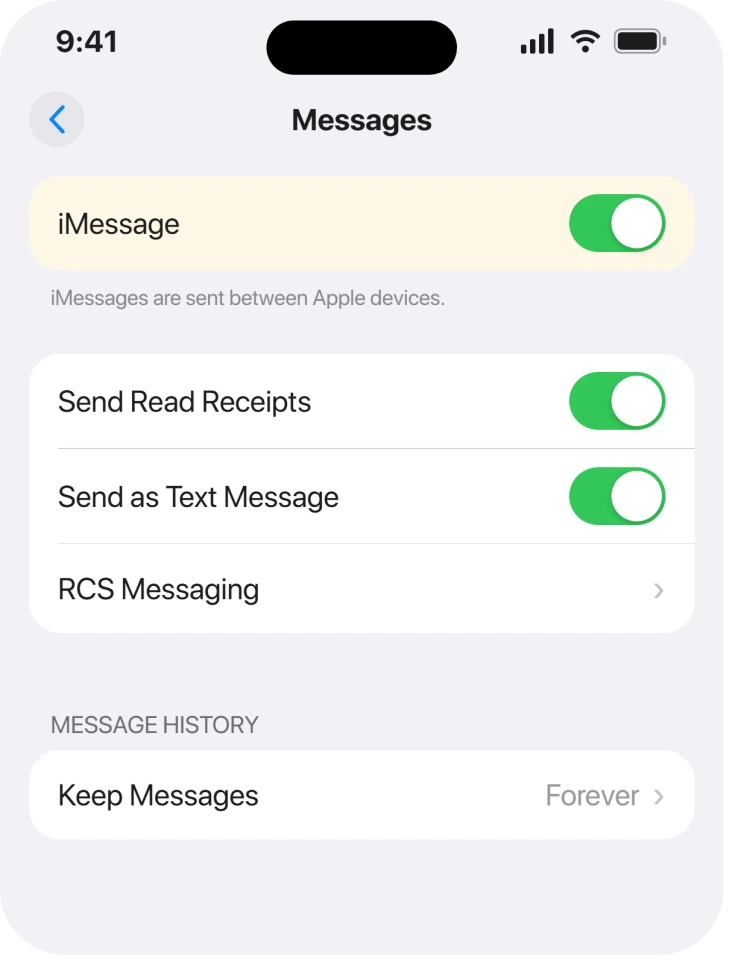
If it reads Waiting for activation, the conversation has quietly fallen back to text and everything above applies. iMessage refusing to activate deals with that.
Owners report no confirmed fix beyond that check. Both threads end with people agreeing they have the same problem and nobody posting a solution.
Double-tapping the message does nothing
Different symptom, and often just the gesture.
Apple documents two ways in, not one: "Double-tap (or touch and hold) a message."
Most people only ever learned the touch and hold. If a double-tap does nothing on your phone, hold the message instead and the menu appears.
Once it is open, Apple says to "swipe left to see suggested emoji and stickers", which is where the wider set lives.
You cannot remove one
This trips people who assume they can tidy up a thread.
Apple is unambiguous: "You can only edit or remove Tapbacks you added. You can't edit or remove Tapbacks other people added."
For your own, the method is not obvious. Apple: "Remove the Tapback: Tap the same Tapback you used (so it's not highlighted)."
So you tap the identical one again rather than looking for a delete option. Tapping a different one swaps it instead of clearing it.
And once it is gone it is gone for everyone, because Apple notes the Tapback "is attached to a specific message in a conversation, and everyone who's part of the conversation can see it."
You want to add a second one to the same message
Short section, because Apple simply forbids it.
Apple: "You can only add one Tapback per message." Tapping another replaces what was there.
If you wanted to pile several on, the documented route is different. Apple points at stickers for that instead, which sit on top of a conversation rather than attaching as a reaction.
Nothing works right after an update
Last, and here there is nothing to hand you but the truth.
On r/ios, somebody posted hours after updating: "I've just updated about 7 or 8 hours ago and yet my phone still displays 'reacted [emoji] to [message text]' instead of just showing the tapback."
A reply reported it alongside other Messages breakage: "Same here. No ability to even respond to a group chat much less Tapback OR to find / use animated gifs or special added Tapback effects".
No fix appears in either thread. If yours started the day you updated and the bubbles are blue, then this is a thing that happens, nobody has published a cure, and waiting for the next point release beats resetting anything.
What does not help
- Turning Reduce Motion off. The owner who raised the r/iphonehelp thread had already ruled it out and said so in the post.
- Resetting network settings. Nothing Apple publishes connects it to Tapback rendering, and no owner report shows it working.
- Asking the other person to resend. If the conversation is not on iMessage, the second attempt travels the same way as the first.
- Deleting and reinstalling Messages. It is a built-in app and removing it takes your local conversations with it.
Status: iOS 26.6.1, rechecked 19 August 2026. The green-bubble case is documented and permanent. The blue-bubble case is reported by owners with no confirmed fix anywhere we looked.
Why do I see "Loved a message" instead of a heart?
Because the conversation is running on SMS, MMS or RCS rather than iMessage. Apple lists Tapbacks as an iMessage feature and leaves them out of both the RCS and the SMS lists, so the reaction is converted to plain text. Green bubbles confirm it.
Do Tapbacks work with Android phones?
Not as icons. Apple's RCS description covers texts, photos, videos and links, and Tapbacks are absent from it, so a reaction sent to an Android phone arrives as words rather than as a symbol.
How do I remove a Tapback I sent by mistake?
Tap the same Tapback again so that it is no longer highlighted. Tapping a different one replaces it rather than removing it, and you cannot remove one somebody else added.
Can I put two Tapbacks on one message?
No. Apple states you can only add one Tapback per message, and adding another simply swaps it. Stickers are the documented way to put more than one thing on a conversation.
The Short Version
- Green bubbles mean no Tapbacks, because Apple lists them for iMessage only.
- A worded reaction is the conversion, not a bug.
- Blue bubbles and still words is a real fault with no published fix.
- Double-tap or touch and hold both open the menu.
- Remove your own by tapping the identical one again.
- You cannot remove anybody else's, and you get one per message.
Where to Next
This page usually ends on a colour rather than a fix. Saying so beats sending you through five resets that were never going to turn a green bubble blue.
If your bubbles are blue and the words keep arriving anyway, say so in the comments with the iOS version at both ends. That is the case nobody has cracked, and enough reports in one place is how it starts getting cracked.

Isaac Smith is the founder and editor of PC Glance, a website that covers computers, laptops, and technology. He is a tech enthusiast and a computer geek who loves to share his insights and help his readers make smart choices when buying tech gadgets or laptops. He is always curious and updated about the latest tech trends.