
Your sister picks a background for your chat and it lands on your phone, replacing the one you chose. Or you set one and the other person swears they cannot see it.
I know how confusing that is, so let me explain what the feature actually does.
One sentence settles most of this. A conversation background belongs to the conversation, not to you.
1. Turn Conversation Backgrounds on, because it can be off
Start here if you see no option to set a background at all.
Go to Settings, tap Apps, tap Messages, and turn on Conversation Backgrounds.
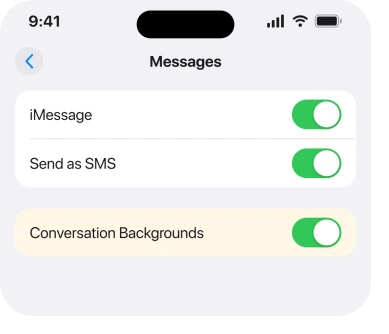
Then force the app closed and open it again. Swipe up from the bottom and pause. Swipe the Messages card away. Reopen it.
If the switch was already on and the option is still missing, turn it off, wait a few seconds and turn it back on. That is the routine owners report when the setting looks correct and nothing appears.
2. Backgrounds are shared, and that surprises everybody
Second, and the answer to most of what people call a bug.
Apple states it plainly on its backgrounds guide, about removing one: "Removing a background affects all participants in a conversation."
That works both ways. Set a background and everyone in the chat sees it. Change somebody else's and you have changed theirs.
Owners found this out the hard way. One reported that her sister changed a background and it appeared on her phone, replacing her own choice.
Another put the frustration exactly: "Yeah when I change the background on my friend and I chat, it changed her background to what I picked.. totally defeats the purpose of customizing my messages.."
A third confirmed the same thing from the other side: "When I changed the background for messages between my wife and I, it also changed hers as well."
So the feature is working. It is simply not personal, and Apple's own description is the only place that says so.
3. Turning it off hides it from you and nobody else
Narrower. This rung stops people expecting the wrong thing.
If somebody keeps changing your chat backgrounds and you want out, you can turn the feature off. What that does is narrower than it sounds.
Apple: "When you turn conversation backgrounds off, others in a conversation still see any background chosen for a conversation."
So the switch is a view setting for your phone. It removes nothing for the group. It stops nobody choosing one.
To actually remove a background for everyone, use the route in rung 4 instead.
And if the trouble is that a group chat is misbehaving more broadly, an iPhone with no text box in a group chat and group texts that never arrive are separate faults.
4. Remove a background properly, and know who it affects
More specific, and the control most people never find.
Apple's route: "Go to the conversation with a background you want to remove. Tap the contact or group icon at the top of the conversation, then tap Backgrounds. Tap None."
That is the same place you set one. Tap the name or the group icon at the top of the thread, then Backgrounds.
Remember rung 2 before you do it. Choosing None clears it for everyone in that conversation, not just for you, and Apple says so in a note on the same page.
5. Give it time, and expect it to be uneven
Narrower again. It explains the reports that contradict each other.
Backgrounds sync between people, and the sync is neither quick nor consistent. Owners describe delays of hours. In one case it took two days.
One owner described a genuinely lopsided result: "My background doesn't change but my wife's does and we have the same phone and same update".
Ours, and marked as ours: on the evidence of that thread, whether you see somebody else's choice depends on both phones having the feature on and having finished syncing.
Apple publishes no expected sync time, so treat the delay as reported rather than documented, and leave both phones on Wi-Fi and unlocked for a while before concluding anything.
6. What needs Apple Intelligence, and what does not
Last. It separates two things people run together.
Setting a photo as a background works on any iPhone running iOS 26. So does one of Apple's own designs.
Generating a new image for it does not. Apple: "If Apple Intelligence is turned on, you can use Image Playground to create one-of-a-kind images for the background of your conversations."
So a missing Image Playground option is a hardware and region question rather than a Messages fault. Apple lists the languages Apple Intelligence supports on the same page, and it is available in beta rather than everywhere.
There is also a safety control worth knowing about if children use the phone. Apple notes you can have an iPhone "receive warnings before a background image containing sensitive content is sent or received".
What does not help
- Deleting the conversation. You lose the thread and the background comes back with the next one somebody sets.
- Signing out of iMessage. It breaks far more than it fixes and does nothing for a shared setting.
- Updating and waiting for a fix. This is documented behavior rather than a bug, so no release is coming to change it.
- Asking the other person to turn the feature off. That only changes what they see, which rung 3 explains.
Status: iOS 26.6.1, checked 19 August 2026. Apple documents the shared behavior in two notes on one guide page. The sync delays come from owners and are not documented anywhere.
Why did someone else change my iMessage background?
Because backgrounds belong to the conversation rather than to one person. Apple states that removing a background affects all participants, and owners confirm the same happens when one is set. Anyone in the chat can change it for everyone.
Why can the other person not see my background?
Usually because their Conversation Backgrounds switch is off, or the sync has not finished. Owners report delays of hours and in one case two days before a background appeared on the other side.
Does turning off Conversation Backgrounds remove it for everyone?
No. Apple states that others in the conversation still see any background chosen for it. Turning it off only changes what you see. To clear it for everyone, open the conversation, tap the name at the top, tap Backgrounds and choose None.
Why is there no option to create a background image?
Because generating one uses Image Playground, which needs Apple Intelligence turned on and is not available on every model, in every region or in every language. Setting a photo as a background does not need it.
The Short Version
- Turn on Conversation Backgrounds at Settings, Apps, Messages, then force the app closed.
- Backgrounds are shared. Anyone in the chat can change one for everyone.
- Turning the feature off only hides backgrounds from you, and Apple says so.
- To remove one for everyone, tap the name at the top of the thread, then Backgrounds, then None.
- Syncing is slow and uneven, and owners report waits of hours or days.
- Creating an image needs Apple Intelligence. Using a photo does not.
Where to Next
Almost every complaint about this feature turns out to be the sharing, which nothing in the app explains at the moment you use it. Once you know a background is the conversation's rather than yours, it stops looking broken.
For the other quiet thing Messages stopped doing, the typing indicator disappears for reasons you can check.
On the subject of what a thread really is, RCS and encryption do not always go together and there is a way to tell.
If iMessage keeps dropping you out entirely rather than misdrawing, that is a separate and better documented problem.
For another feature that quietly stops on its own, Background Sounds has six causes.
If you have found a way to keep your own background while somebody else keeps changing theirs, I would genuinely like to hear it, because nothing in Apple's documentation suggests that is possible.

Isaac Smith is the founder and editor of PC Glance, a website that covers computers, laptops, and technology. He is a tech enthusiast and a computer geek who loves to share his insights and help his readers make smart choices when buying tech gadgets or laptops. He is always curious and updated about the latest tech trends.