
There is a billing problem with a previous purchase stops you dead, and it does it even when you are only trying to download something free.
If you have no idea what you owe or to whom, that is a horrible position, and I will walk you through finding out.
Work these in order. Apple's own route is a sequence, and doing them out of order is how people end up with two payment methods and the same message.
1. Understand what the message actually means
Read this first, because it tells you what you are looking for.
Apple, on its billing page: "If you see a message that says 'billing problem with a previous purchase' or 'verification required,' you have an unpaid balance. Apple couldn't charge your payment method for a previous purchase."
So the two alerts people search separately are the same thing. Somewhere there is a charge that did not go through.
Apple also names exactly what it blocks, and the third item is the one that catches people out: "Make new purchases", "Download free apps", "Use subscriptions".
Owners report the same thing, and a Level 10 member on the community thread put it in one line: "You get a billing problem message because there is a problem paying for something a person bought in the past and this needs to be resolved before Apple will let you make a new purchase, even free items."
2. Retry the payment you already have on file
Second, and it is the step Apple puts first, because it costs you nothing.
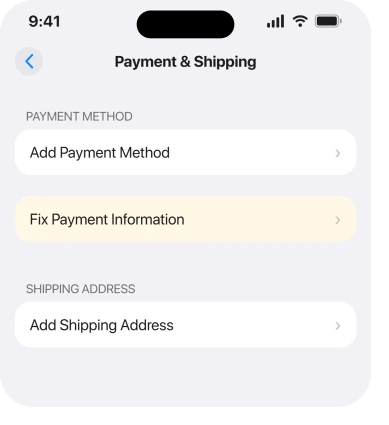
Apple's route: "On your iPhone or iPad, open the Settings app and tap your name. Tap Payment & Shipping. You might be asked to sign in with your Apple Account. Tap Fix Payment Information. Tap Try Again to retry your purchase."
Do this before you add anything new. A card declined for a temporary reason, a travel block or a one-off limit, often goes through on the second attempt.
If Try Again clears it, you can stop here.
3. Find the actual amount, which almost nobody does
Now the step that turns a vague alert into a number. It is the most useful thing here.
Apple's route to your purchase history: "Open the Settings app and tap your name. Tap Media & Purchases, then tap View Account. You might be asked to sign in with your Apple Account. Tap Purchase History."
Then look for the line Apple describes: "Tap the order with red text that says Amount You Owe."
That red text is what you are hunting. It gives you the charge, the date and the amount.
That is the difference between guessing and knowing. Until you have seen it, you are changing settings blind.
4. Change the payment method, in the right order
More specific, and the order matters more than people expect.
Apple: "Add a new, valid payment method. Remove the old payment method. The new payment method is charged automatically."
Add first, then remove. The other way round can leave the account with nothing on file, and an account with nothing on file cannot settle the balance.
Once the new method is on and the old one is gone, Apple charges the outstanding amount by itself. There is no button to press.
5. Pay it with credit instead, which works when cards will not
Narrower, and it is the route for anyone whose card keeps being declined or who does not want to add one.
Apple's method: buy an Apple Gift Card or App Store Card, redeem it to add funds to your Apple Account, then open Purchase History, tap the order with the red Amount You Owe text, and choose Pay with Apple Account Credit.
Apple's own note afterwards is worth knowing: "After you pay for the unpaid order, you can make purchases with your remaining Apple Account balance."
One limitation to check before you buy anything. Apple: "Gift cards aren't available in all countries or regions."
If the code on the card you buy gets scratched off, the scratched gift card page lists what Apple Support asks for.
6. When the debt is not yours, because it is a family member's
Last, and it is the case that leaves people completely baffled.
Apple states the rule: "The family organizer's payment method is charged for all family members' purchases, unless the purchasing family member has a valid payment method."
So a purchase somebody else made can block your account. Or yours can block theirs. The alert says nothing about whose purchase it was.
Apple splits the answer by who you are. Organizer, and either you or a family member is blocked? Change your payment method.
Not the organizer? Apple gives three options: add a valid payment method of your own, ask the organizer to change theirs, or redeem a gift card and pay the unpaid order yourself.
If you are also trying to move country, note that an unpaid balance blocks that too, and changing your Apple Account region covers the rest of those blockers.
And if apps are simply stuck rather than blocked, apps stuck on Waiting is a different fault.
What does not help
- Signing out and back in. The balance follows the account, not the session.
- Adding a second card without removing the first. Apple charges the new one automatically only once the old one is gone.
- Deleting and reinstalling the App Store. You cannot, and it would not clear a balance.
- Waiting for it to expire. It does not. Apple blocks free downloads until it is settled.
Status: iOS 26.6.1, checked 19 August 2026. Every step is documented by Apple on doc 118284, updated 4 June 2026, which covers both alert wordings.
What does 'billing problem with a previous purchase' mean?
It means you have an unpaid balance, because Apple could not charge your payment method for something bought earlier. Apple states that it blocks new purchases, free app downloads and subscriptions until the balance is paid.
How do I find out what I owe Apple?
Open Settings, tap your name, tap Media & Purchases, tap View Account, then Purchase History. Apple tells you to look for the order with red text saying Amount You Owe. That line gives you the date and the amount.
Is 'verification required' the same problem?
Yes. Apple's own page covers both wordings together and gives the same cause, an unpaid balance, and the same fixes.
Why am I blocked when a family member made the purchase?
Because Apple charges the family organizer's payment method for everyone's purchases unless that person has a valid method of their own. The alert never says whose purchase caused it.
The Short Version
- The message means an unpaid balance, and it blocks free downloads too.
- Try your existing payment method again first, at Settings, your name, Payment & Shipping, Fix Payment Information.
- Find the real amount in Purchase History, on the line with red Amount You Owe text.
- Add a new payment method before removing the old one, then Apple charges it automatically.
- A redeemed gift card can pay the balance when a card will not, where gift cards are sold.
- With Family Sharing, the organizer's card pays for everybody, so the debt may not be yours.
Where to Next
The step worth doing before any other is rung 3. An alert with no number attached feels like a mystery, and it stops being one the moment you see the date and the amount in Purchase History.
If you find the red Amount You Owe line and the amount is for something you never bought, say so in a comment. That is worth separating from an ordinary declined card, and it is not something Apple's page addresses.

Isaac Smith is the founder and editor of PC Glance, a website that covers computers, laptops, and technology. He is a tech enthusiast and a computer geek who loves to share his insights and help his readers make smart choices when buying tech gadgets or laptops. He is always curious and updated about the latest tech trends.