
You scratch the strip on an Apple Gift Card a little too hard, and part of the code comes off with it. The money is still on the card, but you cannot type the code in.
Apple has a set route for this, and it asks for three things. I read Apple's gift card page and five forum threads about damaged codes. None of them says how long Apple takes, so I will not guess.
Three answers in one day
An owner asked on 18 September how to redeem a damaged gift card. Three Level 10 volunteers answered within a day, and all three said the same thing: contact Apple Support.
The owner came back on 27 September with a post that starts "How long does it". Nobody has replied to it yet.
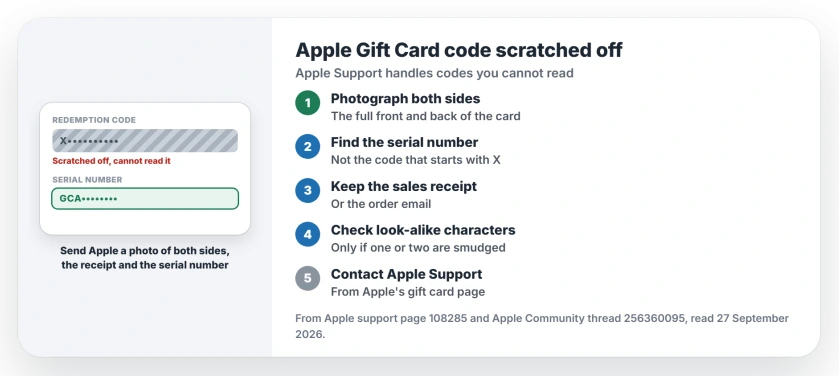
Status: Apple's gift card page, read 27 September 2026, sends codes you cannot read to Apple Support. Have the card photos, the receipt and the serial number ready.
1. Photograph both sides of the card
Apple's gift card help page is short on this point: "If you can't read the code on the back of your card because it's scratched or damaged, contact Apple Support."
The first thing on its list is "An image of the full front and back of your card". Take it in good light. Every printed number should be sharp.
2. Find the serial number, not the code
The back carries two different numbers. The code you redeem begins with an X. Apple says the serial number is a separate number, and its examples begin with GCA, PBH or EPY.
Write the serial number down, or check that it reads clearly in your photo. Apple lists it as the third thing you might need.
3. Dig out the receipt
The second item Apple asks for is "A sales receipt showing when your card was purchased". A card bought in a shop comes with a till receipt, and one bought online has an order email.
If the card was a present, I would ask the person who gave it for the receipt. That tip is ours, not Apple's.
4. Read a smudged character with Apple's list
If only a character or two is unclear, Apple's list of look-alike pairs can help you read them. It names pairs such as B and 8, G and 6, S and 5, and Z and 2.
Apple gives that list for codes that come back as not valid, so use it to read your code, not to guess at one. When the code is gone, only Apple Support can help.
5. Contact Apple Support from Apple's page
Apple's gift card page has a contact Apple Support link in the section on codes you cannot read. Before you start, I would put the photos, the receipt and the serial number in one place.
Keep those photos out of public posts, since a readable code can be spent by anyone who sees it. That warning is ours.
Other Apple Account and purchase problems
If your Apple Account is set to the wrong country, a gift card from home will not redeem, and the account region page covers what blocks a change.
And if the App Store says there is a billing problem, the billing problem page walks through clearing it.
Can Apple recover a scratched gift card code?
Apple's page sends unreadable codes to Apple Support. You might need a photo of both sides, the sales receipt and the serial number.
Where is the serial number on an Apple Gift Card?
On the back of the card. Apple's examples start with GCA, PBH or EPY, and it is not the code that starts with X.
How long does Apple take to fix a damaged gift card?
Across five threads, we could not turn up one owner saying how long it took. The owner who asked this week has no answer yet either.
What if I have no receipt?
Apple says you might need one, not that you must. Send the photos and the serial number, and ask Apple Support what else they can take.
The Short Version
- A scratched code goes to Apple Support.
- Photograph the front and back.
- Find the serial number, not the X code.
- Keep the sales receipt ready.
- Look-alike pairs help with smudges.
- No owner has posted a wait time.
Where to Next
Photograph both sides of your card now, before the scratch spreads. Then open Apple's gift card page and contact Apple Support from there.
When Apple sorts your card out, tell me in a comment how long it took, so the next reader knows what to expect.

Isaac Smith is the founder and editor of PC Glance, a website that covers computers, laptops, and technology. He is a tech enthusiast and a computer geek who loves to share his insights and help his readers make smart choices when buying tech gadgets or laptops. He is always curious and updated about the latest tech trends.