
You type the shortcut you set up months ago and the phone just leaves it sitting there as three letters.
A shortcut that works for a while and then quietly stops is an odd little betrayal, and I know how much time it wastes when you rely on them. Here are the six causes, commonest first.
The first two are design rather than faults, and between them they explain most of what people describe.
1. Your shortcut is a real word, so nothing expands
Start here, because it is the least obvious and the easiest to prove.
A shortcut that is also a word in the dictionary tends not to fire. Apple's own example on the text replacements page avoids this deliberately: it describes typing "omw" to enter "On my way!", and omw is not a word.
Set a shortcut to "car" or "ok" and you are asking iOS to choose between your replacement and ordinary typing. It usually leaves the typing alone.
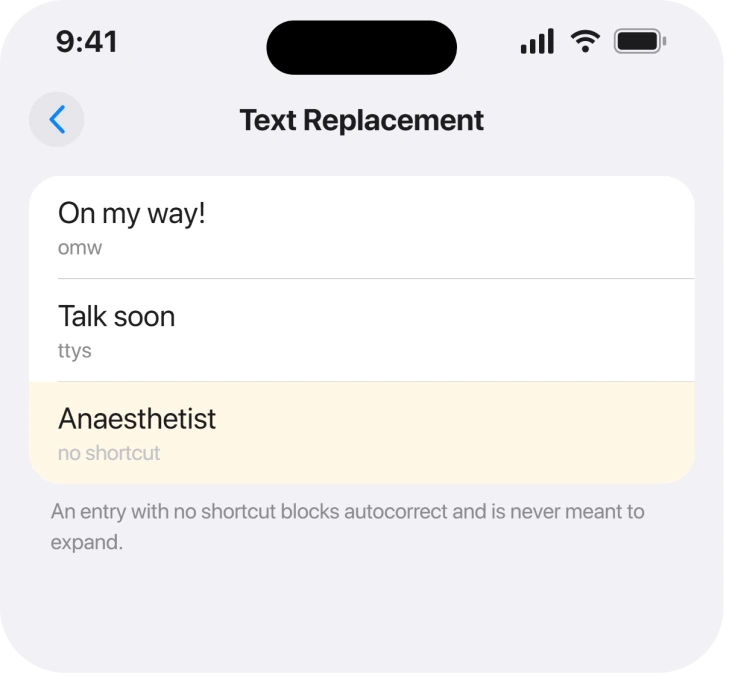
Open Settings, General, Keyboard, then Text Replacement, and look at the shortcut column rather than the phrases.
Ours, and marked as ours: we would use a leading character that never starts a word, so a semicolon or a full stop before the letters. Apple does not recommend this and it is not documented, but it removes the collision entirely.
2. You left the Shortcut field blank on purpose, and forgot
Second, because this one is a feature people set up and then misdiagnose.
Apple documents an entry with no shortcut at all: "Tap at the top right, then enter your word or phrase in the Phrase field, but leave the Shortcut field blank."
That exists to stop autocorrect changing a word you use, not to expand anything. It will never fire, because there is nothing to type.
So if your list has entries with an empty shortcut column, those are working exactly as designed. Only the ones with a shortcut are meant to expand.
3. It is not syncing, and the switch is not where you would look
Third, and this is the fix nobody puts in the right place.
Text replacements travel with your personal dictionary, and Apple ties that to iCloud Drive rather than to anything in Keyboard settings.
Apple: "Use iCloud to keep your personal dictionary up to date on your other devices" and the route is Settings, your name, iCloud, "then turn on iCloud Drive."
So a phone with iCloud Drive off keeps its replacements strictly local. Nothing in the Keyboard screen hints at that, which is why "not syncing" is such a common complaint.
If other iCloud features are dropping out too, iCloud Keychain refusing to stay on runs through the same account plumbing.
4. The replacement was never saved
Fourth, and it is quick to rule out.
Apple gives the creating route two ways. From Settings: General, Keyboard, Text Replacement, then add. Or while typing: "Tap Keyboard Settings, then tap Text Replacement."
Either way you fill two fields. Apple: "Type a phrase in the Phrase field and the text shortcut you want to use for it in the Shortcut field."
Go back into the list and confirm the entry is actually there. An entry added while the phone was mid-sync, or abandoned without saving, simply is not.
5. A third-party keyboard is in the way
Fifth. This one lands on people who never linked the two things.
Text Replacement belongs to Apple's keyboard. A replacement keyboard from the App Store brings its own expansion system, or none at all, and your list is not part of it.
Check which keyboard is active when it fails. Switch back to the standard Apple keyboard with the globe key, then try the shortcut again.
If your keyboard is switching without you asking it to, an iPhone keyboard that keeps changing languages covers why.
6. The dictionary itself has gone bad
Last, and this is the destructive one, so it goes at the bottom.
If shortcuts have stopped firing across the board and everything above checks out, the personal dictionary may be corrupted.
Apple never publishes a repair for this. The route people use is Settings, General, Transfer or Reset iPhone, Reset, then Reset Keyboard Dictionary.
That wipes every word your phone has learned from you, which is why it is last. It does not delete your text replacements, but it does mean autocorrect starts over and will fight you for a week.
Ours: write your replacements down before you touch any reset on this screen. Apple documents no export, and rebuilding a long list from memory is how people lose the ones they used most.
What does not help
- Restarting the iPhone. Nothing in the reports connects it, and a shortcut that collides with a real word will collide again after a reboot.
- Deleting and re-adding one shortcut. Worth a try, and it does nothing if the cause is the word collision or iCloud Drive.
- Turning autocorrect off. Text Replacement is a separate system and does not depend on it.
- Adding more keyboards. It gives iOS more to choose between, not less.
Status: checked 19 August 2026 on iOS 26.6.1. All six causes are documented behaviour rather than bugs, and the iCloud Drive requirement is the one that surprises people.
Why is my iPhone text replacement not expanding?
Most often the shortcut is also a real word, so iOS leaves your typing alone. Apple's own example uses omw precisely because it is not a word. Check the shortcut column in Settings, General, Keyboard, Text Replacement.
Why do my text replacements not sync between devices?
Because they travel with your personal dictionary, which Apple ties to iCloud Drive. Turn on iCloud Drive under Settings, your name, iCloud. Nothing in the Keyboard screen tells you that is the switch.
What is a text replacement with a blank shortcut for?
It stops autocorrect changing that word. Apple documents leaving the Shortcut field blank for exactly that purpose, so those entries are not broken when they never expand.
Will resetting the keyboard dictionary delete my text replacements?
It does not remove the replacements themselves, but it erases every word your phone has learned from your typing, so autocorrect starts from scratch. Write your list down before using any reset on that screen.
The Short Version
- A shortcut that is also a real word usually will not fire.
- An entry with a blank Shortcut field is an autocorrect block, not an expansion.
- Syncing needs iCloud Drive, not a keyboard setting.
- Confirm the entry actually saved into the list.
- A third-party keyboard does not use Apple's replacements at all.
- Reset Keyboard Dictionary is last, and it costs you everything autocorrect learned.
Where to Next
Nearly always this comes down to the shortcut you picked rather than anything broken, which is good news, because changing it takes ten seconds.
If yours are set correctly, iCloud Drive is on and they still refuse to expand, tell me what the shortcut and the phrase are. The collision cases are easy to spot from the outside and almost impossible to spot from where you are sitting.

Isaac Smith is the founder and editor of PC Glance, a website that covers computers, laptops, and technology. He is a tech enthusiast and a computer geek who loves to share his insights and help his readers make smart choices when buying tech gadgets or laptops. He is always curious and updated about the latest tech trends.