
Since the 26 update, the same complaint keeps turning up: you open Settings, find iCloud Passwords and Keychain switched off on its own, tap it back on, watch the little gear spin for a second, and then it flips itself off again.
For something that holds all your passwords, that is unnerving. But it is a few different problems wearing one look, and the first step is to find out whether yours is doing any harm at all.
Let me explain what is happening, because a switch that turns itself off is worth understanding rather than just flipping again.
Start with the two-minute test
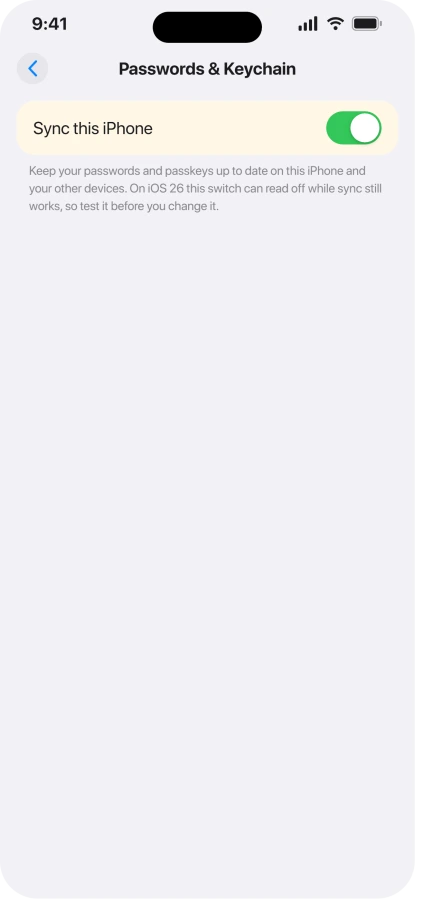
On iOS 26, the toggle can read off while your passwords keep syncing anyway. A lot of people find exactly that, so check it before you change a thing.
On your iPhone, open the Passwords app and add or edit a login, anything small. Wait a minute or two on Wi-Fi, then open the Passwords app on your iPad or Mac.
If the change is there, sync is alive and the toggle is just reporting it wrong.
Nothing is broken, your passwords are safe, and the only thing to do is report the toggle to Apple in Feedback Assistant. If the change did not cross over, keep going.
If passwords really stopped syncing, update to 26.4.1
A separate, real bug sits underneath this. iOS and iPadOS 26.4 stopped some devices from receiving iCloud sync notifications, so passwords, especially shared groups, genuinely stopped updating across devices.
Apple fixed that one in 26.4.1. Open Settings, General, Software Update, and install it.
Be clear on what this does. 26.4.1 repairs the actual sync outage, not the cosmetic toggle. If the two-minute test showed your passwords still syncing, updating may not change how the toggle behaves, and that is fine.
If the toggle is greyed out, not spinning
A toggle you cannot tap at all is a different cause from one that spins and flips off. Something is blocking changes to your account.
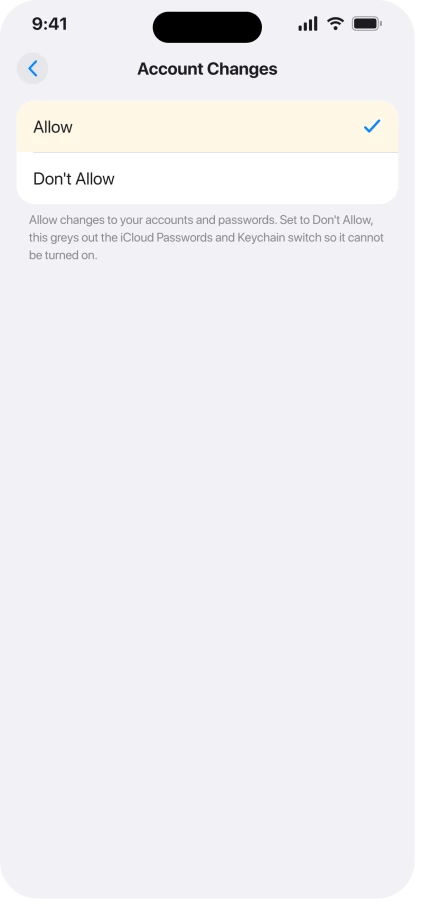
- Screen Time. Open Settings, Screen Time, Content & Privacy Restrictions. If it is on, go to Allow Changes To, Account Changes, and set it to Allow. If you do not use restrictions, turn Content & Privacy Restrictions off.
- A leftover profile. Open Settings, General, VPN & Device Management. Remove any old work or school profile you no longer need. One person traced a greyed-out toggle to an employer app they had forgotten about, and deleting it freed it up.
If sync is stuck between devices, reset it in order
When passwords are genuinely out of step and updating will not help, reset the sync from a clean slate.
Turn iCloud Passwords and Keychain off on every device first. Then turn it back on one device at a time, starting with the one that has the most up-to-date passwords, and let each one settle before the next.
You will not lose anything. Keychain merges what it finds, so the order only decides which device leads. Stay on Wi-Fi through all of it.
The toggle lives at Settings, your name, iCloud, See All, Passwords & Keychain, then Sync this iPhone or Sync this iPad.
On a Mac it is System Settings, your name, iCloud, Passwords & Keychain, Sync this Mac. Apple walks through it in If iCloud Keychain won't turn on or sync.
The quick checks
If none of that fit, run down the basics.
- Restart both devices. It is cheap and clears the odd hiccup, though it rarely touches the cosmetic toggle.
- Two-factor authentication must be on. Keychain will not turn on for an Apple Account without it. Turn it on under Settings, your name, Sign-In & Security.
- Date & Time on Automatic. A wrong clock breaks iCloud sign-ins. Settings, General, Date & Time.
- Check Apple's system status. A rare iCloud outage can freeze sync for everyone at once, and that is not yours to fix.
Status: on iOS 26 the toggle often reads off while sync still works, so test it first. Apple fixed the real 26.4 sync outage in 26.4.1, but has not acknowledged the cosmetic toggle, which persists.
What will not fix it, and what is not this bug
- Panicking and signing out of iCloud. If the test shows sync working, your passwords are safe. Do not sign out or erase anything over a wrong-looking switch.
- Waiting for an update to fix the toggle. 26.4.1 fixed the sync outage, not the display glitch. Apple has not acknowledged the toggle, so report it and use the test instead.
- Passwords not autofilling is separate. If logins sync but will not fill in apps or Safari, that is an AutoFill setting, a different fix.
- The endless sign-in prompt is separate. If your phone keeps begging you to sign in, that is iPhone keeps asking to sign in to your Apple Account.
Are my passwords still syncing if the iCloud Keychain toggle is off?
Often, yes. On iOS 26 the toggle frequently reads off while sync keeps running underneath. Add or change a password on one device, wait a minute or two, and look for it on another.
If it crosses over, your passwords are safe and the switch is simply wrong. If it does not, treat it as a real sync problem, so update to 26.4.1 and try the reset.
Did iOS 26.4.1 fix the iCloud Keychain bug?
It fixed the real one. iOS and iPadOS 26.4 broke iCloud sync notifications, so passwords stopped updating between devices, and 26.4.1 repaired that.
It did not necessarily fix the cosmetic toggle that shows off while sync still works, which Apple has not acknowledged. Update for the sync outage, not to make the switch behave.
Where is the iCloud Keychain toggle in iOS 26?
Open Settings, tap your name, then iCloud. Tap See All next to Saved to iCloud, then Passwords & Keychain. The switch inside is called Sync this iPhone, or Sync this iPad.
Depending on the exact build, the row may read Passwords or Passwords & Keychain.
If you also want to check other iCloud data, iCloud Photos stuck on Syncing Paused covers that side.
The Short Version
- On iOS 26, iCloud Passwords and Keychain often shows off while your passwords keep syncing. Add a password on one device and check another before you touch anything.
- If passwords genuinely stopped crossing over, that was a real 26.4 sync bug. Update to 26.4.1, under Settings, General, Software Update.
- A greyed-out toggle is a restriction: allow Account Changes under Screen Time, or remove an old profile under VPN & Device Management.
- If sync is out of step, turn Passwords and Keychain off on every device, then back on one at a time, most up-to-date device first. Nothing is lost.
- The cosmetic toggle bug is unacknowledged and may outlast updates, so report it in Feedback Assistant and trust the test.
Where to Next
And if iCloud Drive stops syncing every time the Mac sleeps, that is a documented Tahoe behavior.
- Other iCloud data stuck: Safari bookmarks not syncing on iOS 26
- The sign-in prompt that never quits: iPhone keeps asking to sign in to your Apple Account

Isaac Smith is the founder and editor of PC Glance, a website that covers computers, laptops, and technology. He is a tech enthusiast and a computer geek who loves to share his insights and help his readers make smart choices when buying tech gadgets or laptops. He is always curious and updated about the latest tech trends.